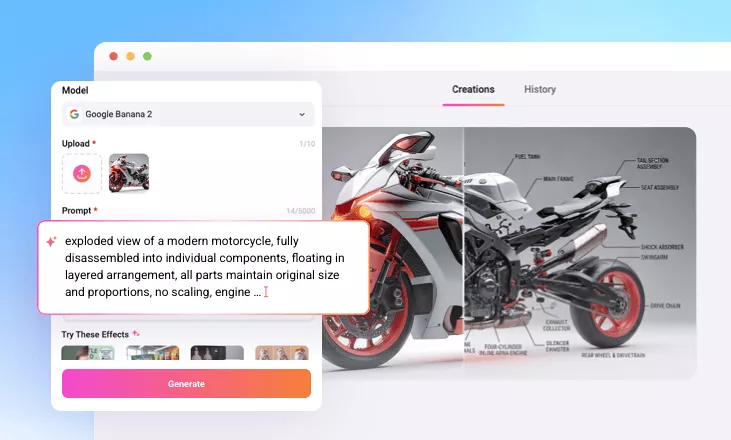
AI Exploded View Generator
Transform ordinary product photos into stunning AI-powered exploded view animations, where every internal component floats in perfectly aligned layers for seamless teardown effects. Just upload a single image and let the AI handle the rest.
TRUSTED BY
Why Choose FlexClip to Create Exploded View Animation?

Smart AI Process
Upload a single product photo and AI will handle the rest - generating exploded view picture and turning images into animation video. No 3D modeling or manual editing skills required.

Instant Generation
The entire process takes just a few minutes, allowing you to quickly share teardown animations where parts seamlessly separate and reassemble without long waits required.

Privacy Protection
Your privacy comes first. Your product photos are used solely for AI exploded view generation, and all uploads are kept secure and strictly confidential.
Turn Product Photos into Engineering-Style Animations
Showcase your product with a captivating exploded view animation! Simply upload a product photo, and AI will generate a detailed exploded view diagram, highlighting internal components in clear, floating layers. With its engineering-style design and dynamic teardown animation, your product promotion becomes both informative and engaging.
Professional Teardown Animation for Any Product
FlexClip’s AI Exploded View Generator works with any type of product. From high-tech electronics like smartphones and gaming consoles to appliances, furniture, or even food, it quickly transforms a product image into a dynamic teardown animation—helping viewers understand your product better while leaving a lasting, memorable impression.
Edit AI Exploded View Animation to Perfection
Once your AI-generated exploded view animation is ready, you can fine-tune it with FlexClip’s built-in video editor. Add custom background music, adjust speed curves for dramatic effects, insert your brand logo for recognition, and more. Generate effortlessly, then let FlexClip help you perfect every detail.
How to Create an Exploded View Video with AI
- 1
Create an Exploded View Diagram
Open FlexClip’s AI Photo Editor and upload your product image. The tool will automatically separate internal components and arrange them in a clean, perfectly aligned exploded view.
- 2
Generate a Teardown Animation
Go to FlexClip’s AI Video Generator and enable the End Frame option. Choose a model, then upload both the exploded view diagram and the original image to generate a smooth teardown animation.
- 3
Edit and Download
Your exploded view content will be ready in minutes. Download it instantly, or continue editing in FlexClip by adding background music or adjusting speed curves for a more dynamic result.