HeyGen revolutionized AI video generation with realistic digital twins, flawless lip-syncing, and powerful language support. But as many creators are discovering, it is not perfect for all. Escalating subscription costs, credit caps, and regional access blocks have left many searching for a more reliable alternative.
We have tested 13 AI avatar video generators similar to HeyGen, and come up with the top 6 list. Check our real experiences and choose the right tool that meets your purposes.
List of the Best HeyGen Alternatives
Synthesia: Highly structured, professional corporate avatars. Handles brand governance and multi-user workspaces.
Jogg.ai: Turn URL into dozens of short-form social media ads without going broke.
FlexClip: AI avatar video generator and a video editor where you can create great videos out of it.
ElevenLabs: Create AI avatar videos with beautiful voiceover in different layouts.
Higgsfield: Generate AI avatar videos based on URL and a simple prompt.
Arcade: Create interactive UGC videos, product demos for businesses of all kinds with viewer-level analytics.

Skincare Product Ad

Jewelry Business Promo

AI Outfit Ad
How We Test the HeyGen Alternatives
When reviewing these platforms, I use a standardized script, a 60-second speech content written in English, which I then translate into Spanish to evaluate for critical friction points:
Realistic Lip-Sync: Does the avatar look like a hostage reading something, or does it look like a real human? I look closely at eye blinking, micro-expressions, shoulder movements, and whether the lips match the speech.
Localization Stress: Many tools handle English context well, but generate robotic voiceover when it comes to Mandarin or German. I tested how natively those platforms handle lip-syncing across different languages.
Timeline Workflow: HeyGen has a highly flexible canvas, a strong alternative needs a timeline that’s easy to navigate, smooth, and contains basic features like adding text overlays, cutting, swapping B-rolls.
The Price: AI video doesn’t have to be notoriously expensive. I mapped out exactly how much every AI video cost in per tool, and watched out for hidden costs.
1. Synthesia
Synthesia Overview
Realism: 4.5/5
Language Support: 140+ languages, deep, highly accurate professional accents.
Best for: L&D teams, HR professionals, global enterprise onboarding, and anyone creating long-form technical tutorials.
Pricing: Free tier (10 mins/month), starter from $18/month, creator from $64/month.
Where Synthesia Outperforms HeyGen
Long-Form Continuity: Synthesia utilizes expressive engines. No matter which avatar I use, it always creates videos with perfect lip sync and some micro-gestures like nodding, blinking. We also noticed great stability when dealing with scripts longer than 5 minutes. It doesn’t just cycle predictably. Instead, it adds professional posture for every frame.
Slide-Deck Production Flow: Synthesia’s editing panel reminds me of PowerPoint or Google Slides. You can swap scene order, remove or duplicate slides, or manage layout grids with ease.
Built-In B-Roll Generation: Synthesia integrates high-end generative video models directly inside the editor. You can generate custom, context-aware B-roll visuals right on your slide without needing another text-to-image/text-to-video tool.
Interactive Compliance: Synthesia supports SCORM package exports. It could be helpful for enterprises or HR to embed interactive elements like clickable choices, quizzes.
Where HeyGen Outperforms Synthesia
Hyper-Realistic Charm: We generated some short clips, HeyGen dominates. Its Avatar IV engine captures natural facial expressions, subtle fluid movements, and conversational pauses that easily pass for real human footage on social feeds. Synthesia’s presenters can sometimes feel a bit like formal actors.
Customized Avatars Plus Voice Cloning: Synthesia provides customized avatar and voice cloning features too. However, it is behind a steep annual add-on fee. HeyGen makes personal branding available, even for entry-tier subscription.
4K Output Quality: HeyGen supports 4K resolution exports on its Business tier and above. Synthesia caps its video rendering at 1080P across the board.
Massive Language: HeyGen supports over 175 languages and some localized dialects with exceptional cross-lingual voice cloning.
Our Verdict
Choose Synthesia if your priority is educational structure, enterprise compliance, and long-form training scale. It is the industry standard for L&D professionals, human resources, and global corporate operations teams who need to securely publish polished, brand-governed video courses, software walkthroughs, and step-by-step onboarding modules.
2. Jogg.ai
Jogg.ai Video Tutorial
Realism: 3.8/5
Language Support: 100+ languages and accents focused on conversational and marketing tones.
Best for: E-commerce, marketing agencies, social media content creators focused on high-volume ad testing.
Pricing: Free tier (3 credits for free), Starter from $15 per month, Creator from $39 per month.
Where Jogg.ai Outperforms HeyGen
URL-to-Video Pipeline: Instead of forcing me to write and paste a marketing script to AI, Jogg.ai automatically wrote a conversation-focused hook, scrapped the product images, and matched with a creator avatar. All I did was pasting a product link from Amazon. Pretty handy!
Multi-Model Bundling: I found that on Jogg.ai’s middle-to-high tiers, it bundles external video generation tools directly into the dashboard. This gave me native access to the most advanced engines like Google Veo and Seedance under a single subscription.
Templates: HeyGen is built primarily around a single talking head, but Jogg.ai is far more creative by offering conversational, multi-avatar setups. I can quickly spin up side-by-side or spilt-screen podcast templates, which perfectly mimics the viral social media styles I see on TikTok.
Budget-Friendly Scaling: HeyGen’s credit tiers can scale drastically when I start layering in advanced avatars or heavy translations. Jogg.ai, however, grants me generous video generation counts at a much lower cost.
Where HeyGen Outperforms Jogg.ai
Hyper-Realistic Lip Syncing & Facial Tracking: When I zoomed in on the facial expressions during testing, HeyGen remains the leader for absolute visual realism. Jogg.ai avatars look convincing on a fast-scrolling mobile feed, but under close inspection, I can still notice minor lip-sync drifting and repetitive hand-gesture loops.
Natural Tone Changes: When my script required nuanced voice acting, like shifting from a happy tone to whisper, HeyGen’s sound engine is far more better. Jogg.ai voices can sometimes feel a bit flat.
4K Resolution Exports: Similar to Synthesia, you are capped at 1080P export resolution. HeyGen exports content in full 4K quality on its Business tiers.
My Verdict
I would definitely go Jogg.ai if I were an agile marketer, e-commerce seller, or performance agency optimizing for high-volume, short-form paid social campaigns. It is also worth mentioning the generated script. Quite eye-catching.
3. FlexClip
FlexClip AI Avatar Overview
Realism: 4.1/5
Language Support: 140+ languages with video translation engines.
Best for: Social media creators, faceless YouTube channels, and marketing teams who need an all-in-one timeline editor.
Pricing: Free tier available (720p exports), Plus tier from $11.99, Business tier from $19.99 per month.
Where FlexClip Outperforms HeyGen
Complete All-in-One Production: When I stepped into FlexClip, I realized that it’s not a pure avatar video generator. It wants to act as your entire browser-based video editing suite. FlexClip bundles a full multitrack timeline editor, an expansive stock footage library, visual effects to polish video without jumping into Premiere Pro or CapCut.
Long to Shorts Repurposing Workflow: This is where FlexClip significantly boosts repurposing efficiency. If you have a long interview, podcast, or software tutorial, I can feed it directly into FlexClip’s long to shorts engine, turn it into digestible clips, and reframe the video to vertical.
Advanced Audio Stack: FlexClip features a deeply versatile text-to-speech engine. By combining multiple voice architectures like ElevenLabs, Minimax, Google, Microsoft, it gives me 3700 voices across 80 languages. It also comes with AI music and sound effects generator. I can easily pick the voice you like, compose matching background music, and align them with ease.
Where HeyGen Outperforms FlexClip
Lifelike Talking Avatar: While FlexClip included talking human avatars in its suite, HeyGen’s avatar remains the undisputed king of realism. When I compared them head-to-head, HeyGen’s avatars displayed much more natural facial tracking, nuanced eye blinking, and real lip sync. FlexClip’s avatars may feel slightly stiff under tight, up-close scrutiny.
Personal Digital Twin: HeyGen spins up a flawless digital twin from a webcam clip. FlexClip creates digital twins too, but it can’t change movements from a video clip. I can’t ask the avatar to make movements as I like.
Our Verdict
I would definitely choose FlexClip if I were a social media manager, marketing team running faceless channels or rapid content repurposing loops. It generates excellent AI avatar videos, combines and edits them with powerful tools.
4. ElevenLabs
ElevenLabs AI Avatar Introduction
Realism: 4.8/5 for audio, 4.2 for avatars
Language Support: 32 languages with industrial benchmark voice model.
Best for: Podcasters, audiobook narrators, and anyone who wants to build content with unmatched vocal acting.
Pricing: Free tier available. Starter from $5 per month, Creator from $22 per month, Pro from $99 per month.
Where ElevenLabs Outperforms HeyGen
Golden Standard of Vocal Emotion: When I played the generated voice side by side, ElevenLabs completely blew HeyGen out of the water on raw vocal performance. I even tried to add subtle human nuances, like a dramatic pause, a sarcastic sigh, or shifting smoothly from a whisper to an excited marketing hook, ElevenLabs captures them all. HeyGen’s voices are good, but still sound robotic plateau over long blocks.
Multi-Model Studio: ElevenLabs recently added a video dashboard, and I found it works like a massive cinematic canvas. Instead of picking a stock background, I have access to industry-leading generative engines like Sora, Google Veo 3, Kling.
Persistent Avatar Styles: I uploaded multiple reference photos of a single character from different angles. ElevenLabs created a permanent, reusable identity sheet. I was then able to make changes on the original avatar, for instance, putting on a different outfit, or changing background lighting conditions without visual identity drift.
Where HeyGen Outperforms ElevenLabs
Automated Video Dubbing: I uploaded a pre-existing video into HeyGen, it translates the audio, and morphs the actual lips to match the new language flawlessly. ElevenLab’s dubbing tools excel at generating the translated audio tracks, but leave the lip movements untouched.
Massive Language Support: ElevenLab’s multilingual model sounds beautiful, it covers roughly 32 major languages. HeyGen supports over 175 languages and regional dialects.
Our Verdict
I would choose ElevenLabs if I were an audio-first creator, cinematic storyteller where voice depth, rich audio design, and custom video generation are the soul of the content. It is also a perfect fit for those who want to create highly consistent characters.
5. Higgsfield
Higgsfield AI Avatar Video Tutorial
Realism: 4.0/5 for talking animations, 4.6/5 for environmental/cinematic motion
Language Support: Incorporates multiple voice models that support major global languages
Best for: Social media content creators, creative directors who want to build highly cinematic ads or concept trailers without traditional talking-head constrains
Pricing: Free daily credits to generate videos with watermarks, Starter from $15 per month, Plus from $39 - $49 per month, Ultra at $99 per month
Where Higgsfield Outperforms HeyGen
Multi-Model Roster: When I opened Higgsfield, I have access to the industry’s absolute best video models, including Seedance 2.0,
Kling 3.0 under one subscription. I can draft a rapid concept using any model to generate 4K media resources without leaving the dashboard.
Persistent Character: One of the biggest headaches with generating narrative content in HeyGen is the character drift if I change the background. Higgsfield allowed me to input up to 9 distinct visual reference angles of a character. You can then create completely different sequential shots while keeping the face or product geometry.
URL to Video: Just like Jogg.ai, Higgsfield features a built-in marketing studio built heavily on Seedance. Paste a product link, the platform scraped the page to build optimized social hooks and stunning visuals.
Where HeyGen Outperforms Higgsfield
Localized Dubbing: HeyGen is a total powerhouse for rapid translation with perfect cross-lingual voice cloning, while Higgsfield handles native multilingual language audio generation and voice binding during the initial generation pass.
Learning Curve: For me, Higgsfield is rather hard to use because I am not a professional who understands framing, lighting modifiers, and prompt mechanics. Beginners may suffer from trial-and-error inconsistency. HeyGen is explicitly built for beginners.
Our Verdict
If you feel like push past basic talking-head videos, Higgsfield may bring you surprises. It creates cinematic visuals with excellent voiceovers. It holds a single character’s identity perfectly across multiple dynamic scenes, and creates complex camera paths.
6. Arcade
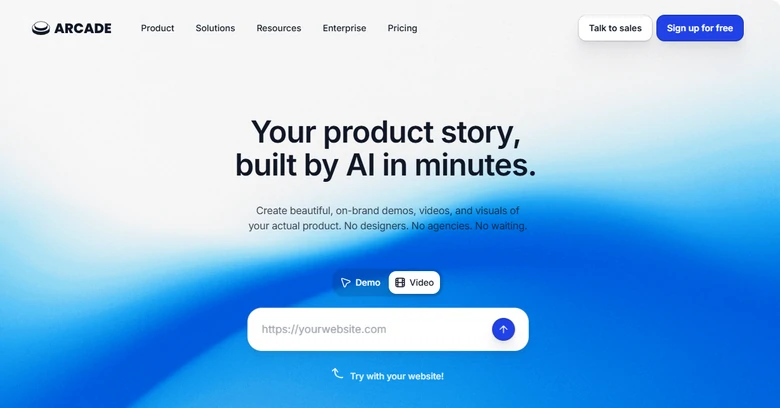
Arcade Interface
Realism: 4.7/5
Language Support: 15+ languages natively via integrated AI voice translation.
Best for: Product marketing teams, or B2B SaaS teams who need to show software workflows without a talking head.
Pricing: Free to create watermarked video. Pro tier starting around $40 per month.
Where Arcade Outperforms HeyGen
Screen Recording to AI Video: When I tested Arcade, I instantly realized it is from opposite philosophy compared to HeyGen. HeyGen assumes you want a talking head. Arcade assumes that you are selling. It uses a Chrome extension or desktop app to record my actual product clicks, scrolling, and user flows cleanly.
No Writing Script: I need a nice script before using HeyGen. With Arcade, however, I just need to record screen, and the AI will analyze my actions and automatically generate context-aware voiceover and sync it with actual clicks.
CRM Sync: Arcade includes viewer analytics where you can see exactly which step they dropped off on or clicked, making it a much stronger asset for software optimization.
Where HeyGen Outperforms Arcade
Human Connection: If you need a face to tell a story, Arcade completely drops the ball. It doesn’t do human talking avatars at all. However, you can always do a webcam recording.
Global Localization Power: Arcade supports around 15+ language translations for its click voiceovers, HeyGen is an absolute global beast with over 175 languages and flawless cross-lingual voice cloning.
Creative Content Flexibility: Arcade is strictly locked into software interfaces and tech walkthroughs. If you try to use it for a physical product ad, a lifestyle vlog, it doesn’t work.
Our Verdict
I would choose Arcade if I were a SaaS founder, or sales engineer whose corn objective is showing software in action. It eliminates traditional, time-consuming video production workflow and turns direct screen recordings into interactive web tours and narrated feature walkthroughs.
Elena
/

Member of PearlMountain Limited. Has a mania for video editing. Love to share photo/video shooting tips and ideas.