AI UGC video generators can significantly reduce your marketing fees. No hiring influencers, no hours spent on video production, just pure AI creation at minimal cost.
In this post, you will learn the easiest way to create scroll-stopping, authentic-looking AI UGC commercial ads, plus some UGC video generators. Ready to turn viewers into loyal customers? Let’s dive in!
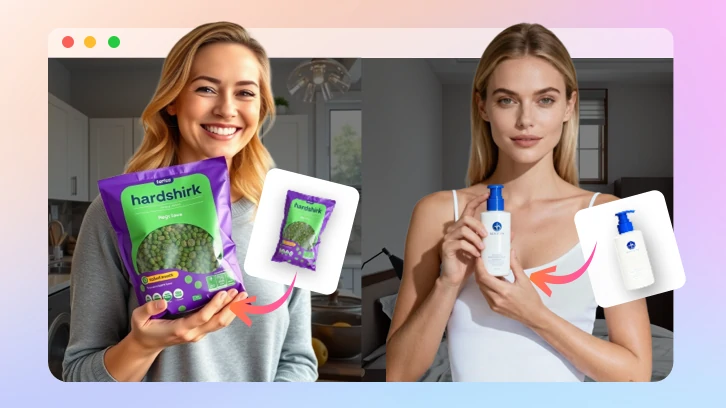
AI UGC Video Example Image
Table of Contents


Browse More Promo Video Templates >
Can't Miss: How to Make Radio Ads >
What Are UGC Ads
UGC ads, abbreviation for User-Generated Content ads, are videos created by real users. They often include production reviews, testimonials, social posts, unboxing videos, or casual everyday use tips. No matter what they are about, their main purpose is to build brand awareness, boost engagement, and drive conversions.
Compared with videos created by professional marketing teams, AI UGC videos feel more genuine because they mimic real customer experience, so audiences are more likely to trust, interact, and purchase.
AI UGC Video Example
How to Create an AI UGC Commercial Ad
There are tons of AI UGC video generators in the market. In this post, we will be using FlexClip, the one-stop tool from AI generation to manual tweaking. Take 10 minutes from your busy schedule and follow the 7-step guide.
Step 1. Craft Storyboards
First up, let’s turn to ChatGPT, where you can turn your product highlights into into engaging UGC video script, even in multiple scenes. Enter a prompt and pick the best version.
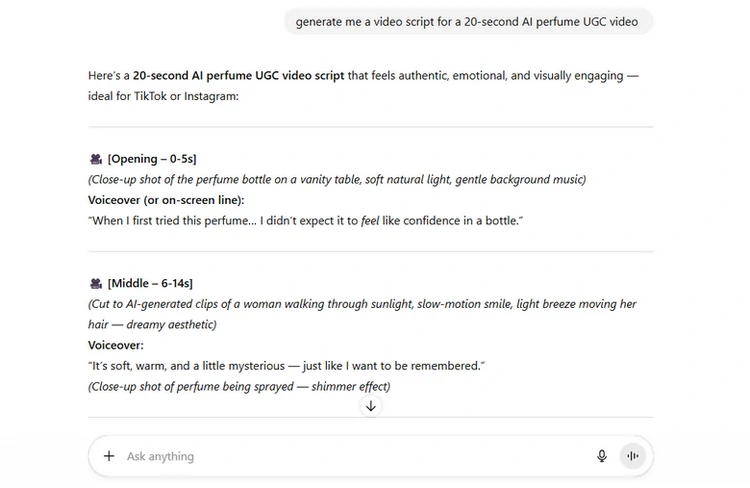
Generate AI UGC Video Script Using ChatGPT
Step 2. (Optional) Generate AI Model
Now, it is time to create a model that matches your brand. Most UGC ads are about AI-generated characters, but you don’t have to. You can directly use a portrait of yourself or team member to get started.
Feel like using an AI model? Turn to FlexClip’s Text to Image that brings your ideal character to life. As its name implies, you just need to enter a prompt describing the UGC model, and the generation should finish within several seconds.
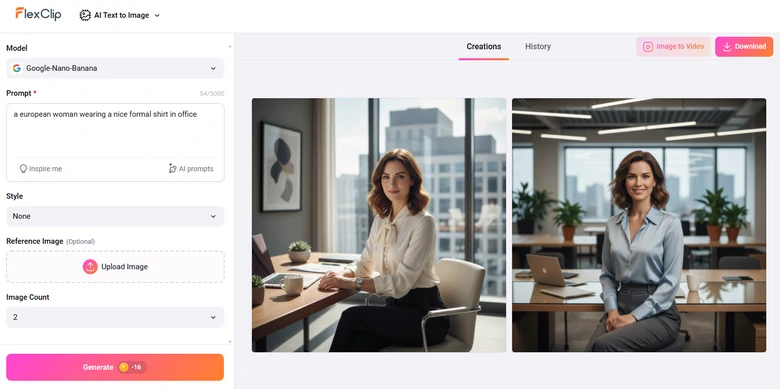

Step 3. Incorporate Product Photo with AI Model
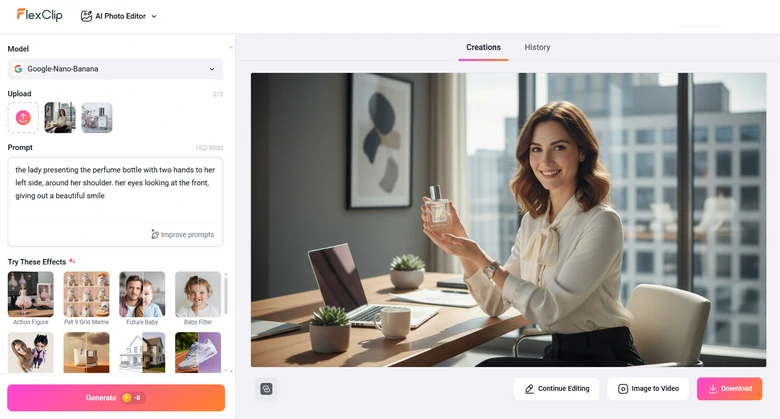
With FlexClip, all edits can be made just by a simple prompt. FlexClip’s AI Photo Editor can make the AI model display your product, in any pose you like. For instance, we uploaded two images, and entered the prompt: the lady presenting the perfume bottle with two hands to her left side, her eyes looking at the front, giving out a beautiful smile. Here is the result.
Step 4. UGC Image to UGC Video Clips
Static AI UGC images are not what we need. FlexClip easily turns your static AI images into lively, engaging video clips. FlexClip’s Image to Video tool is what we need. Powered by Veo 3.1 and Sora 2, we will not only generate smooth movements, but also native audio with enhanced lip sync.
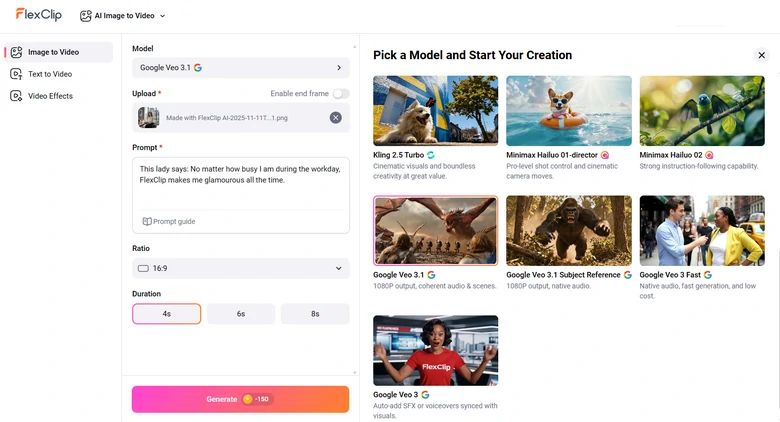
This is the prompt we’ve used: This lady says. No matter how busy I am during the workday, FlexClip makes me glamourous all the time. Check the AI UGC clip from FlexClip.
FlexClip Generated UGC Clips
Step 5. Craft UGC Sound Effects
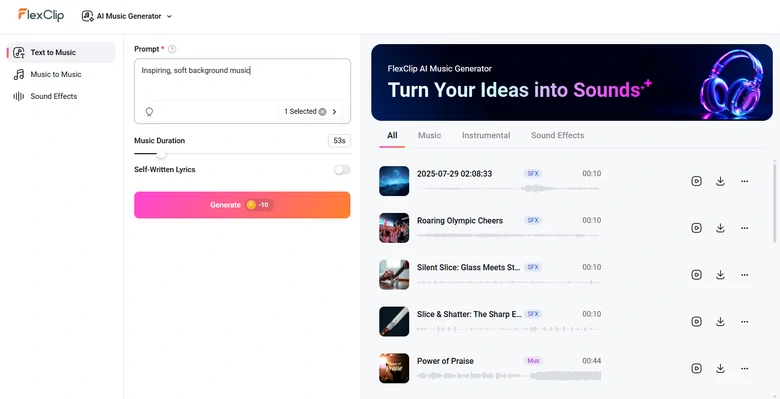
UGC videos are cool with pure narration. However, it could be better with matching sound effects, like applause, cheering, dog barking to make your video more vivid. Another good idea is bringing in a whole relaxing background to the video.
FlexClip’s AI Music Generator creates all sounds you need. Again, enter a prompt and witness magic happen.
Step 6. Edit the AI UGC Video
One AI UGC clip is not enough to tell a cohesive story. Access FlexClip’s editor, where you can merge multiple clips, apply filters, add AI captions, background music, translate voices, etc. Play with your AI UGC clips and achieve the best results.
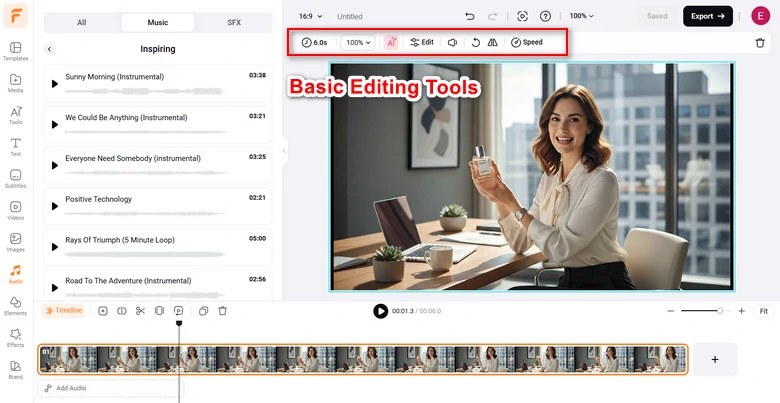
Make Basic Edits on UGC Video
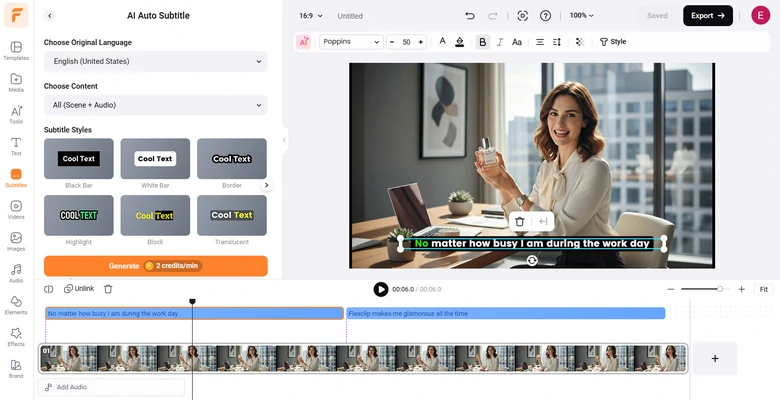
Add Auto Caption to Video
Step 7. Share & Export
Whenever you are done with editing, enjoy the ultimate freedom of sharing. Besides downloading your AI UGC video, save to cloud services, send via a short link, or post directly to social media.
Other UGC Video Generators Worth a Try
Now that you know how to make your own AI UGC video, from writing a video script to animating and editing. If you feel like exploring other AI UGC ad generators, you are in luck. We tested out 10 tools and here are 2 that work best. Even though they work differently, these options are worth trying.
1. Arcads
Arcads is designed for marketers who want to generate UGC videos fast. Instead of preparing visuals, it offers over 100 AI avatars that you can use to generate a talking-head style video that mimics the real user reviewing your product.
How to Use Arcads to Generate AI UGC Ads
Arcads Preview
Pros of Using Arcads
Downsides of Using Arcades
2. HeyGen
HeyGen turns text into videos, perfect for AI UGC ad production. That’s no different than Arcades. However, HeyGen offers more realism when it comes to lip sync, as well as avatar customization. You can create a unique AI avatar that closely resembles a real person or your brand persona, which makes your videos fell more authentic and relatable.
How to Use HeyGen to Generate AI UGC Video
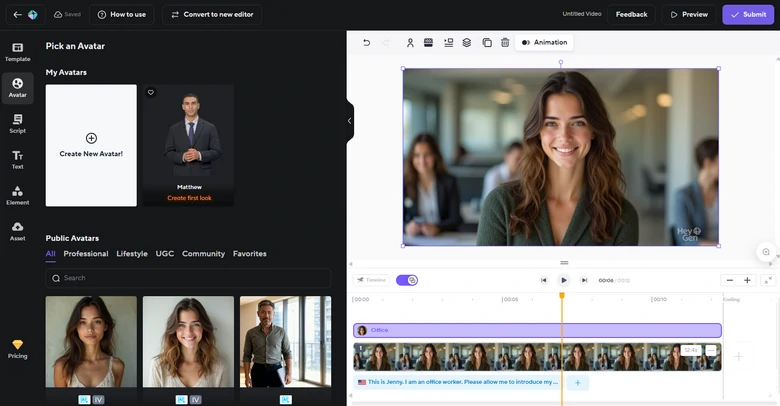
HeyGen Preview
Pros of Using HeyGen
Cons of Using HeyGen
Frequently Asked Questions
1. Can ChatGPT make AI UGC videos?
You can’t directly generate AI UGC videos. However, if you have subscribed to ChatGPT, you can use it to outline your video scenes, camera angles, etc.
2. Do AI UGC videos require human input?
Yes, even videos are AI generated, users still need to provide product information, tone preferences, and target audience details.
3. Is it ethical to use AI UGC videos?
Yes, as long as brands are transparent about AI usage and avoid misleading audiences. It is best to disclose when avatars or voices are AI-generated.
4. Can AI UGC videos include real footage?
Yes, After generating all AI UGC clips, you can import them to FlexClip’s timeline, merge them with product demos, customer testimonials to enhance authenticity while keeping production costs low.
5. Is it possible to make multilingual UGC videos using AI?
Yes, Most AI UGC generators support generating multiple language voiceover with perfect lip sync, allowing your video to reach global audiences effortlessly.




FlexClip AI Video Maker
Reach professional-quality videos faster with easy editing tools, templates, and smart AI.
Start Now for Free
Hot & Trending
-

Best Ways to Find Music in YouTube Videos
-

Instagram Story Video Quality Bad After Upload? Fix It!
-

How to Repost Video on TikTok & How to Remove TikTok Repost
-

Improve Video Quality Online: 3 AI Video Quality Enhancers You Can't Miss
-

4K Convert to HD 1080p without Watermark: Best 4k Video Converters
-

Best 8 Free Video Editors - No Download Required
-

Top 13 Birthday Video Makers with Music and Effects Free
-

How to Search Filters on TikTok & Use a Filter You See - TikTok Filter Guide