Ready to upgrade your product visuals? Try a fully interactive 360 degree video that virtually merges with reality, allowing customers to explore and interact with your product like never before.
Traditionally, creating 360° product videos required multi-camera setups, turntables, professional lighting, and hours of production work.
But now, the game has changed.
With AI 360 product photography, artificial intelligence can reconstruct your product from just one image and generate a smooth, professional, and highly realistic 360° spin video instantly. No studio. No equipment. No editing headaches. Just smooth, realistic, interactive product spins created by AI.
AI 360° Product Video From Just 1 Image Using FlexClip AI

What Is AI 360 Product Photography?
AI 360 product photography uses artificial intelligence to generate a full 360-degree view or rotating video of a product from a single static image. Instead of photographing an item from multiple angles using professional equipment, AI analyzes one photo, understands the object's shape, texture, lighting, and depth, and then reconstructs a realistic, 360-degree perspective for a 360 product video showcasing.
This makes it ideal for showcasing electronics, jewelry, and other premium products with a sleek, high-end finish. Whether you're updating your Shopify store, enhancing Amazon product listings, or producing social media ads and marketing videos, AI 360 product photography delivers stunning, interactive visuals with minimal effort.
How to Make 360° Product Video From Just 1 Image Using AI
There are now countless AI tools capable of generating 360-degree product videos, but in this post, we’ll focus on FlexClip, offering a powerful, user-friendly AI image-to-video generator. With a single product image and a simple text prompt, FlexClip’s AI can instantly create:
The results look just like traditional 360° product photography, but with no studio, no equipment, and no experience required.
AI 360° Product Video From Just 1 Image with FlexClip AI
Let's walk through the steps to create such a stunning 360-degree product showcase video from a single photo using FlexClip's AI.
Step 1 Go to FlexClip’s AI Video Generator
Start by visiting FlexClip’s AI Video Generator. Once you're on the page, you’ll see several advanced AI video generation mode like Hailuo AI, Veo 3 and Sora 2, etc. Just pick one you desire for turning your product image into a 360-degree product showcase video. Here we'll take the Google Veo 3.1 AI model as an example for generating 360-degree product showcase video from a single photo.
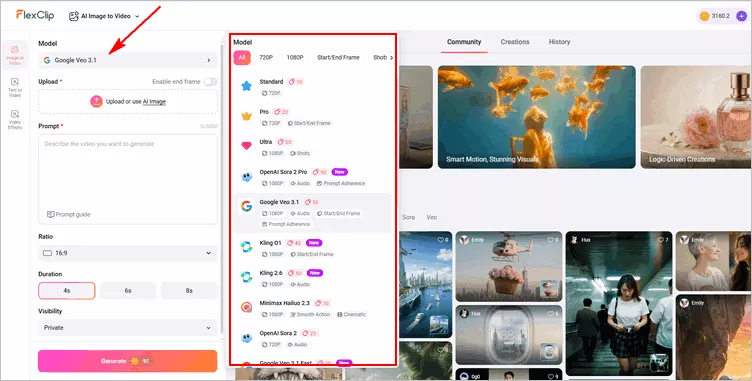
Make 360° Product Video From Just 1 Image Using FlexClip AI: Select Model
Step 2 Upload Your Product Image
After selecting the AI video generation model, click Upload to add the product image you want to convert into a 360° spin video.
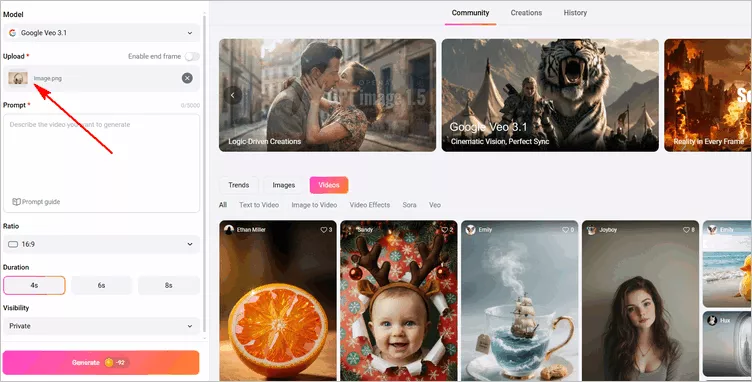
Make 360° Product Video From Just 1 Image Using FlexClip AI: Upload
Pro tip: Use a high-res, centered product image on a clean background with even lighting, avoid shadows or filters. For a flawless look, enhance your photo with FlexClip's AI Photo Editor to remove clutter, adjust the background, refine details, and upscale your image before creating your 360° product video.
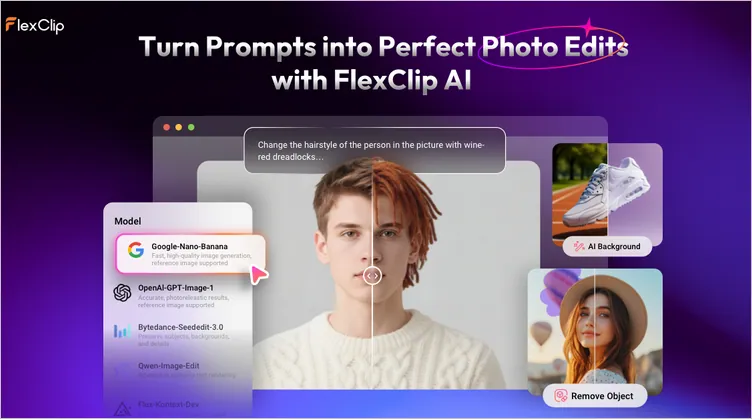
Edit Your Photo for Perfect 360° Product Video
Step 3 Add a Simple Text Prompt
Once your image is uploaded, go to the prompt box to enter your words describing how you want your 360° product video to look. Keep your prompt clear and concise, describing the rotation style, lighting, background, and any special effects. For example: "Generate a smooth 360-degree rotation of this product with realistic lighting and shadows."
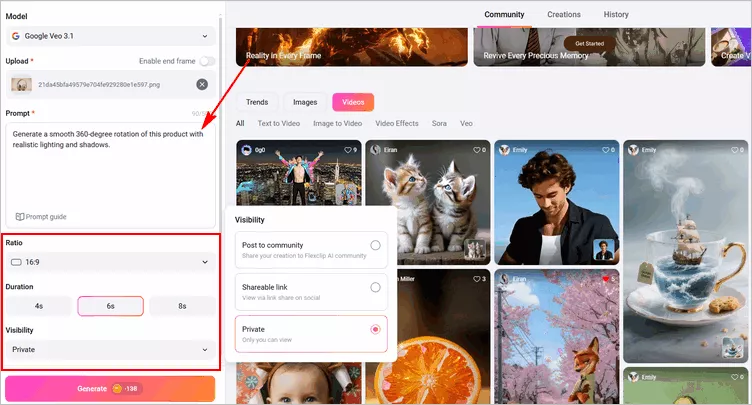
Make 360° Product Video From Just 1 Image Using FlexClip AI: Prompt
After entering your prompt, you can fine-tune the video settings, such as aspect ratio and duration. These adjustments help refine the output, ensuring your 360° product video looks smooth, professional, and tailored to your desired style and platform. Also remember to adjust the visibility, choosing whether to share your creations with the FlexClip AI community or keep them private.
Step 4 Let FlexClip’s AI Generate the 360° Video
Once done, click the Generate button to let the AI work its magic for a 360° product video. FlexClip’s AI will analyze your image, interpreting the product’s shape, depth, texture, and lighting to produces a smooth, continuous rotation that mimics a professional product photoshoot, but without the need for cameras, turntables, or a studio.
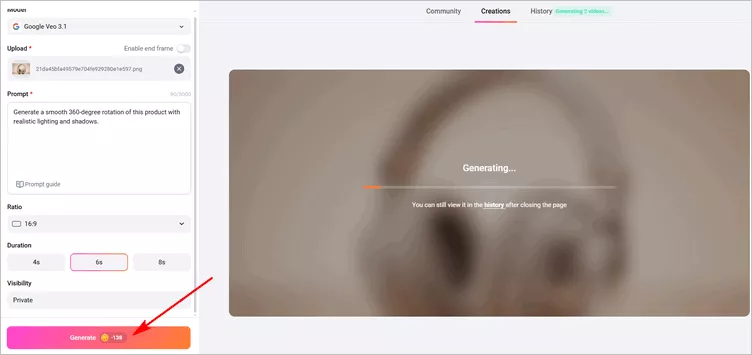
Make 360° Product Video From Just 1 Image Using FlexClip AI: Generate
Step 5 Preview and Download
The AI-generated 360° product spin video will be ready in just a few minutes. Take this time to carefully review the results and ensure the rotation is smooth, product details are clear, and any effects or overlays appear correctly.
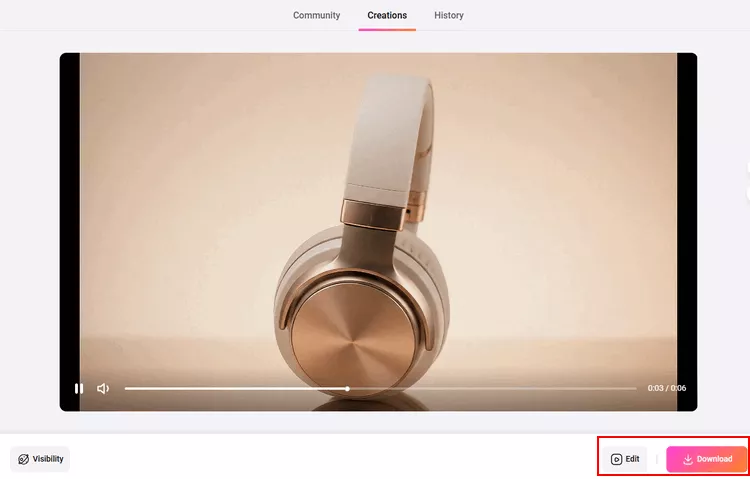
Make 360° Product Video From Just 1 Image Using FlexClip AI: Preview
If you're satisfied, you can download the video directly, share it instantly, or click the Edit button to take it into FlexClip's built-in video editor for further edits.
If something seems off, don't worry! AI outputs can often be improved with a few simple tweaks. You can refine the video by simplifying or adjusting your text prompt, changing the duration, or experimenting with a different AI model to achieve a smoother, more realistic 360° rotating product showcase.
Step 6 Customize Your 360 Spin Product Video (Optional)
Once you're happy with the generated 360° video, you can take it into FlexClip’s built-in video editor to further polish and customize it for your brand, adding your logo, slogan, text overlays, background music, or other visual enhancements to make your product video truly stand out.
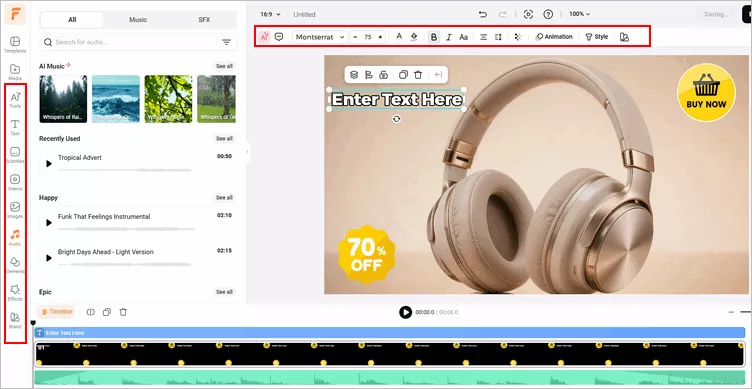
Make 360° Product Video From Just 1 Image Using FlexClip AI: Customize
Customizing your video ensures it looks professional, engaging, and perfectly aligned with your brand, ready to capture attention on e-commerce sites, social media, and marketing campaigns. Feel free to explore and try FlexClip’s powerful features and stunning effects to level up your 360-degree product video!
Bonus: More Than a 360° Product Showcase Video Generator
FlexClip AI video generator isn't just for creating AI 360 product video, it's a full-featured AI prompt-driven video tool that you can try to make different videos, let's check some trendy examples below:
Fake Drone Video
Prompt: "Create a 360 degree realistic drone shot panning far away from the character."
AI Drone Shot Made with FlexClip AI
AI Flying Video
Prompt: "The character in the image slowly lifts off the ground, hovering horizontally in midair and ascending toward the sky. The character flies upward in a Superman-like pose, with the camera slowly following upward, in high quality."
AI Flying Video with FlexClip AI
AI Season Change Video
Prompt: "A gentle, dreamy time-lapse showing winter slowly changing into spring. Snow fades, ice melts, and pastel green sprouts appear. Flowers bloom in soft colors, trees regain leaves, and warm golden sunlight replaces the cool winter tone. Dynamic sky movement and realistic seasonal lighting."
AI Season Change Video Made with FlexClip AI
More creative video ideas and eye-catching effects are waiting for you to explore! With FlexClip, you can easily bring your stories to life using powerful AI, preset video effects, animations, and editing tools designed for creators of all levels. Whether you're making content for social media, marketing, or personal projects, FlexClip helps you turn simple ideas into stunning videos in just a few clicks—so why not give it a try now!
Final Words
AI 360 product photography is redefining how brands create product visuals. With the ability to generate stunning 360° product videos from a single image, businesses of all sizes can now offer premium shopping experiences without the traditional cost or complexity. Just turn to FlexClip to upgrade your product visuals and boost conversions effortlessly.




FlexClip AI Video Maker
Reach professional-quality videos faster with easy editing tools, templates, and smart AI.
Start Now for Free
Hot & Trending
-

Best Ways to Find Music in YouTube Videos
-

Instagram Story Video Quality Bad After Upload? Fix It!
-

How to Repost Video on TikTok & How to Remove TikTok Repost
-

Improve Video Quality Online: 3 AI Video Quality Enhancers You Can't Miss
-

4K Convert to HD 1080p without Watermark: Best 4k Video Converters
-

Best 8 Free Video Editors - No Download Required
-

Top 13 Birthday Video Makers with Music and Effects Free
-

How to Search Filters on TikTok & Use a Filter You See - TikTok Filter Guide