Best Synthesia Alternatives in 2026: My Hands-On Review of 5 AI Avatar Tools

Last Updated: 2026. 07. 02

In the fast-growing world of AI video generation, Synthesia has been one of the early pioneers. It's changed the way we create video content by making it possible to use lifelike AI avatars that can read scripts in different languages, accents, and tones—without needing a camera crew, actors, or a traditional studio setup.

However, while Synthesia is a popular AI video creator, I've found that it doesn't always meet every use case, workflow requirement, or budget. Because of this, I've been exploring 5 Synthesia alternatives on the market that offer different features, pricing plans, customization options, and user experiences.

In this guide, I'll take a closer look at how these Synthesia alternatives compare and which one may be the best fit for my video creation needs—and potentially yours as well.

Contents:

Part 2 How I Tested These Synthesia Alternatives - Best Alternatives List

Part 1 Why Use a Synthesia Alternative - Where Synthesia Falls Short

Synthesia offers several strong capabilities, including support for 140+ languages, a high-quality enterprise avatar library, and a streamlined script-to-video workflow that simplifies the creation of structured AI-generated videos.

However, after extensively testing multiple AI avatar platforms, I've found that while Synthesia.io is powerful, its avatar-only output format and limited free trial can be restrictive for some users.

There are also additional factors driving growing interest in Synthesia alternatives—let's take a closer look.

  • Avatar-only output: Synthesia focuses on talking-head avatar narration, which works well for presenter-led content. However, for SaaS teams that need to demonstrate real product UI, this format often ends up describing the software rather than clearly showing how it actually works in practice.
  • Repetitive avatar option: After creating a dozen videos, I’ve noticed the same faces recurring. Limited customization makes it difficult to match my brand identity.
  • Restricted editing capabilities: Beyond talking-avatar videos, Synthesia offers limited customization. It's not easy to combine avatars with b-roll or create the polished, multi-layered videos that marketing teams typically need.
  • Pricing scales steeply: I've noticed a recurring pattern where Synthesia's pricing becomes restrictive as video production scales. Personal users or small teams often hit cost ceilings when using it in weekly production workflows, and the per-minute pricing structure can limit experimentation and rapid iteration.
  • Limited use cases: I find Synthesia works well for structured, presentation-style content, but it feels less suited for creative storytelling. Its templates often have a corporate tone that can become repetitive, and I notice it offers limited flexibility for adapting content to more social-media-style formats.
  • Ultimately, choosing a Synthesia alternative depends on your preferences and budget. It's worth testing different options to find the AI avatar tool that best fits your needs.

    Part 2 How I Tested These Synthesia Alternatives – Best Alternatives List

    I tested each of these Synthesia alternatives using the same script to ensure a fair, consistent comparison of avatar quality. I then compared each tool against Synthesia to better understand how they perform in real-world scenarios, highlighting both their strengths and limitations.

    In my evaluation, I focused on the most important criteria for AI avatar tools—avatar realism, lip-sync accuracy, localization quality, and overall ease of use across each platform.

    Now, let's take a closer look at the best Synthesia alternatives, one by one.

    HeyGen

    HeyGen really surprised me when I first tried it. It's one of the most versatile AI video tools out there, and the lip-syncing is honestly some of the best I've seen.

    HeyGen is one of the closest one-to-one alternatives to Synthesia and remains one of the most widely used options in this space. It stands out for its strong avatar realism and highly accurate lip-sync performance, making it especially effective for professional, marketing-focused videos.
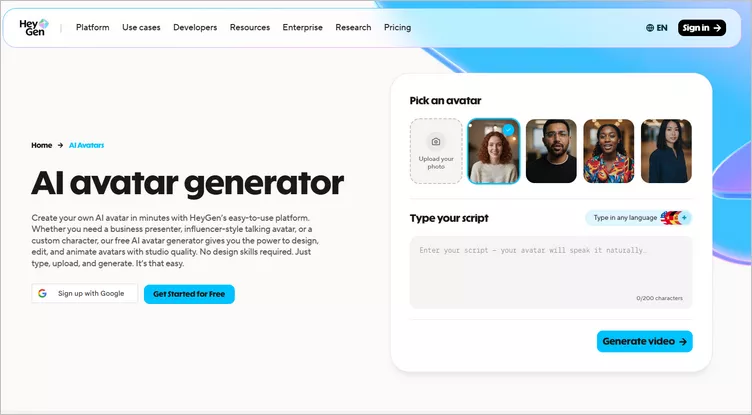
    Synthesia Alternative: HeyGen

    Synthesia Alternative: HeyGen

    Key Features of HeyGen:

  • 700+ AI avatars with distinct visual identities and presentation styles, plus custom avatar creation for branded or professional spokesperson use.
  • 175+ languages with 300+ voices (tested English and Spanish—both sounded natural)
  • Features a Talking Photo tool that converts static images into speaking avatars.
  • ChatGPT integration for faster script generation and content ideation.
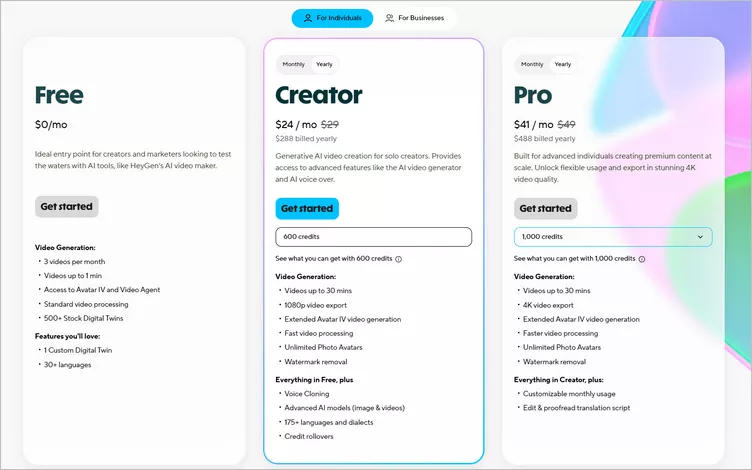
  • Pricing:

  • Free Plan: 3 videos per month (up to 3 min each), 500+ avatars, 30 languages.
  • Creator: $24/month for unlimited videos up to 30 minutes each, with 1080p exports and voice cloning.
  • Pro: $41/month for unlimited videos in 4K quality, faster processing, and early access to new features.
  • Business: $119/month for videos up to 60 minutes, including 5 custom digital twins and team collaboration tools.
  • Enterprise: Custom pricing for large-scale needs, with dedicated support, tailored onboarding, and unlimited video duration.
  • HeyGen Pricing

    HeyGen Pricing

    What I like:

  • Realistic, natural avatar delivery
  • Supports personalized or cloned avatars
  • Strong support for multi-avatar interactions
  • Simple editor makes script changes easy for non-editors
  • Limitations:

  • Limited control when editing real recorded footage or scenes
  • Limited customization even for advanced users
  • Limited language support compared to Synthesia's extensive range of options

    FlexClip

    I've found that HeyGen, like Synthesia, produces avatar-based narration of scripts rather than actual product UI videos. From my experience working with SaaS teams, HeyGen may address the cost issue compared to Synthesia, but it doesn’t solve the underlying limitation of the format itself. For this use case, I recommend giving FlexClip a try.

    FlexClip really caught my attention because it goes beyond the typical AI avatar tools. It packs a solid set of AI features, and its video editing capabilities feel more advanced and flexible than what many competitors currently offer.

    What sets FlexClip apart from Synthesia is that it isn't limited to avatar-based videos. Instead, it is an all-in-one video creation tool that offers a broader suite of AI tools along with more robust video editing features. On top of video creation, you also get tools like screen/webcam recording, image generation, background removal, and video translation, making it a much more flexible option for a wide range of creative projects.
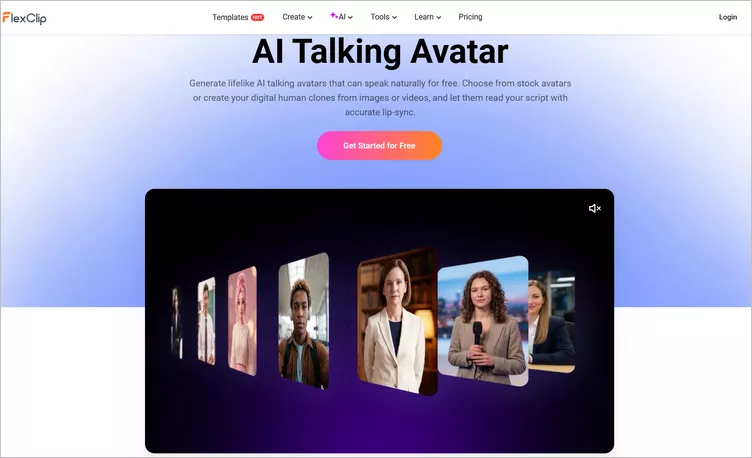
    Synthesia Alternative: FlexClip

    Synthesia Alternative: FlexClip

    Key Features of FlexClip:

  • Supports custom avatar generation by uploading photos or videos, or using AI-generated images and videos to create your own AI avatar
  • Comes with 3700+ voices in over 80 languages, enabling avatars can speak English, Spanish, Portuguese, Chinese, Japanese, French, German, Hindi, and more
  • Helps create realistic talking-head videos with accurate lip-sync that matches your script. It aligns speech with smooth mouth movements, natural expressions, and gestures, making avatars look more lifelike.
  • Flexible editing features allow you to add the AI talking avatars to your video projects and make edits for professional product explainers, brand videos, training, news updates, and social media content
  • Other AI tools like AI translation, AI background music generator, AI text-to-speech boost your editing efficiency
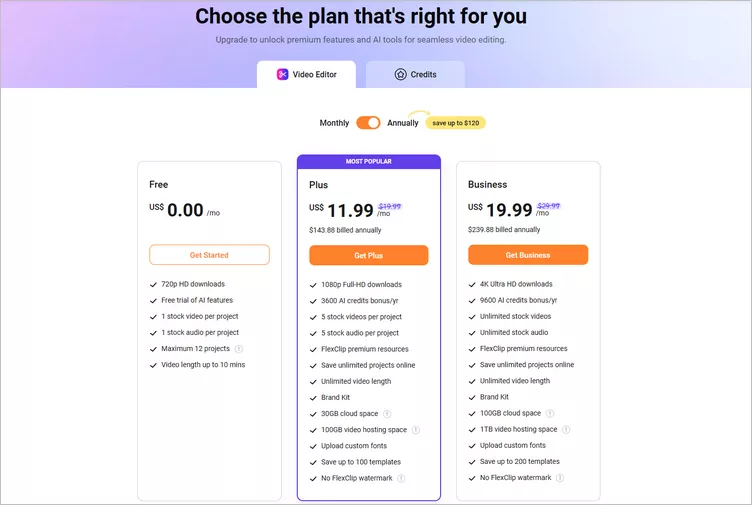
  • Pricing:

  • Free Plan: 720P exports, watermark, limited AI credits.
  • Plus Plan: $11.99 per month for 1080P exports, no watermark, more assets & storage.
  • Business Plan: $19.99 per month for more AI credits, storage, and resources.
  • AI Credit Plan: $9.9 for additional AI usage.
  • FlexClip Pricing

    FlexClip Pricing

    What I like:

  • Custom photo-to-avatar and video-to-avatar conversion
  • Voice cloning for personalized narration
  • Convert text, documents, or presentations into narrated videos
  • Flexible customization allows you to combine avatars with b-roll and create the polished, multi-layered videos
  • User-friendly interface with easy drag-and-drop operations
  • Limitations:

  • It doesn't work well for creating custom avatars from animal, cartoon, or group photos
  • No capability for multi-avatar dialogue or interaction

    D-ID

    When I tested D-ID, the main surprise was how quickly it turned an idea into a shareable video. I started with a still headshot, wrote a short forty-word script, and within forty seconds, I had a talking head video ready to post.

    D-ID takes a unique approach in the AI avatar category by specializing in photo-to-avatar video generation. It is easier to use than Synthesia and produces AI-generated spokesperson videos and visual storytelling content featuring photorealistic digital humans and animations from text. This helps eliminate the hassle and cost of video production at scale.
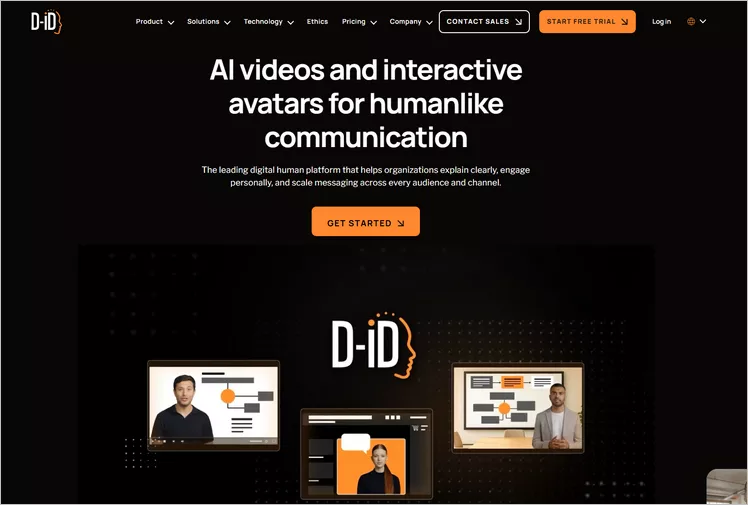
    Synthesia Alternative: D-ID

    Synthesia Alternative: D-ID

    Key Features of D-ID:

  • Converts any portrait image into a speaking video using advanced face-animation synthesis.
  • Offers natural-looking eye tracking and facial movements
  • Works natively with ElevenLabs and PlayHT for higher-fidelity voices. When I linked my ElevenLabs voice model, I noticed a clear improvement in speech quality
  • It can integrate with chatbots and work with real-time avatar conversations
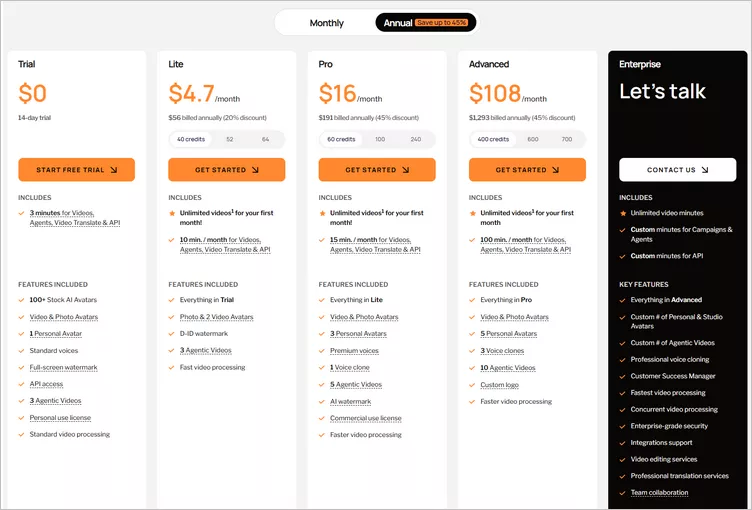
  • Pricing:

  • Free Trial: 3 minutes videos, watermarked, limited avatars
  • Lite Plan: $4.7/month for 10 minutes videos, watermarked, basic avatars, 1080p
  • Pro Plan: $16/month for 15 minutes videos, no watermark, premium avatars, API access
  • Advanced Plan: $108/month for 100 minutes videos, commercial rights, PowerPoint plugin
  • D-ID Pricing

    D-ID Pricing

    What I like:

  • Fastest generation speed among all reviewed platforms
  • Full customization of virtual actors to match any brand’s look, feel, and messaging
  • Affordable usage-based pricing but charge for every run
  • API access for scalable generation
  • Limitations:

  • Suitable for a single speaker and short-form content only
  • Not support complex video creation like transitions and scenes
  • Basic editing capabilities compared to full video platforms, like FlexClip

    Colossyan

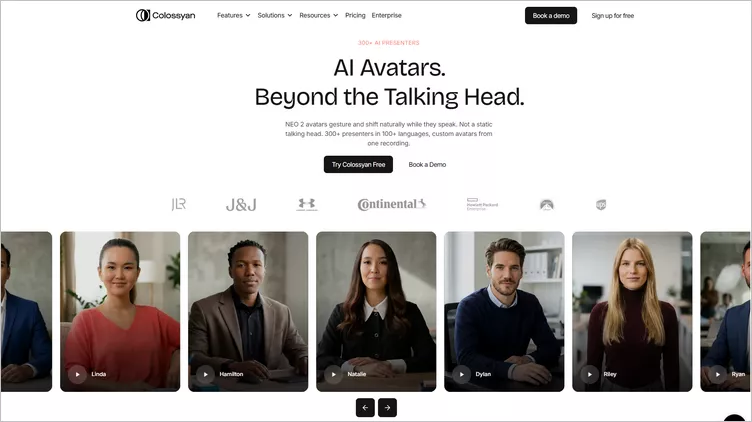
    Colossyan Creator positions itself as a platform for e-learning and corporate training. I find it really excels at educational content, with features specifically designed for learning outcomes rather than just marketing videos.

    It is the most purpose-built synthesia alternative for training video, compliance content, and LMS integration. It supports multiple avatars, on-screen text, and clickable quizzes—features that Synthesia doesn't offer. The platform is more focused on interactive learning rather than just talking-head narration.
    Synthesia Alternative: Colossyan

    Synthesia Alternative: Colossyan

    Key Features of Colossyan:

  • 150+ avatars with different appearances, voices, and accents. You can also create your own avatar and voice.
  • Many avatars, voice styles, and templates are available for different communication needs
  • Built-in features for adding quizzes and interactive, branching scenarios to your videos.
  • Supports SCORM exports, so it plays nicely with most Learning Management Systems (LMS).
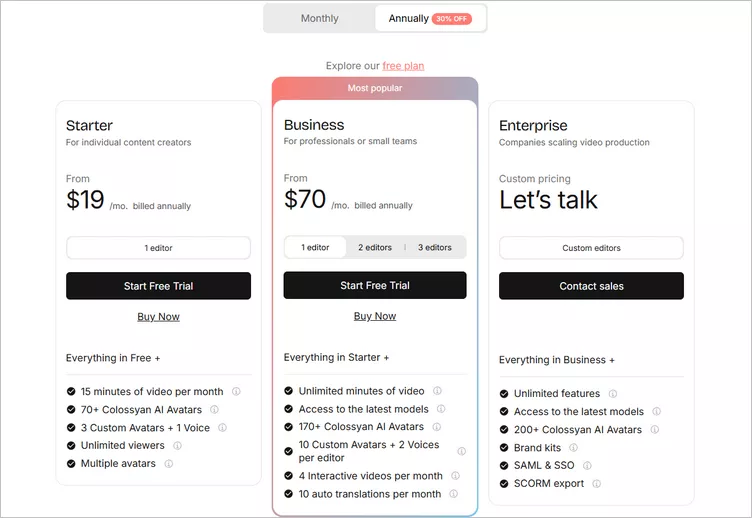
  • Pricing:

  • Free Plan: 3 minutes total (up to 3 scenes per video) with watermark
  • Starter Plan: $19/month for 15 minutes of video, 70+ Colossyan AI Avatars, 3 Custom Avatars + 1 Voice
  • Business Plan: $70/month for unlimited minutes of videos, 170+ Colossyan AI avatars, 10 custom avatars + 2 voices per editor
  • Colossyan Pricing

    Colossyan Pricing

    What I like:

  • Excellent translation and subtitle accuracy
  • Training-focused templates
  • Screen recording integration
  • Smooth LMS export workflow
  • Limitations:

  • Avatars look realistic but lack expression
  • Fewer scene and character choices may limit your creative options
  • Less suited for marketing or social content

    Elai

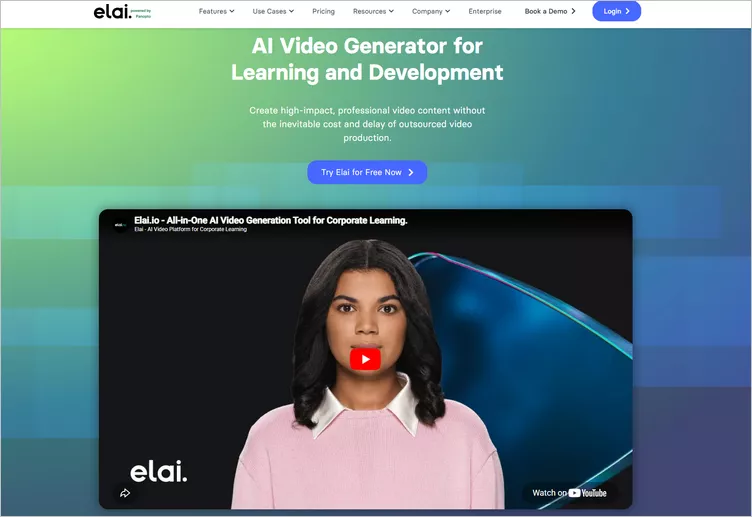
    Elai.io includes a robust video editor with interactive capabilities and SCORM export, which is essential for e-learning workflows. The value proposition is strong—you get features that often cost significantly more on other platforms.

    When I used this avatar, I found it particularly useful for creating training content, though it also works well for marketing videos. The platform’s rendering was slower than others, but the trade-off for a personalized, reusable avatar felt worth it.
    Synthesia Alternative: Elai

    Synthesia Alternative: Elai

    Key Features of Elai:

  • Choose from 80+ ready-made avatars in four styles: selfie, studio, photo, and animated mascot, or design your own custom avatar to suit your needs
  • Here are more than 75+ languages in 450+ voices
  • Supports recording and uploading your own voice to create a custom avatar.
  • ChatGPT4 integration for easy script creation
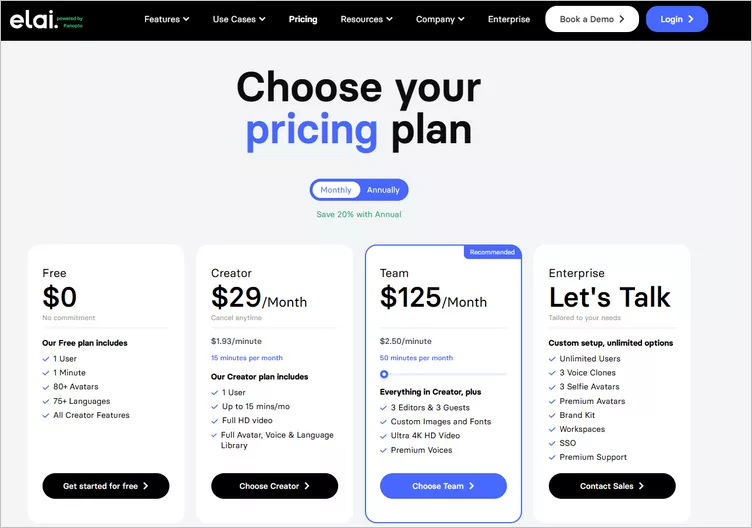
  • Pricing:

  • Free Plan: 1 minute monthly with 80 avatars and full 1080p quality.
  • Basic Plan: $23/month for 15 minutes monthly and 50+ templates.
  • Advanced Plan: $59/month for 100 minutes monthly with subtitles.
  • Elai Pricing

    Elai Pricing

    What I like:

  • Custom avatars, selfie avatars, and cartoon avatars
  • Avatar-chatbot integration
  • Create a digital twin using video recording
  • Reliable API for automation and localization
  • Limitations:

  • Custom avatar setup requires up to two days
  • Smaller library of ready-made avatars
  • The lip sync accuracy of the avatars could be improved

    Final Words

    After (many) hours testing these platforms (and dealing with the occasional frustrating glitch), I’ve realized there’s no one-size-fits-all solution in the AI video space. Synthesia has earned its reputation for quality and its focus on the enterprise market, but these alternatives offer compelling features—often at lower price points and with free plans worth exploring.

    If you're just starting out, I recommend beginning with HeyGen’s free plan, as it offers a strong balance of features and limitations for newcomers. If you’re looking for an AI tool beyond avatar-based video creation, give FlexClip a try, as it provides an all-in-one video generation and editing solution. And if you're creating for training and educational content, Colossyan's interactive capabilities are particularly impactful. For more personal uses, just check my list above to pick an AI avatar tool meet your needs.

    Group 11
    Make a free video online
    Create Your First Video With FlexClip Now
    Get Started - Free