


Most daily photos - of ourselves, our pets, and our travels, often get lost in social feeds. The problem? Ordinary photos don’t stand out.
Indeed, AI can transform casual snapshots into cinematic blockbusters. How to make the most of AI and achieve the best results?
In this post, you will discover the most common and effective AI tricks to elevate your photos. Ready to take your everyday shots into unforgettable, share-worthy visuals? Let’s dive right in!
10 AI Tricks to Turn Normal Photos to Blockbusters
To show you difference, we will be using real images and edit them with the following tricks.
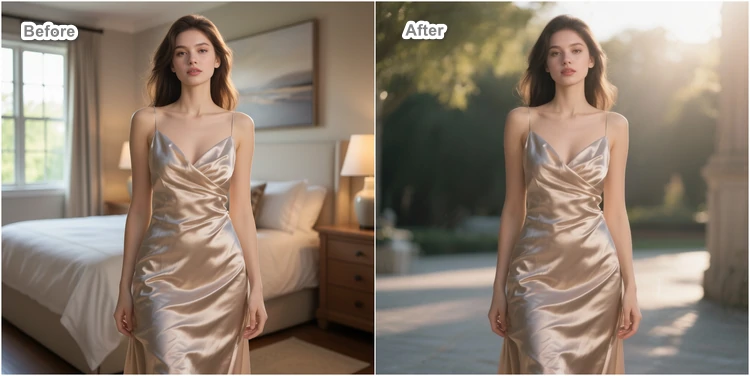
1. Swap in a New Background
AI background upgrade instantly places yourself in a cinematic setting, whether it is a tropical beach, bustling city, or a fantasy world. Instead of spending hours on Photoshop, AI tools can seamlessly cut out the key object, generate a background, and integrate everything naturally.
Prompt: Replace the background with natural outdoor scene while keeping the person sharp and naturally lit. Don’t change her facial details.

2. Change Weather/Season
Think of the endless possibilities. A boring summer scene can be turned into a rainy shot, a snowy wonderland, or a vibrant spring landscape. AI can effortlessly add elements like rain, snow, fog, or falling leaves while keeping the natural reflections and shadows.
Prompt: Turn this bright sunny scene into a snowy winter shot with falling snowflakes and frosty details.

3. Change Lighting
Lighting is a crucial key factor to control the mood and atmosphere the photo is delivering. You can switch from flat daylight to moody studio lighting, golden-hour glow or even complicated neon lights. AI will automatically adjust the shadows, tones to make the shot look natural and cinematic.
Prompt: Transform the photo into a golden-hour portrait with warm sunlight and soft shadows highlighting the subject’s face.

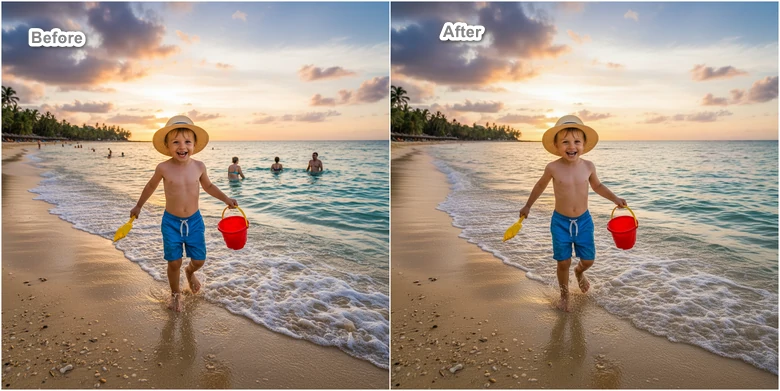
4. Remove Unwanted Objects in Photo
Any distracting objects, like photobombers, a building, can ruin a good shot. AI removes the unwanted elements, and then reconstructs missing areas with accurate textures and colors. This trick is useful to enhance travel shots, event photos, or celebrity street photos.
Prompt: Remove the bystanders from the background and fill in the space with natural scenery to keep the subject in focus.
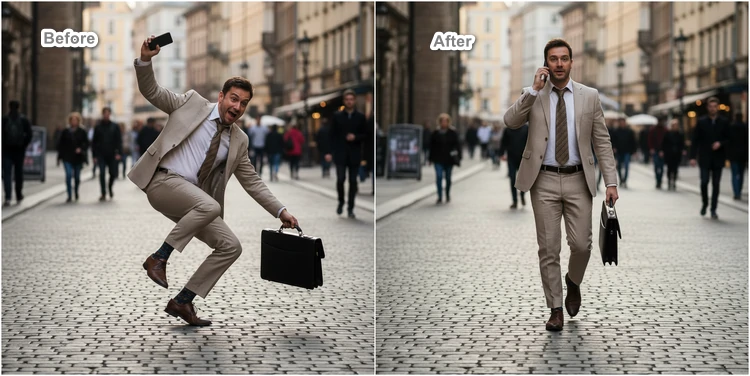
5. Change Body Pose
Everyone can be a supermodel, even if you can’t pose like a supermodel, thanks to advanced AI. It lets you refine posture or even change the entire stance while preserving the natural proportions and details. A completely game changer for fashion, advertising, and social media where body languages speak aloud.
Prompt: this man walks naturally, his left hand holds the briefcase, and the right hand holding the phone to his ear, as if making a phone call, showing great confidence.
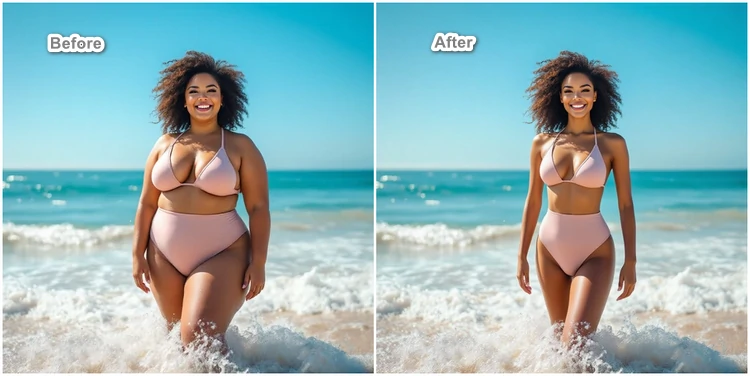
6. Refine Body Details
We are not prompting body shame, but there are times when you need a more flattering appearance. It can be as simple as slimmer waistlines, enlarged breasts, or silky skins. AI can understand your prompt and adjust the body details as you like. The results keep the natural look intact while adding polish and confidence.
Prompt: Refine the figure with a model-like silhouette: slimmer waist, toned legs, and elegant posture while preserving realistic details.
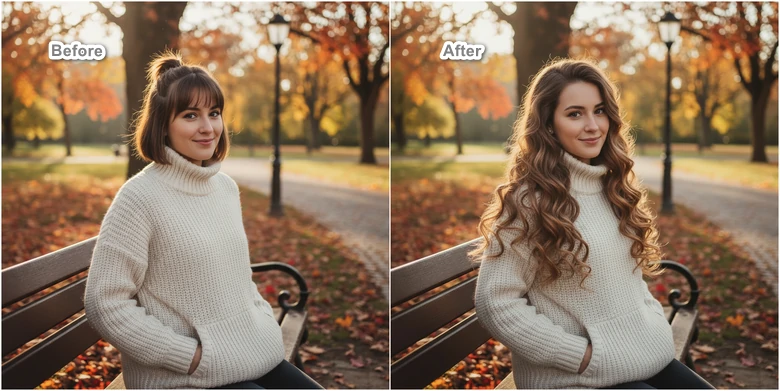
7. Change Hairstyles
Hairstyle can completely transform your vibe. With AI, you can try out countless hairstyles, such as popular long curls, sleek bob, braids. Don’t frustrate if you are a man. AI also supports man’s hairstyles like crew cut, side-parted, hawk. It is perfect for experimenting with personal style, testing professional looks, or creating themed content.
Prompt: Change the hairstyle to long wavy curls with natural lights, styled for a glamorous photo shoot look.
8. Put On Virtual Outfit
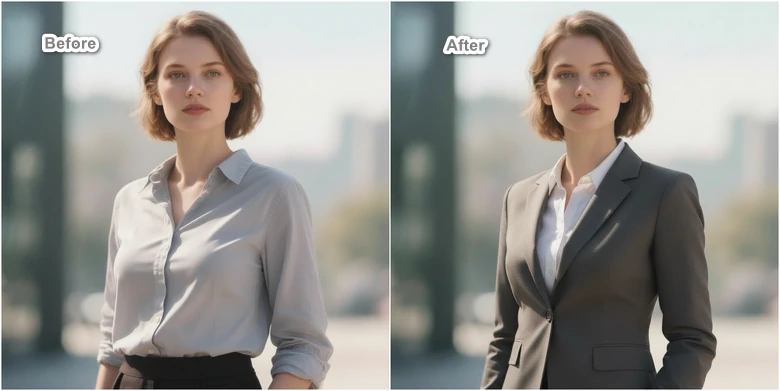
Let AI give you a wardrobe update. Whether it is a casual wear, business suits, evening gowns, or beautiful dress, AI can seamlessly fit the clothes you love into your body. This trick saves you time and money, letting you experiment fashion without physical trials.
Prompt: Change her shirt into formal business suit, keeping the original lighting and pose.
9. Mix Images
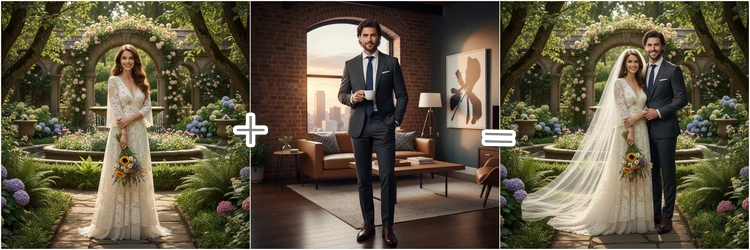
Whenever you find the photos are boring, you can try mixing different photos into one. We are not talking about simple collage, but mixing of different elements, styles, color schemes, even textures. This trick is perfect for artistic edits, surreal photography, or attention-grabbing social media posts.
Prompt:Transform the two daily shots into a wedding photo, elegant background, the man in the same outfit.
10. Image Style Transformation
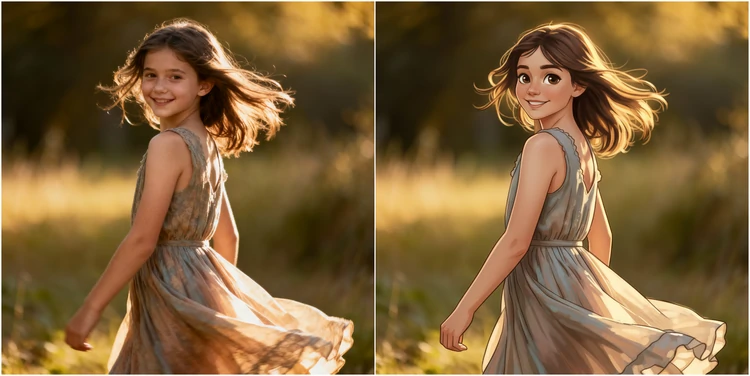
Reimagine your photo in another styles. From normal selfie to watercolor, popular Ghibli, oil painting, FlexClip made it easy. Its AI analyzes all elements, and then recreates them in another stroke. Give ordinary images an extraordinary artistic edge.
Prompt: Transform this portrait into watercolor painting while keeping the facial details.
How to Give Normal Photo an Artistic Look Using AI
The only AI tool we need to transform normal photos into blockbuster is FlexClip. Backed up with advanced models like Google Nano Banana, Flux, OpenAI, it easily edits your photos as prompt says. Let’s witness magic.
Video Tutorial of FlexClip AI Photo Editor
FAQs About Transforming Normal Photo to Blockbuster
1. How to turn normal photos into cinematic photos?
It is easy to add a cinematic touch to normal photos. You can upload a screenshot of a royalty-free film as a reference image, and then turn your portrait into a cinematic photo.
2. Can I ask ChatGPT to edit a photo?
Yes, you can ask ChatGPT to edit a photo. However, photo editing is a feature for subscribers. Free users are limited to 3 trials per day.




FlexClip Video Maker
The easiest way to help you create custom videos, no design skills needed.
Start Now for Free
Hot & Trending
-

Ultimate Tik Tok Guide – How to Tik Tok & How to Make a Tik Tok Video that Gets Likes
-

7 Best Ways to Find Music in YouTube Videos
-

Instagram Story Video Quality Bad After Upload? Fix It!
-

How to Repost Video on TikTok & How to Remove TikTok Repost
-

Improve Video Quality Online: 3 AI Video Quality Enhancers You Can't Miss
-

4K Convert to HD 1080p without Watermark: Best 4k Video Converters
-
How to Change Face in Video on Phone/Desktop/Online
-

Top 13 Birthday Video Makers with Music and Effects Free


