Noticing one eye looking away in an otherwise perfect photo is more common than you think! When one eye looks slightly away from the camera, often described as a lazy eye in photos, it can distract viewers and reduce confidence in the image. This issue is common in portraits, headshots, and group photos, even for people without a medical lazy eye.
Thanks to advanced AI photo editing tools, it's now easy to change eye direction in a photo, fix a lazy eye in a picture, and correct eye alignment instantly. In this guide, you'll learn how AI eye correction works and how to fix lazy eye in photos quickly, naturally, and without professional editing skills.
Contents:
Best Use Cases for AI Eye Correction
AI eye correction tools, like FlexClip AI photo editor, are perfect for a variety of photo types where eye alignment matters most. Some of the best use cases include:
#1 Professional Headshots & LinkedIn Photos
Ensure your eyes are looking directly at the camera to convey confidence, approachability, and professionalism.
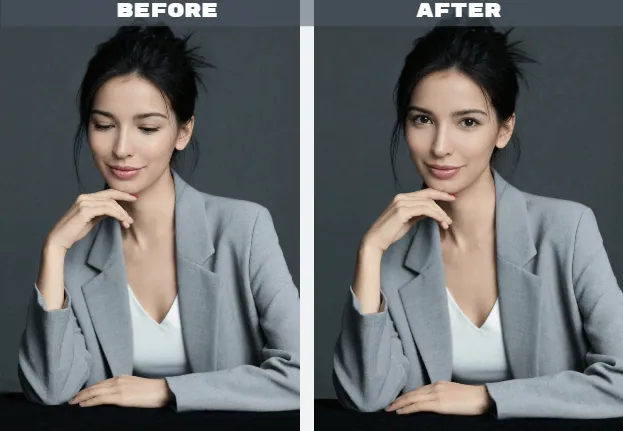
Fix Eye Direction in Professional Headshots & LinkedIn Photos

#2 Group Photos
Fix misaligned eyes in group shots so that everyone appears engaged and connected, so every face looks engaged.
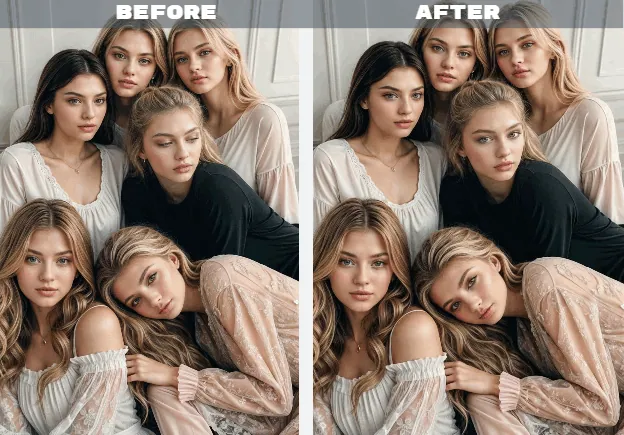
Fix Eye Direction in Group Photo
#3 Wedding And Event Photography
Subtle eye adjustments preserve those precious memories without the need for retakes, making every moment picture-perfect.
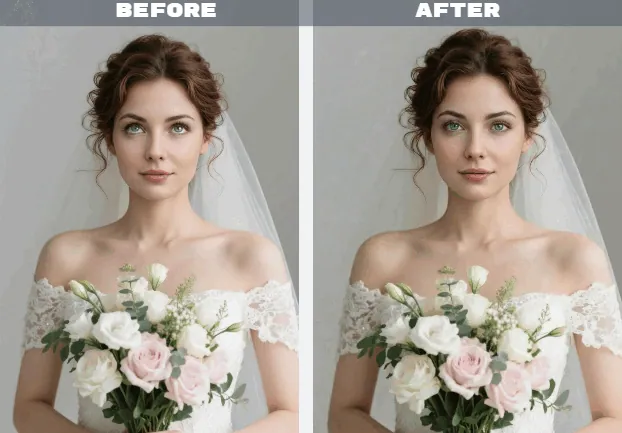
Fix Eye Direction in Wedding Photo
#4 Social Media Profile Pictures
Eye alignment can make your images more appealing and approachable on platforms like Instagram, Facebook, or TikTok.
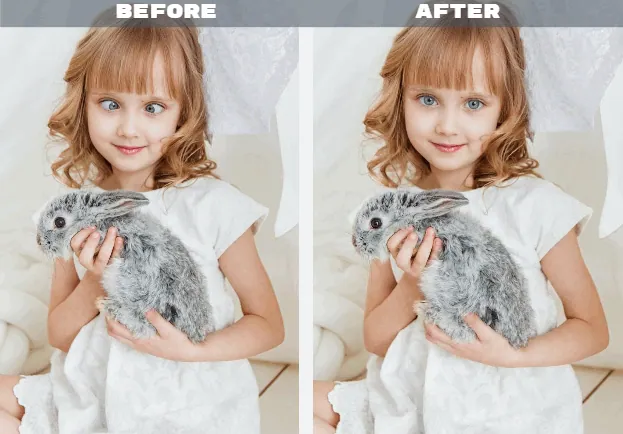
Fix Eye Direction in Profile Picture
#5 More Creative and Fun Uses
AI eye correction isn't just for serious shots. It can turn ordinary photos into fun memories. Whether it's your cat glancing at the lens, or a toddler refusing to look at the camera, AI eye correction can save the day, making all eyes aligned, every time, without the stress of retakes.
How to Chang Eye Direction and Fix Lazy Eye in Photo Using FlexClip AI
With AI-powered tools like FlexClip AI photo editor, you can easily change eye direction in a photo and fix lazy eye in pictures in just a few clicks, giving your portraits and group images a polished, professional look.
Step-by-Step Guide to Change Eye Direction in Photo with FlexClip AI
Here's a simple step-by-step guide to using FlexClip AI to change eye direction in photo and fix lazy eyes. Let’s check the steps below:
Step 1 Upload Your Photo
Start by uploading the photo you want to correct to FlexClip's AI photo editor. Whether it's a portrait, a professional headshot, or a group photo where someone's gaze is slightly off, FlexClip can handle it with ease. Make sure the eyes are clearly visible for the best results.
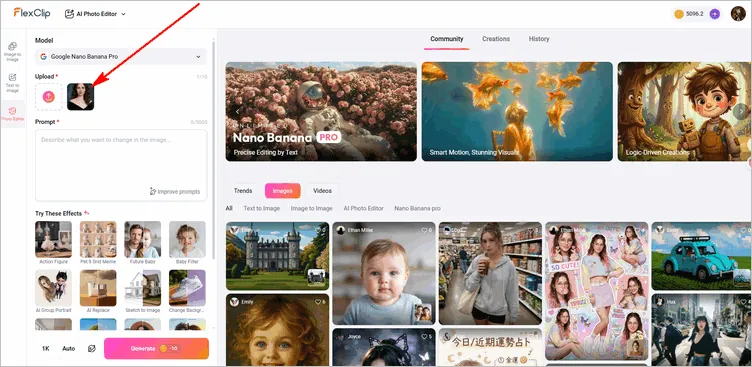
Access FlexClip's AI Photo Editor
Step 2 Enter an Eye Correction Prompt
Here’s where the magic happens! FlexClip allows you to fix lazy eyes or change eye direction using simple text prompts—no complicated manual editing required.
Go to the prompt box and type commands like: "Make both eyes look straight at the camera", "Align eyes naturally", "Adjust gaze so eyes face forward". Then customize the settings, including resolution, aspect ratio, and visibility—choosing whether to share your creations with the FlexClip AI community or keep them private.
Quick Tip: Also Check out our post: "Copy-and-Paste Prompts for Stunning AI Image" for more image generation inspiration.
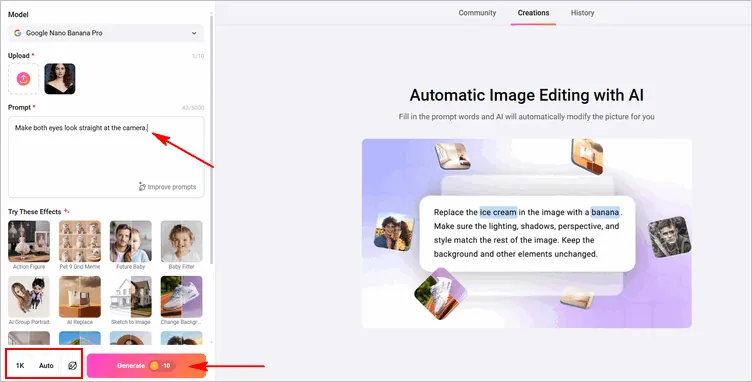
Input Eye Correction Prompt and Adjust Settings
Once done, click Generate, and FlexClip's AI will analyze your photo, detect the eyes, and automatically adjust the direction and alignment while keeping your face looking natural.
Step 3 Preview, Fine-Tune, and Download
Once the AI has processed your photo, preview the results. You can make small adjustments if needed to perfect the eye direction or refine facial expressions by clicking the Continue Editing button.
When you're satisfied, click Download to save your corrected image in high-quality. Your photo now has naturally aligned eyes, giving it a polished, professional look—perfect for headshots, social media, or personal portraits.
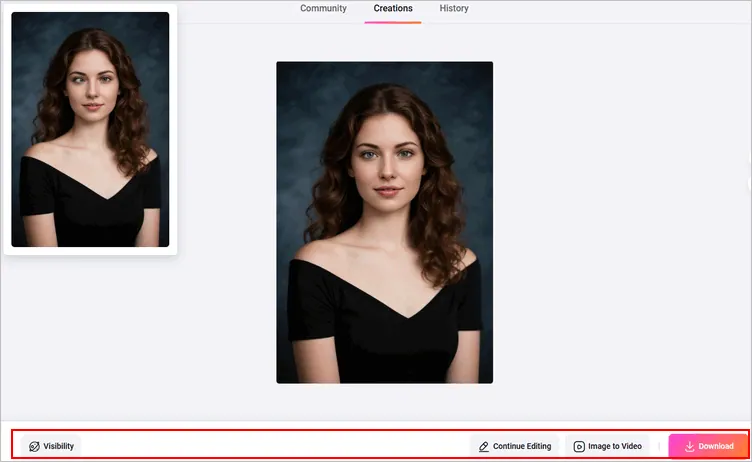
Preview, Fine-Tune, and Download the Photo
Bonus: More Than an AI Eye Direction Changer
FlexClip AI photo editor isn't just for fixing lazy eyes or changing gaze direction, it's a full-featured AI prompt-driven photo enhancement tool. Some bonus features include:
FAQs about Change Eye Direction in Photo with AI
Q1: How can I fix a lazy eye in a picture quickly?
You can fix a lazy eye in a picture by using AI eye correction tools, like FlexClip AI Photo Editor. Upload your image to the AI Photo Editor, type a prompt describing how you want the eyes to look (for example, eyes looking straight at the camera), and let the AI generate the edit based on your request. No manual editing or Photoshop skills required.
Q2: Does FlexClip AI tool make eye correction look natural?
Yes. FlexClip AI analyze facial symmetry, eye shape, and reflections to ensure the corrected photo looks natural and realistic. When used properly, AI eye correction is usually unnoticeable.
Q3: Does fixing eye direction affect photo quality?
No. FlexClip’s AI tools aim to preserve high‑quality visuals while editing. When you correct features like eye direction or retouch facial areas, the AI strives to maintain resolution and natural texture, ensuring the photo remains sharp and realistic. You can even try AI tools to improve your photo quality in simple clicks.
Q4: Can I fix lazy eye in group photos?
Yes. FlexClip AI photo editor can correct eye direction for individuals in group photos, even if only one person's eyes are misaligned.




FlexClip AI Video Maker
Reach professional-quality videos faster with easy editing tools, templates, and smart AI.
Start Now for Free
Hot & Trending
-

Best Ways to Find Music in YouTube Videos
-

Instagram Story Video Quality Bad After Upload? Fix It!
-

How to Repost Video on TikTok & How to Remove TikTok Repost
-

Improve Video Quality Online: 3 AI Video Quality Enhancers You Can't Miss
-

4K Convert to HD 1080p without Watermark: Best 4k Video Converters
-

Best 8 Free Video Editors - No Download Required
-

Top 13 Birthday Video Makers with Music and Effects Free
-

How to Search Filters on TikTok & Use a Filter You See - TikTok Filter Guide