


The holiday season is the perfect time to get creative, and one trend that's gaining popularity on TikTok and Instagram is using wrapping paper as a backdrop for photos. Get in on the festive fun with the latest holiday wrapping paper trend that's been lighting up social media! And the best part? You don’t even need a professional photographer or fancy equipment to pull it off. Thanks to AI, creating a stunning wrapping paper photo is easier than ever!
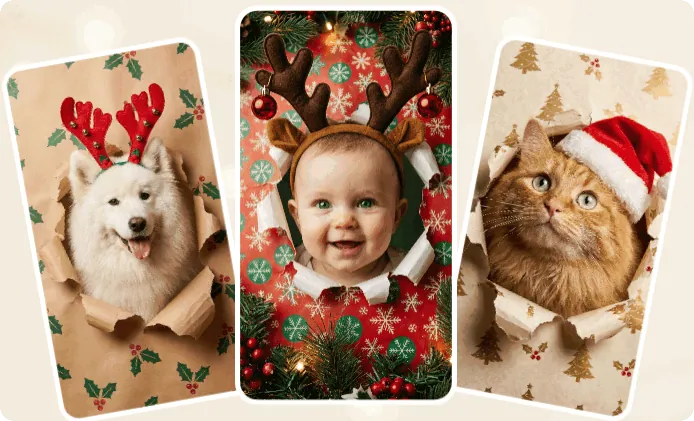
AI Wrapping Paper Trend Photo (Generated by FlexClip AI)

In this guide, we’ll show you how to get the perfect wrapping paper photo using AI – without any messy tape! Embrace the holiday spirit, get creative, and impress your friends and family with your AI-generated wrapping paper shots. Ready to elevate your holiday photos? Let’s dive in!
Bonus: Free Editable Holiday Video Templates You Might Like



Create Video Faster with FlexClip's Pre-Made Templates →
Start from Scratch Easily with FlexClip's Online Video Maker →
What Is Wrapping Paper Trend?
The wrapping paper trend is a viral photo and video concept that has taken social media, like TikTok and Instagram, by storm, especially during the holiday season. The idea centers around a subject, often a pet (like a dog or cat) or even a baby, appearing to “emerge” from torn or crumpled wrapping paper, with their face playfully centered in the frame.
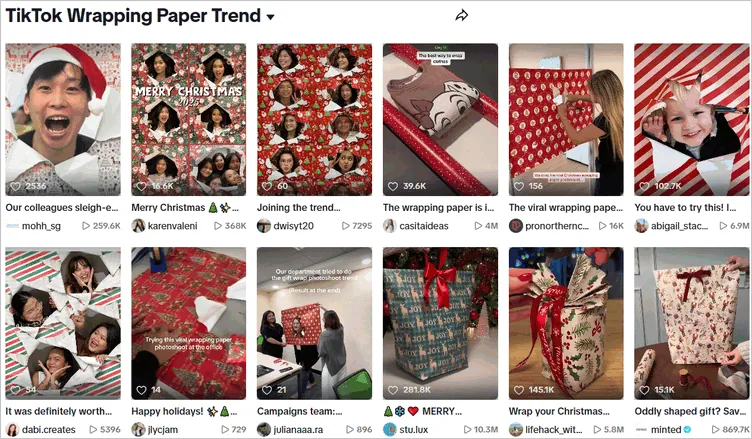
Image Board: Tiktok Wrapping Paper Trend
This fun trend plays on the excitement of unwrapping gifts, much like the joy of tearing off wrapping paper on Christmas or New Year morning. It’s festive, and full of cheer, making it perfect for holiday posts or fun videos. The wrapping paper trend is all about capturing moments of surprise and spreading joy in a creative way. Some common uses include:
How to Create Wrapping Paper Effect Photo with AI
As the trend evolved, AI-generated versions became increasingly popular because they look realistic while avoiding physical props.
With powerful AI tools, like FlexClip's AI Photo Editor and AI Image Generator, you can recreate the wrapping paper trend in just a few taps—and the results look surprisingly real. Now, let’s see how you can try out this tend with AI.
Method 1 Create Wrapping Paper Photo with FlexClip Photo Editor
First, you can turn an existing photo into a wrapping paper masterpiece using FlexClip's powerful AI photo editor. Simply upload your image, describe the festive wrapping paper effect you want, or upload a reference image to guide the AI in transforming your photo. Once the image is generated, you can fine-tune the background, add fun textures, and adjust colors to craft a vibrant holiday scene. Check out the detailed steps below.
Step 1 Access FlexClip's AI Photo Editor
Click the Try Wrapping Paper Effect with AI button below to access AI Photo editor. Simply upload or drag and drop the photo you want to transform with a wrapping paper effect, whether it's a dog, cat, or a cute baby, the choice is yours!
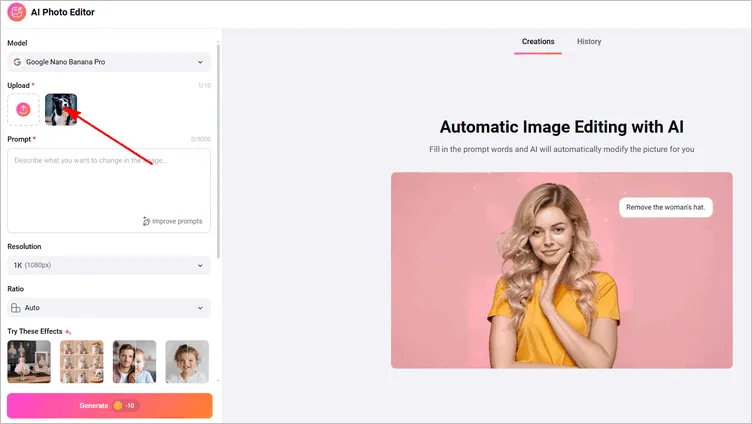
Image Board: Create Wrapping Paper Photo with FlexClip Photo Editor - Upload Images
Step 2 Pick an AI Model for Generation
FlexClip provides multiple editing models like Google Nano Banana Pro, Flux Kontext, OpenAI, Seedream, and Qwen. Here we'll go with the default one, Google Nano Banana Pro, which is known for precise character consistency, ideal for editing an existing photo while keeping all the characteristic.
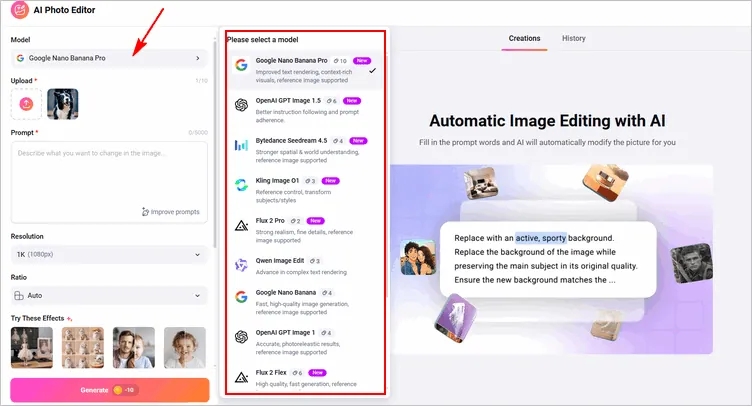
Image Board: Create Wrapping Paper Photo with FlexClip Photo Editor - Select Model
Step 3 Enter Your Wrapping Paper Photo Prompt
Enter the prompt describing how you'd like to transform your photo into a Christmas or New Year and any festival wrapping paper photo, including the wrapping paper style, motion, and mood, etc. We recommend adding a reference image to guide the AI in replicating the wrapping paper style and overall vibe, helping you create a unique and festive wrapping paper visual.
Then adjust the image settings, like resolution and ratio, and then click the Generate button to let the AI do its magic.

Image Board: Create Wrapping Paper Photo with FlexClip Photo Editor - Prompt
Step 4 Download or Continue Editing
FlexClip will turn your wrapping paper photo idea into stunning visual within several seconds. You can preview the AI-powered wrapping paper trend photo, then download it instantly. Or, click Continue Editing to perfect your image by changing the background paper pattern, adding festive frames and stickers, refining details, and more—before sharing it directly to social media.
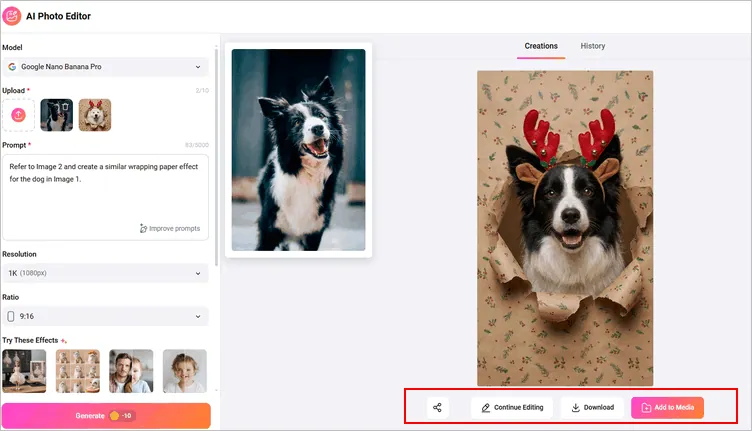
Image Board: Create Wrapping Paper Photo with FlexClip Photo Editor - Download
Step 5 (Optional) Turn Your Still Wrapping Paper Photo into a Video
After generating your image, you can use FlexClip's powerful AI image-to-video tool to bring your still photo to life. Animate your wrapping paper photo into a dynamic, motion-filled video with natural movement, adding an extra layer of excitement to your creation.
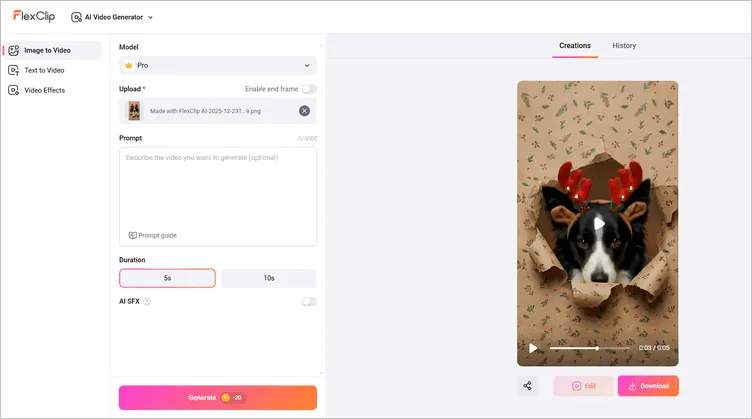
Image Board: Turn Your Still Wrapping Paper Photo into a Video
Let's check the final wrapping paper dog video together:
Wrapping Paper Dog Video Made with FlexClip AI
Method 2 Create Wrapping Paper Photo with AI Image Generator
If you don’t have the perfect photo, no problem! With FlexClip’s AI Image Generator, you can create a wrapping paper photo from scratch! Just describe the scene you want, and the AI will generate a stunning, custom image based on your text description. Let’s see how it works.
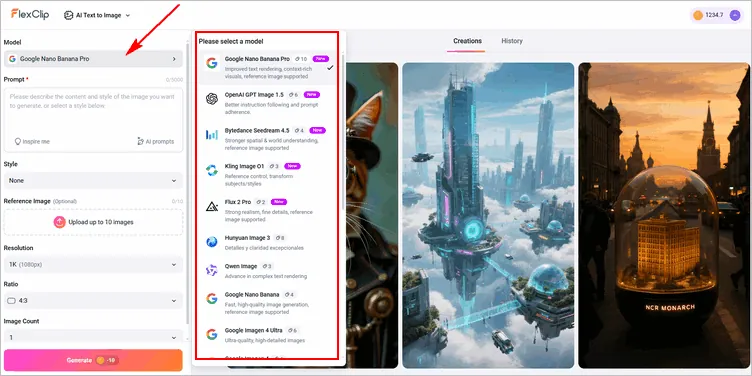
Create Wrapping Paper Photo with AI Image Generator - Select Model
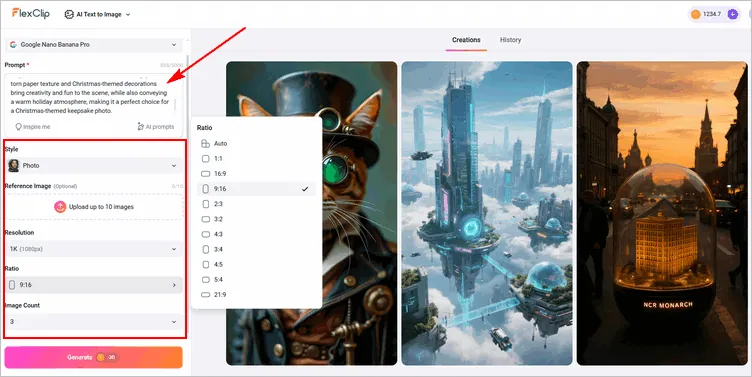
Create Wrapping Paper Photo with AI Image Generator - Prompt & Setting
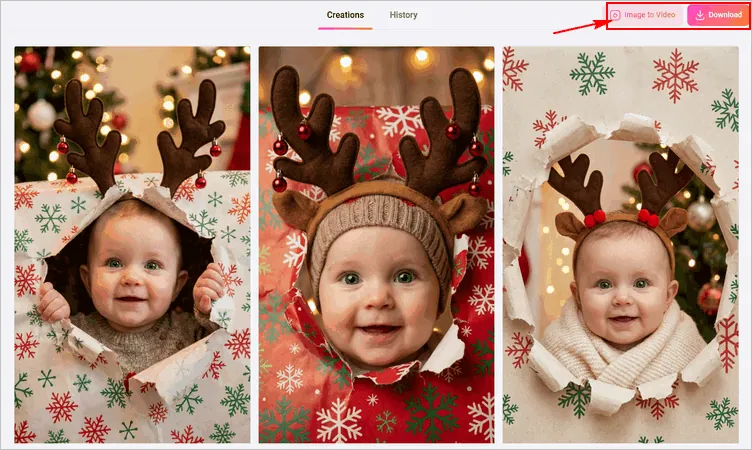
Create Wrapping Paper Photo with AI Image Generator - Generate
Check the final AI wrapping paper baby video generated by FlexClip:
Wrapping Paper Baby Video Made with FlexClip AI
Final Words
The wrapping paper photo trend is a fun and creative way to add a festive twist to your holiday photos. Whether you're capturing the excitement of a pet or child emerging from a torn sheet of wrapping paper, this trend offers endless possibilities for unique and eye-catching images. By leveraging AI tools like FlexClip, you can easily enhance your photos, making the process fast and accessible, even turning still images into dynamic videos. So, turn to FlexClip and start your creation now!




FlexClip AI Video Maker
Reach professional-quality videos faster with easy editing tools, templates, and smart AI.
Start Now for Free
Hot & Trending
-

Best Ways to Find Music in YouTube Videos
-

Instagram Story Video Quality Bad After Upload? Fix It!
-

How to Repost Video on TikTok & How to Remove TikTok Repost
-

Improve Video Quality Online: 3 AI Video Quality Enhancers You Can't Miss
-

4K Convert to HD 1080p without Watermark: Best 4k Video Converters
-

Best 8 Free Video Editors - No Download Required
-

Top 13 Birthday Video Makers with Music and Effects Free
-

How to Search Filters on TikTok & Use a Filter You See - TikTok Filter Guide




