Golden hour is pure magic for photography – but what if you missed it?
No worries! Thanks to AI, you don't have to wait for nature to cooperate. With AI-powered golden hour photo editors, like FlexClip's AI Photo Editor, you can recreate that dreamy, sunlit glow with just a few clicks. Whether the sky was overcast, the timing was off, or the light didn't work out, FlexClip AI gives you the precision and control that simple traditional filters can’t match.
Learn how AI golden hour photo editor creates dreamy, sunlit edits with an AI golden hour filter – even when the sunset doesn't show up. Perfect for outdoor and portrait photographers.
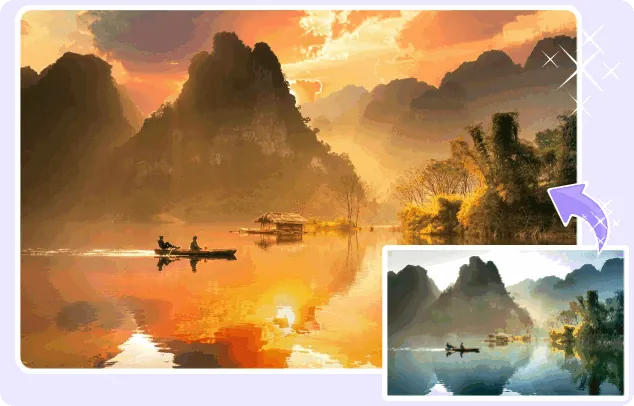
Golden Hour Effect Photo Made with FlexClip AI

Introducing FlexClip AI Photo Editor: The Best AI Golden Hour Tool for Aesthetic Photos
FlexClip's AI Photo Editor is a powerful online tool designed to make photo editing easier and more intuitive. Powered by advanced AI technology, it analyzes your images and applies professional-level edits with just a few clicks. Whether you want to change backgrounds, remove or add objects, edit text, or more, all you need are simple text prompts to make it happen.
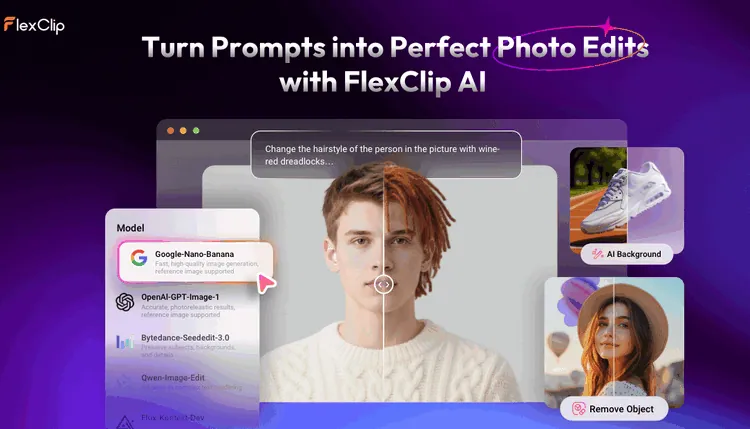
The Best AI Golden Hour Tool for Aesthetic Photos - FlexClip
So you can easily prompt the AI to add a golden hour effect to any photo. This makes FlexClip your new go-to tool for adding that perfect, dreamy golden hour glow to any photo, no matter the lighting conditions when it was taken. With FlexClip's AI-powered technology, you can easily enhance your photos with an aesthetic golden hour effect that mimics the soft, warm sunlight you get during that magical time of day.
How to Add a Golden Hour Effect to Your Photos Using FlexClip AI Photo Editor
The magic of FlexClip's AI Golden Hour tool lies in its simplicity and versatility. Whether you want to recreate the soft glow of sunrise, the rich warmth of sunset, or a dreamy golden haze, FlexClip AI makes it easier than ever to transform your photos. There are two main ways to add that stunning golden hour effect to your photos. Let's check out together.
Method 1 Generate AI Golden Hour Effect via Text Prompts
With FlexClip AI, you can now transform your photos into stunning golden hour masterpieces by simply describing the golden hour aesthetic you're looking for with a prompt. Whether you want soft, warm light, vibrant sunflare, or that dreamy sunset glow, just type in what you envision, and let the AI work its magic! Here’s how it works:
Step 1 Upload Your Photo
Click the Try AI Golden Hour Effect button above to access FlexClip's AI photo editor and upload a selfie, portrait, or landscape photo that you'd like to transform with a golden hour aesthetic.
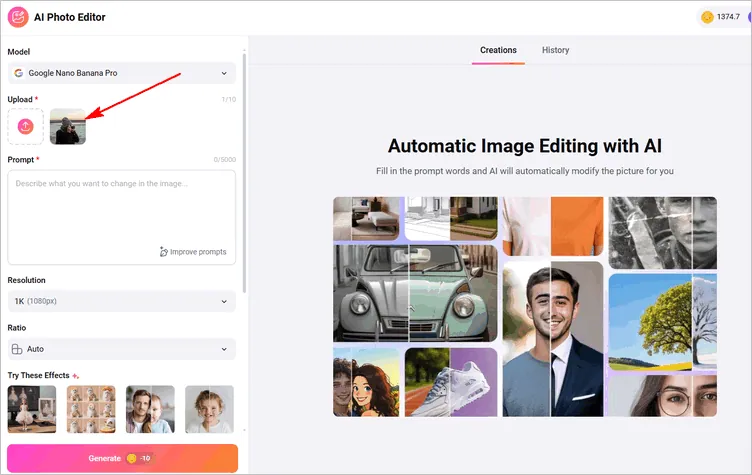
Access FlexClip's AI Photo Editor
Step 2 Input Golden Hour Effect Prompt
Now, describe your ideal golden hour aesthetic in the prompt box. Just type a description of the golden hour look you want. For example: "Transform the photo with warm, sunset-inspired light and vibrant colors."
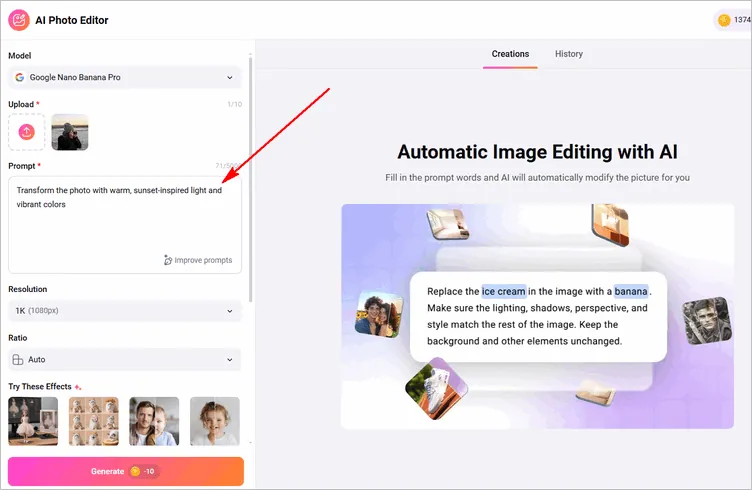
Input Golden Hour Effect Prompt
Quick Tip: Also Check out our post: "Copy-and-Paste Prompts for Stunning AI Image" for more image generation inspiration.
Step 3 Adjust Settings & Generate
Once you enter your prompt, adjust the settings, like resolution and ratio, then click the Generate button to let the AI get to work, analyzing your image and adjusting the lighting, colors, and shadows to match your description.
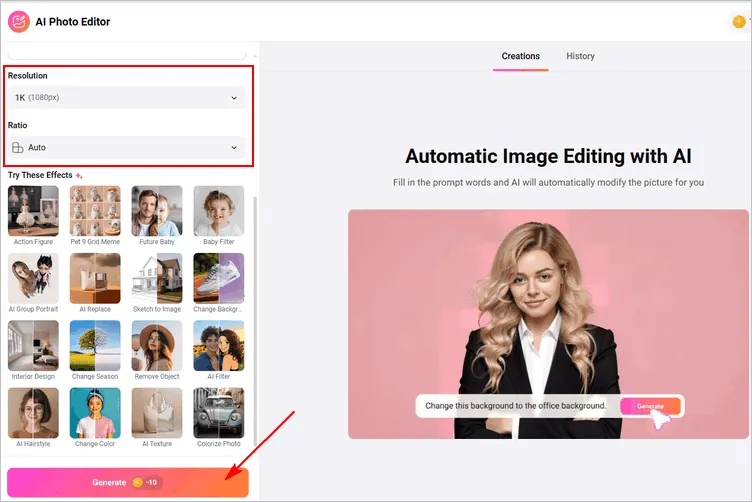
Adjust Settings & Generate
Step 4 Download the AI-generated Golden Hour Photo or Keep Editing
Once the transformation is complete, you can preview the AI-generated golden hour image and make any adjustments by clicking the Continue Editing button. Here, you can enhance the warmth or adjust the brightness, fine-tune everything to get your desired golden hour effect, or even change the background, and more.
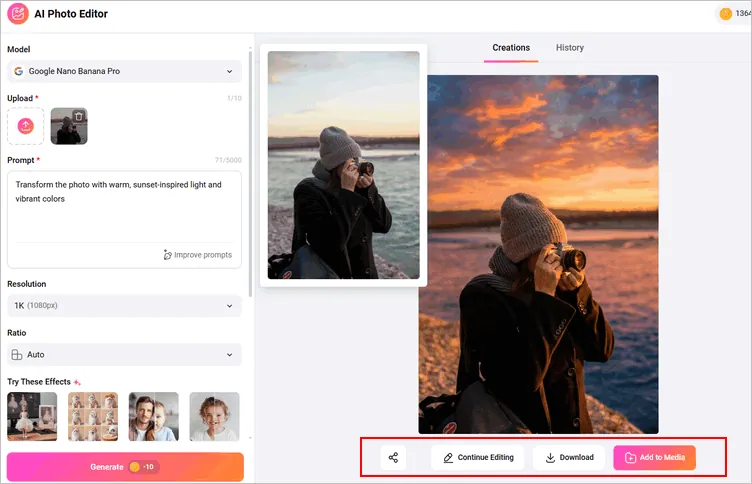
Download the AI-generated Golden Hour Photo or Keep Editing
When you're happy with the result, simply click Download to save your AI-generated golden hour photo and share it with others. Alternatively, you can take it to FlexClip's built-in editor to incorporate it into your video projects.
Method 2 Replicate Golden Hour Effect from a Uploaded Reference Photo
Not sure how to describe it? No problem! You can also upload a reference photo of the golden hour light effect you want to replicate. The AI will analyze it and apply a similar effect to your own photo, ensuring a seamless and natural transformation. Check the detailed steps below:
Step 1 Select An AI Model
Start by accessing FlexClip's AI photo editor and selecting an AI model that supports uploading multiple images (the photo you want to enhance with the golden hour effect and the reference photo with the desired golden hour aesthetic). Some options include models like Google Nana-Banana/Nana-Banana Pro, OpenAI GPT-Image 1, Bytedance Seedream 4/4.5, Flux 2 Flex, or Flux 2 Pro.
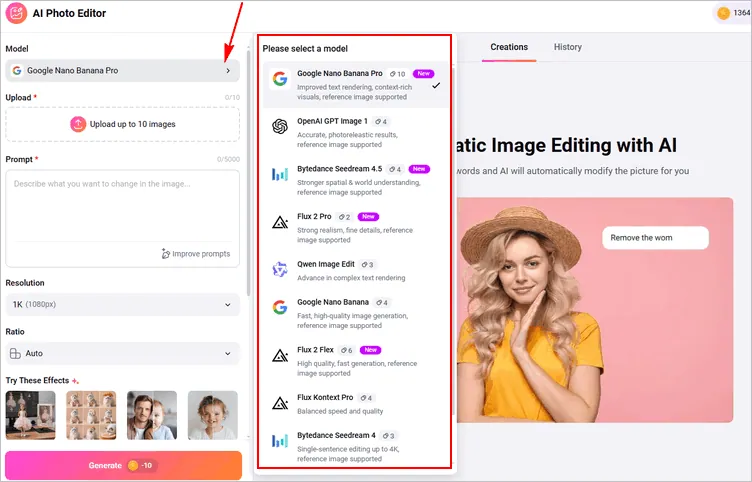
Select An AI Model
Step 2 Upload Your Photos
Upload both the photo you want to enhance with the golden hour effect and the reference photo that perfectly captures the golden hour glow you're aiming for, whether it's a sunset, sunrise, or that warm, sun-kissed ambiance.
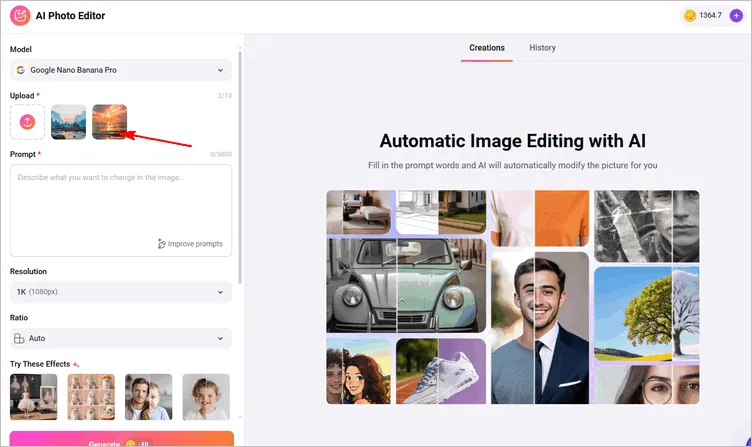
Upload Your Photos
Step 3 Let AI Retouch Your Photo with Prompts
Write prompts that instruct the AI to analyze the reference image, focusing on the light, colors, and overall atmosphere. Then, click the Generate button to apply the same golden hour effect to your own photo, ensuring a natural and cohesive transformation.
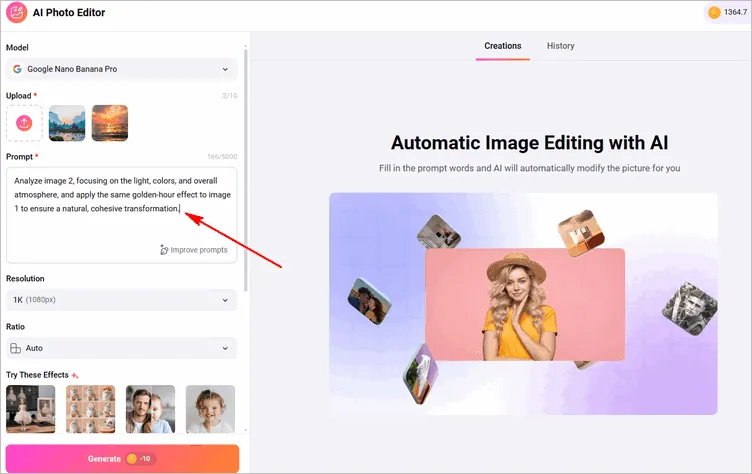
Let AI Retouch Your Photo with Prompts
Step 4 Download and Share
Now preview your photo with the golden hour effect. Here, you can still adjust the final result. Once satisfied, download and share it to amaze your friends now.
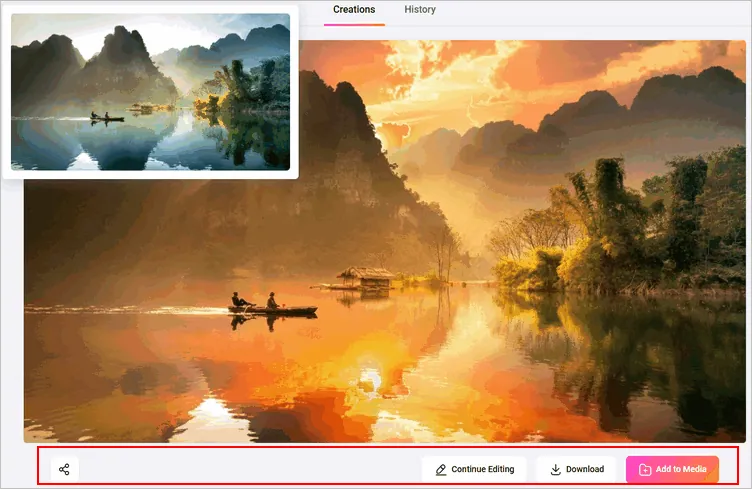
Download and Share
Which Method Is Right for You?
Use Text Prompts for Golden Hour Effect: If you have a specific vision for your golden hour effect and enjoy the creative freedom of describing it, this method is perfect. It’s quick, flexible, and lets you experiment with different lighting styles using just a few words.
Try a Reference Photo to Relight a Golden Hour Photo: If you're more of a visual learner or want the AI to replicate an exact golden hour effect from a photo you love, uploading a reference image is your best bet. It’s fast and easy, and it gives you a direct, consistent result based on a real-world example.
Final Words
As you can see, FlexClip's AI Photo Editor provides unbeatable convenience and flexibility for adding a golden hour effect to your photos. Say goodbye to missed golden hour moments and hello to FlexClip’s AI Golden Hour Effect, your new secret weapon for creating stunning, sunlit photos.




FlexClip AI Video Maker
Reach professional-quality videos faster with easy editing tools, templates, and smart AI.
Start Now for Free
Hot & Trending
-

Best Ways to Find Music in YouTube Videos
-

Instagram Story Video Quality Bad After Upload? Fix It!
-

How to Repost Video on TikTok & How to Remove TikTok Repost
-

Improve Video Quality Online: 3 AI Video Quality Enhancers You Can't Miss
-

4K Convert to HD 1080p without Watermark: Best 4k Video Converters
-

Best 8 Free Video Editors - No Download Required
-

Top 13 Birthday Video Makers with Music and Effects Free
-

How to Search Filters on TikTok & Use a Filter You See - TikTok Filter Guide