


Looking for a cool intro for your travel vlog? Want to turn a single photo into an eye-catching transition? Try the trending Earth Zoom-Out Effect — where your video begins with a close-up image, then pulls back to reveal the city, the continent, and finally the entire Earth from space.
Epic Earth Zoom out Effect Generated by FlexClip's AI
No editing skills needed. It’s powered by AI, creating a cinematic zoom effect in just minutes. Follow our simple step-by-step guide and watch your photo transform through breathtaking, multi-layer perspectives — all the way to Earth’s view from space.
Also Interested in: How to Add Transitions Between Clips/Photos>>
How to Create Earth Zoom Out AI Effect Using FlexClip
To create an Earth zoom-out AI effect, FlexClip stands out with its support for multiple advanced generation models and flexible creation methods. Its web-based, intuitive interface makes the process simple and accessible. Whether you want to transform a static image into a dynamic Earth zoom-out effect or craft an epic intro for your video, FlexClip adapts seamlessly to your creative needs.

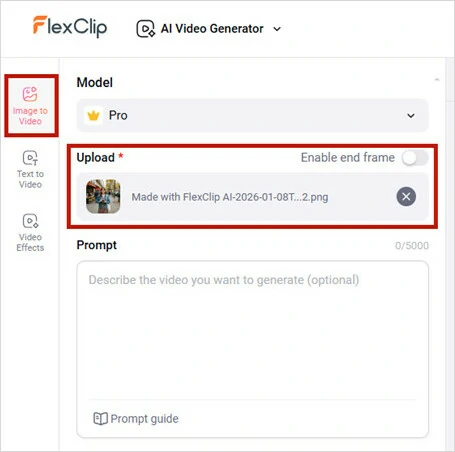
Upload Your Photo to FlexClip
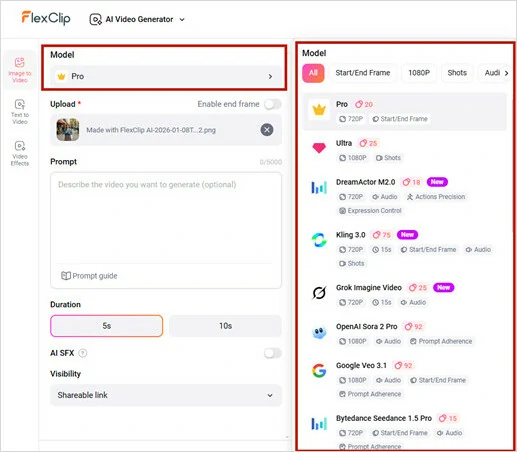
Select the Generation Model
Fast zoom out from [starting object, e.g., a cup of coffee on a table], revealing the surrounding [mid-scene, e.g., a busy city street]. The camera continues pulling back rapidly through white clouds, unveiling vast [geographical features, e.g., continents and oceans], and ends with a cinematic shot of the glowing Earth in the dark cosmos. High speed, seamless transition, epic scale, 8K resolution.
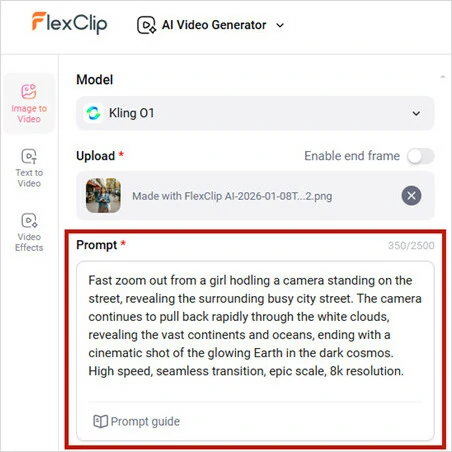
Enter Your Prompt to Create Earth Zoom Out Effect
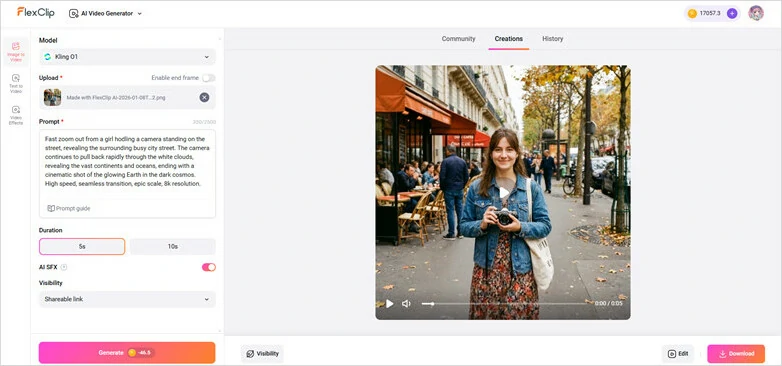
Generate and Animate Image with Earth Zoom Out Effect
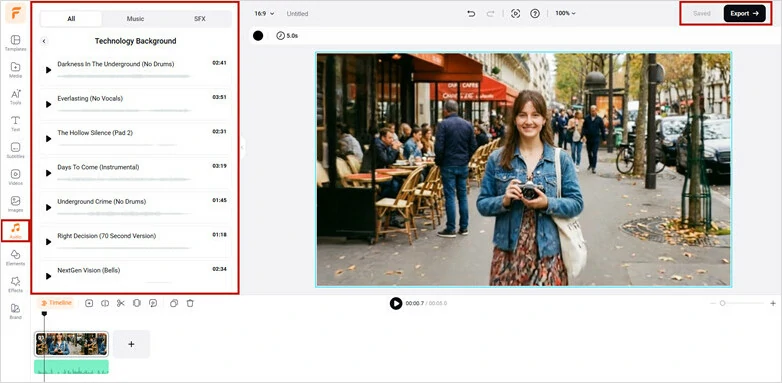
Enhance Your Earth Zoom Out Video with Background Music
Two More Ways to Create Earth Zoom Out with AI Templates
1.PixVerse
Transforming your photos into a captivating Earth Zoom AI video is effortless with PixVerse. Simply upload a clear, well-lit image with a clean background to ensure a smooth animation — from the vastness of outer space down to your subject.
The generated video is social-media ready, complete with dynamic background music. You can also customize settings such as resolution, aspect ratio, and seed to match your specific needs. However, PixVerse primarily generates an Earth Zoom-In effect. If you’re aiming for an Earth Zoom-Out visual, you’ll need to reverse the footage in post-production for the desired result.
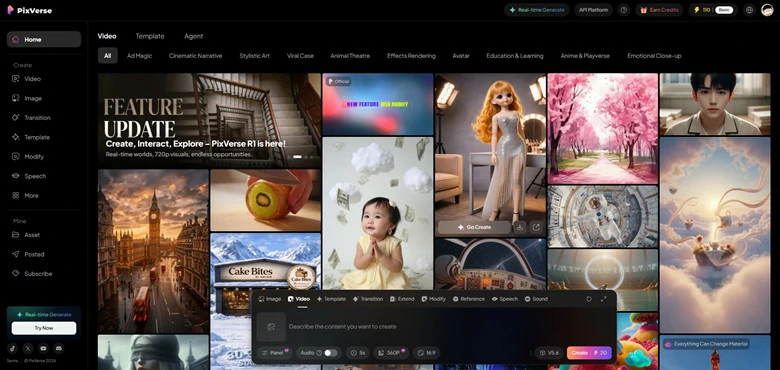
Create Earth Zoom Out Effect Using PixVerse
How to Generate Earth Zoom Out Effect Using PixVerse
2.Higgsfield
Higgsfield is an AI-powered creative platform that curates trending templates and eye-catching effects for social media content creators. Known for its cinematic-quality results, it helps turn simple ideas into visually stunning videos in minutes.
For the popular Earth Zoom-Out effect, Higgsfield offers a dedicated AI template that simulates dramatic camera movement — pulling back rapidly from your subject to reveal the city, then the continent, and finally the entire Earth from space. Just upload your image, and the AI takes care of the entire transformation automatically.
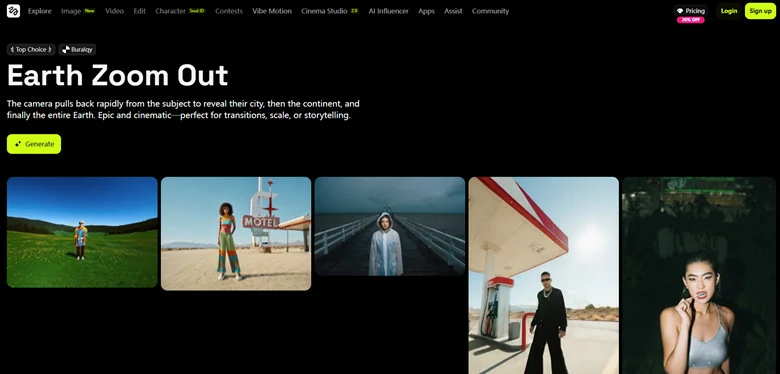
Create Earth Zoom Out Effect Using Higgsfield
How to Make Your Earth Zoom Out Video Using Higgsfield
FAQs About AI Earth Zoom Out Effect
1.Do I Need Professional Video Editing Experience to Create this?
No. All the methods introduced above are beginner-friendly, allowing anyone to create an impressive Earth zoom-out effect—no editing experience required.
2.What Types of Photos Work Best with Earth Zoom Out AI?
For the optimal results, use clear, well-lit outdoor photos. Avoid plain backgrounds or extreme close-ups to ensure the depth algorithm works effectively.
3.Can I Use the Generated Video for Commercial Ads or YouTube Monetization?
Certainly! Once you get results from FlexClip’s Earth Zoom out AI video generator, you can use them for both personal and commercial purposes with ease.
Final Words
Jump on the trend and create your own stunning Earth zoom-out AI video. Choose your favorite approach and craft a captivating clip that begins with the Earth watching you!




FlexClip AI Video Maker
Reach professional-quality videos faster with easy editing tools, templates, and smart AI.
Start Now for Free
Hot & Trending
-

Best Ways to Find Music in YouTube Videos
-

Instagram Story Video Quality Bad After Upload? Fix It!
-

How to Repost Video on TikTok & How to Remove TikTok Repost
-

Improve Video Quality Online: 3 AI Video Quality Enhancers You Can't Miss
-

4K Convert to HD 1080p without Watermark: Best 4k Video Converters
-

Best 8 Free Video Editors - No Download Required
-

Top 13 Birthday Video Makers with Music and Effects Free
-

How to Search Filters on TikTok & Use a Filter You See - TikTok Filter Guide




