Want your content to be more engaging? Try changing image style with AI. Whether it's a daily selfie or a travel photo, AI can breathe new life into your images - turning a normal picture into an oil painting, anime, or even a futuristic style in seconds.
If you'd like to make photos more aesthetic without using curve-learning software like Photoshop, keep reading to explore AI image style transfer for efficient process and creative style transforming.
Also Interested: Convert Normal Photo to Oil Painting with AI>>
The Best AI Image Style Changer You Need Only
Changing image style like a pro is easier with an AI photo editor called FlexClip. Without any editing required, you can instantly transform existing image into any style you want in seconds, whether it's anime, Ghibli, action figure, cyberpunk, picture book, etc. Moreover, cutting-edge AI technology is utilized to ensure the styled image looks ultra-realistic by recognizing your uploads and preserving the original characteristics.
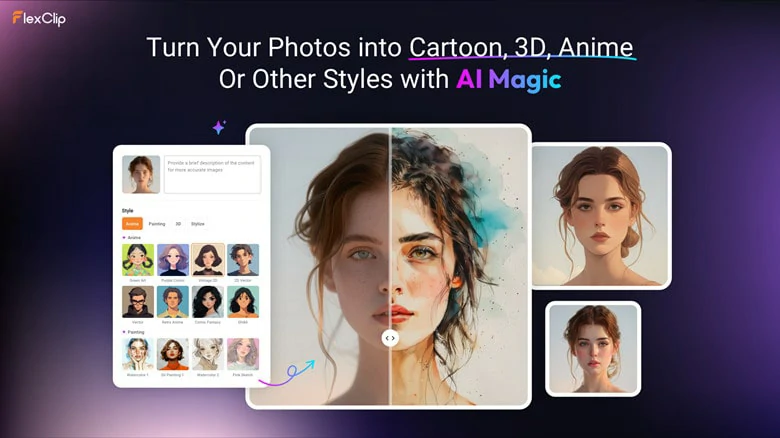
Change Image Style with AI Online - FlexClip
Whether you prefer style preset to change image style or tend to make image style transfer with prompt with full control, FlexClip's AI image transfer gets you covered with the easiest solution. Now just access it's user-friendly interface and follow our track to see how to change image style with AI using FlexClip

How to Change Image Style with AI Using FlexClip
Spice up with versatile ways to change image style with AI using FlexClip. Here we'll take you through three workaround for different needs. Let's dive in.
1. Change Image Style in One Tap with Style Preset Filter
The easiest way to change photo style is to find an existing style preset and let AI turn your image into this filter. So, here we'll show you how to convert images into 80+ styles with FlexClip's image-to-image tool. Here we go!
Step 1: Go to FlexClip and Upload Your Photo
Open FlexClip's image-to-image tool through your browser and click Upload Image to add the picture you want a style variation.
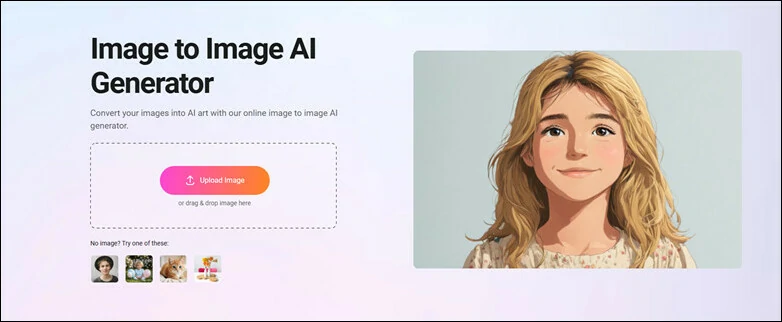
Go to FlexClip's Image to Image Tool and Upload Your Photo
Step 2: Select a Style Preset to Filter
You can see a wide range of style filters, including Ghibi, watercolor, line drawing, cartoon, action figure, claymation and other 80+ trending image styles. Just scroll down to find a style you prefer and decide how many pictures you want to generate.
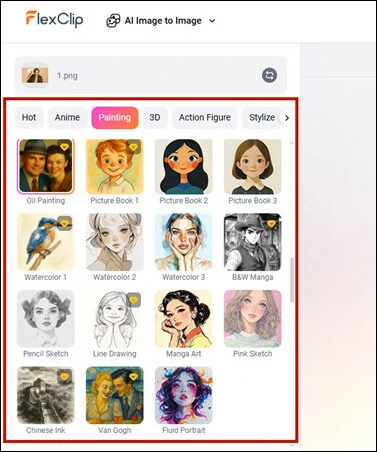
Select an Image Style Preset to Generate New Style Image
If you need more controls over the result, describe the image briefly in the Prompt. Once you're ready, tap on Generate button to start generating.
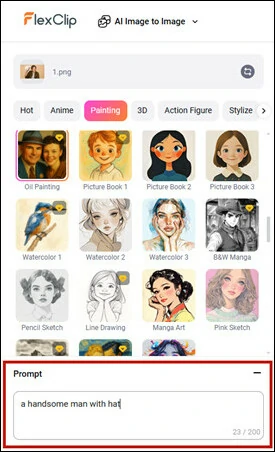
Enter Prompt to Control the Style Changed Result
Step 3: Download and Share
Download the images you're satisfied with and continue using it to create animated photo collages or slideshows. Or you can easily share it across social media to win more likes in no time!
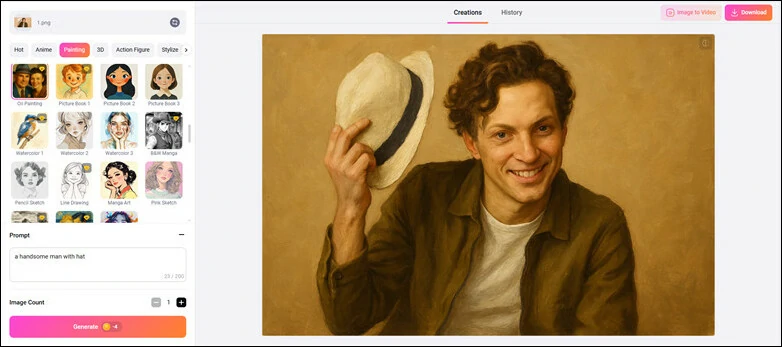
Download Satisfied New Style Image and Share
Here is a before-and-after Style Comparison Generated by Image-to-image Tool
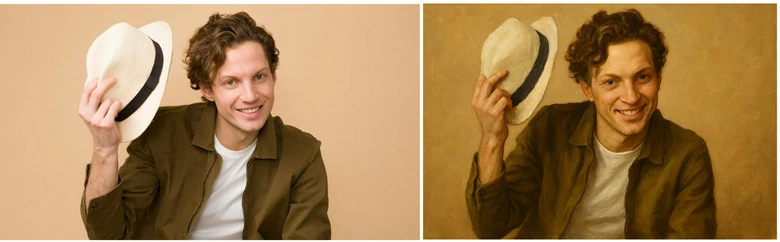
Download Satisfied New Style Image and Share
2. Transfer Image Style with a Reference Photo
If you’d like to experiment with image style transformation using different AI models or can’t find your desired style in FlexClip’s image-to-image presets, learn how to transfer image styles with a reference photo using FlexClip’s AI text-to-image generator.
Step 1: Access FlexClip's AI Text-to-image and Upload
Open FlexClip’s AI text-to-image tool and upload the image you want to restyle as a reference. The AI will generate a completely new styled image while preserving the character consistency of the original.
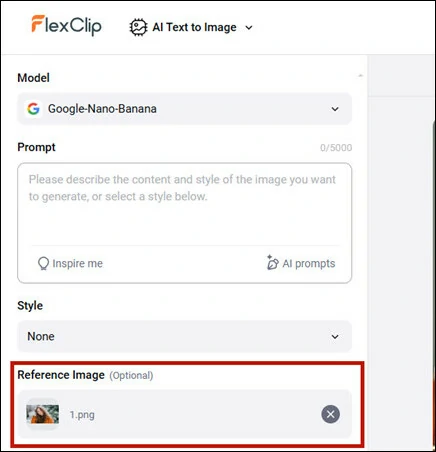
Access FlexClip's AI Text-to-image Tool and Upload Your Photo as Reference
Step 2: Select or Describe Style You Want
You can select from FlexClip’s default style options—different from the presets in the image-to-image tool, or simply describe your desired style in the Prompt panel and let AI restyle it for you.
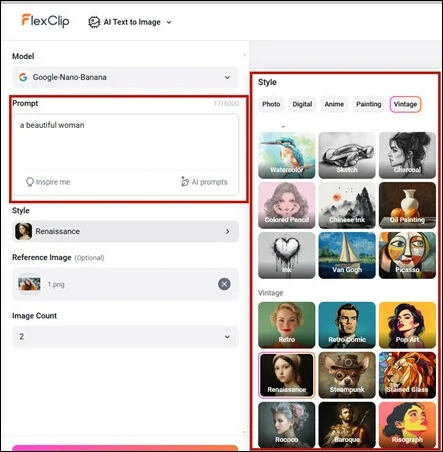
Select or Describe Style You Want in FlexClip
Step 3: Restyle Picture and Download
Select how many restyled images you want and hit on Generate button to begin the style transformation process. Within seconds, you'll see the new style images. Download your favorite one to share or continue editing with FlexClip's extensive edits features.
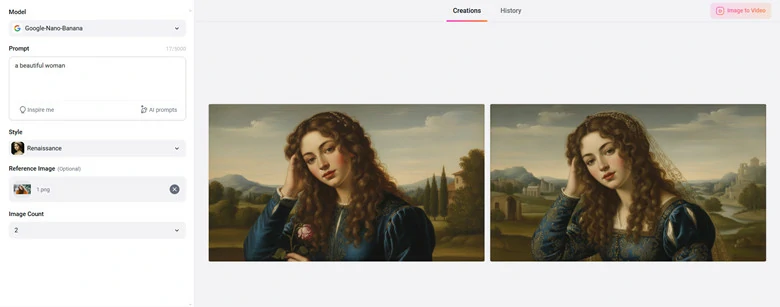
Restyle Image in FlexClip and Download Your Favorite One in Seconds
Here is a before-and-after Style Comparison Generated by AI Text-to-Image Tool
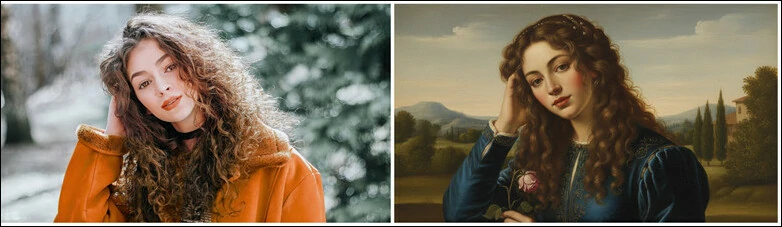
Download Satisfied New Style Image and Share
3. Restyle Part of Your Image with AI Prompt
Want to make image style transfer more fun? With FlexClip’s AI photo editor, you can restyle just part of your image, like your adorable pet, while keeping the rest untouched. Enjoy creative freedom and explore endless style possibilities today!
Step 1: Add Photo to FlexClip's AI Photo Editor
Begin by access FlexClip's AI photo editor and add the image you want to restyle.
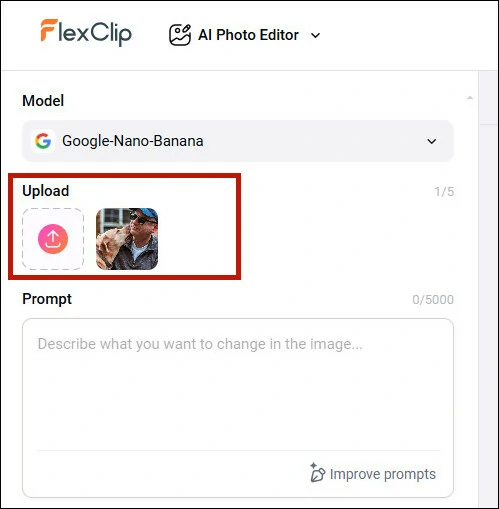
Add Photo to FlexClip's AI Photo Editor for Style Transfer
Step 2: Describe the Part You Want to Transform Style
Describe the specific part you want to change a new style. For example, you can enter like change the cat into cartoon style while keep the rest remained. The more specific your description is, the accurate result you'll get.
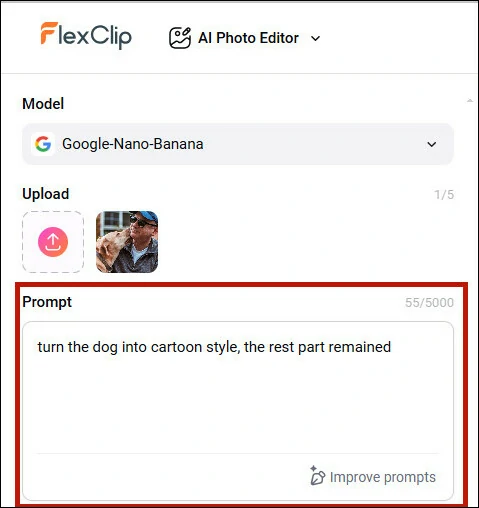
Describe the Part You Want to Transform Style
Step 3: Transform the New Style and Download
Click Generate and let AI restyle the selected part for you. In just seconds, your new styled image will be ready to download and share.
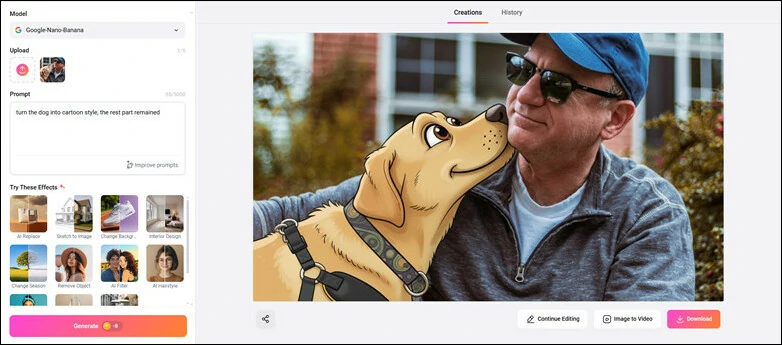
Transform the New Style and Download Your Favorite Image
Here is a before-and-after Style Comparison Generated by AI Photo Editor
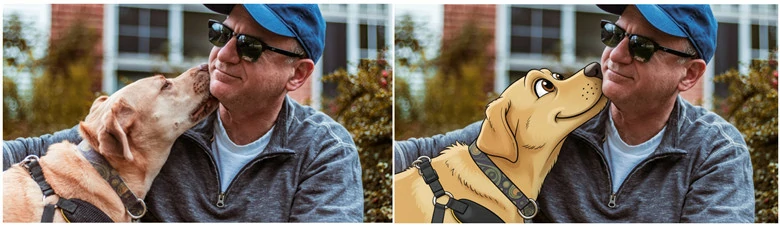
Download Satisfied New Style Image and Share
What Makes FlexClip the Best Image Style Change to Try
Trained on millions of real images, FlexClip’s AI instantly analyzes your uploads and transforms them into the desired style, while preserving all the unique characteristics of the original photo.
FlexClip makes restyling images with AI easy and fun. With a variety of trending AI models and multiple customization options, you can effortlessly achieve the style you want.
Changing image styles is effortless with FlexClip’s powerful compatibility. Whether you’re on the go or at home, you can easily access FlexClip and transform your photos into stunning artistic looks.
FlexClip is not just for image style changes. Additionally, it's an AI playground to experiment various AI-powered tool. Enhance photo with photo restoration tool, image upscaler, watermark & object remover; Have fun with object replacement, sky change, face swap, hairstyle& clothes change; Or bring still image to animation video with 3D animation tool, image-to-video converter. In a nutshell, FlexClip is a magic platform to bring all your imagination into reality!
More AI Tools from FlexClip to Explore Endless Fun
Two More AI Image Style Changer for You to Explore:
In case you don't like the way offered by FlexClip to transform image style, here are two more AI image transfers for you to check.
#1 AI Image Style Changer - Stable Diffusion
When it comes to stylizing images, Stable Diffusion is a must-have on any recommendation list. As a highly popular generative AI model, it enables image-to-image transformations guided by text prompts.
One of the key advantages of using Stable Diffusion is that a wide range of styles is already embedded within the model. You can easily change the style of a photo with simple text prompts. Moreover, if the default styles don’t meet your expectations, you have the flexibility to fine-tune the model or even create your own custom model to achieve the desired results.
How to Change Style of An Image with AI Using Stable Diffusion
#2 AI Image Style Changer - Prisma
If you want to swap image style on mobile, Prisma is a nice option to try. It's a photo manipulation app that uses machine learning and artificial intelligence to transform your photos with artistic styles. Featuring over 500 stunning filters, Prisma makes it easy to give your images a fresh look by applying a filter.
Meanwhile, this app also includes additional features like changing photo backgrounds and adjusting exposure and contrast to better suit your needs. Once you're done editing, Prisma lets you download your stylized image in HD quality.
How to Change Image Style with AI Using Prisma
FAQs About Change Image Style with AI
1. What does “change image style with AI” mean?
It means using AI technology to transfer the look of your existing photo into a new artistic style, such as anime, Ghibli, cyberpunk, oil painting, cartoon, or photorealistic, without manual editing process.
2. Can I convert my photo into retro Indian style picture?
Of course! With FlexClip's AI photo editor, you can effortlessly turn your selfie into retro Indian-style image. Just upload your photo and enter prompt, then AI will make the magic happen in seconds.
Prompt example you can use: convert, 4k hd realistic, a stunning portrait of a young indian woman with long, dark, wavy hair cascading over her shoulders. she is wearing a translucent, elegant red saree draped over one shoulder, revealing a fitted blouse underneath. white flowers are tucked behind her right ear. she is looking slightly to her right, with a soft, serene expression. i want same face as i uploaded no alternation 100 percent same. the background is a plain, warm-toned wall, illuminated by a warm light source from the right, creating a distinct, soft-edged shadow of her profile and hair on the wall behind her. the overall mood is retro and artistic.
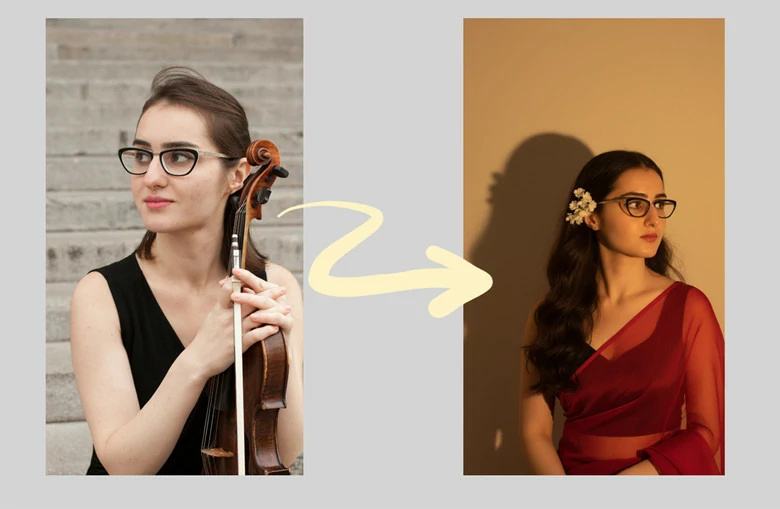
Convert Photo into Retro Indian-style Image
3. Do I need any editing skills to use AI image transfer?
No. FlexClip's AI tools are beginner-friendly. You simply upload a photo, choose or describe a style, and the AI instantly transforms it for you.
4. Will the AI preserve character consistency in my photo?
Yes. Trained by millions of real images, FlexClip's AI style transfer tools can completely keep your original features, shapes, and details intact while applying the new style, ensuring the image is still recognizable.
The Bottom Line
Well, that’s the end of this blog. To summarize, AI image style changers offer a fun and easy way to transform your photos into artistic masterpieces. Here we’ve taken you through three AI image transfers that enables you to stylize images on computer, mobile and online. Ready to begin your photo-stylizing adventure? Choose your preferred style and start creating today!




FlexClip AI Video Maker
Reach professional-quality videos faster with easy editing tools, templates, and smart AI.
Start Now for Free
Hot & Trending
-

Best Ways to Find Music in YouTube Videos
-

Instagram Story Video Quality Bad After Upload? Fix It!
-

How to Repost Video on TikTok & How to Remove TikTok Repost
-

Improve Video Quality Online: 3 AI Video Quality Enhancers You Can't Miss
-

4K Convert to HD 1080p without Watermark: Best 4k Video Converters
-

Best 8 Free Video Editors - No Download Required
-

Top 13 Birthday Video Makers with Music and Effects Free
-

How to Search Filters on TikTok & Use a Filter You See - TikTok Filter Guide