


Changing colors of an image is a great way to achieve new aesthetics. For instance, you'll be able to explore the perfect hair color before dye or virtually try on different colors to find out the best clothing hue.
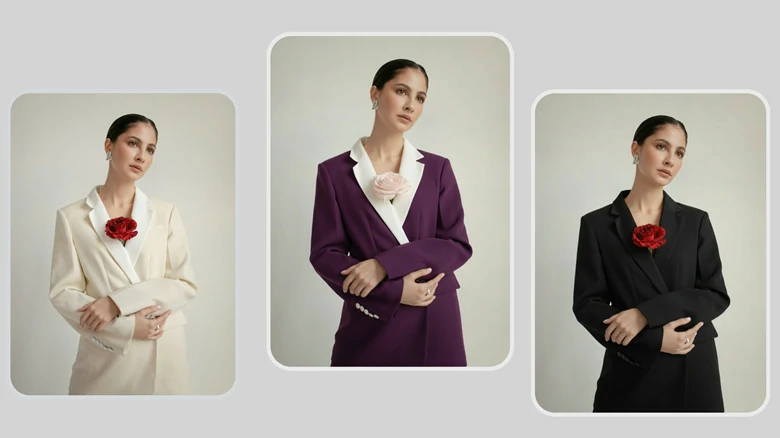
Examples of Changing Colors of Images
But how to change image color easily? With an AI photo editor called FlexClip, you can easily change color of any objects through simple text prompts. Read on to discover how to change color of image online using this image color changer.

How to Change Color of Image with AI Prompt
Want to refresh a dull background or experiment with different image colors for fun? FlexClip makes it easier than ever to recolor an image. Here's how to do it:
Step 1: Access FlexClip's AI Photo Editor and Upload an Image
Directly open FlexClip's AI photo editor through your browser. Then upload the picture you'd like to recolor.
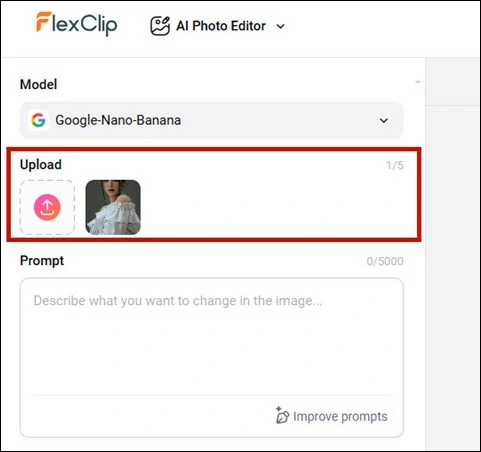
Open FlexClip AI Photo Editor and Upload Your Image
Step 2:Select a Model to Change Image Color
Each model has its strengths. If you want to experiment with color changes, FlexClip offers a variety of AI photo models to suit your needs.
By default, FlexClip uses the Google Nano Banana model, known for its speed and character consistency. You can also switch to other advanced models like Seededit, ChatGPT, Qwen, and Flux, depending on your needs. Here we keep the default option.
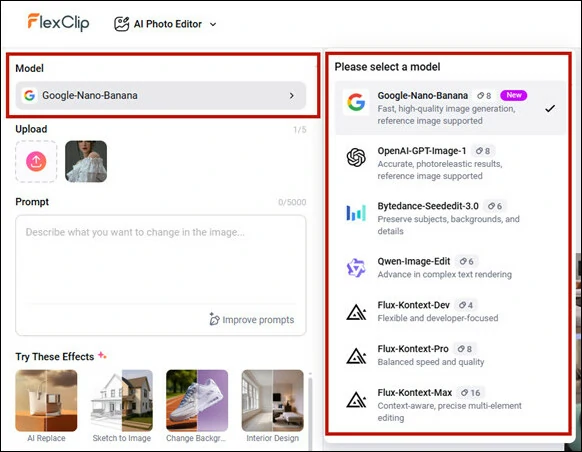
Select an AI Photo Model to Change Image Color
Step 3:Enter the AI Prompt for Color Change
Now we come to the fun part! Type a clear and specific prompt to describe the color changes you want. For example, you can enter like Change the Clothes Color to Purple.
The more precise you prompt, the more accurate recolored image you'll get, helping you truly bring what you've imagined into reality.
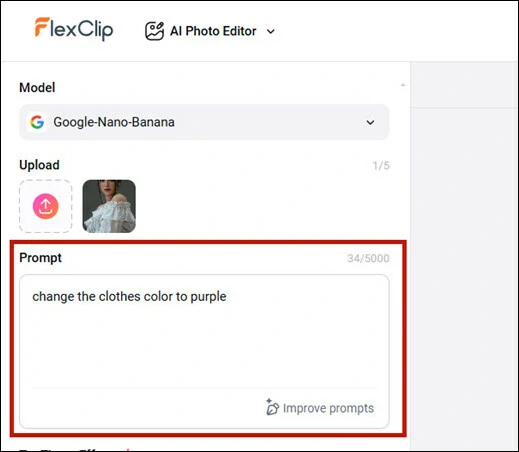
Select an AI Photo Model to Change Image Color
Step 4:Recolor Your Image and Download
Hit on Generate button and AI will automatically apply this color changes to your image.
Within seconds, you can download the new image to your PC, directly share it across social media, animate the recolored image for a dynamic video or continue editing for more creative touches.
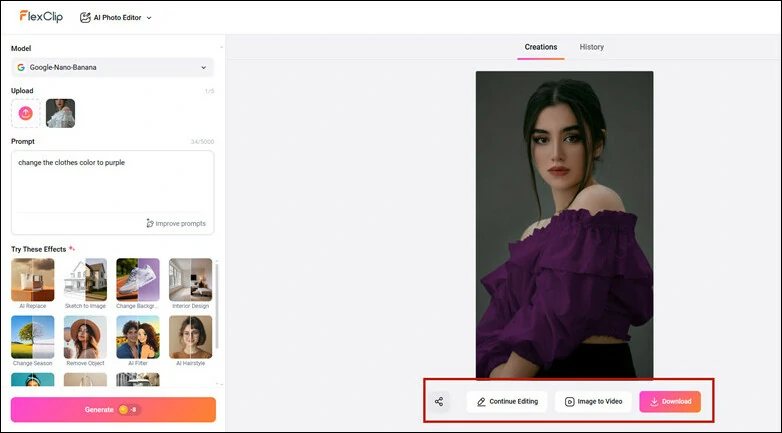
Recolor Your Image and Download the New Picture
More Practical Applications to Change Color of an Image
Color changes of an image are not limited to clothing. Explore more practical applications created by FlexClip as below:
1)Change Color of an Object in Image
Sometimes, you might want to transform a specific object ito another color for a strong visual shock in your image. You can do this with FlexClip's AI photo editor below:
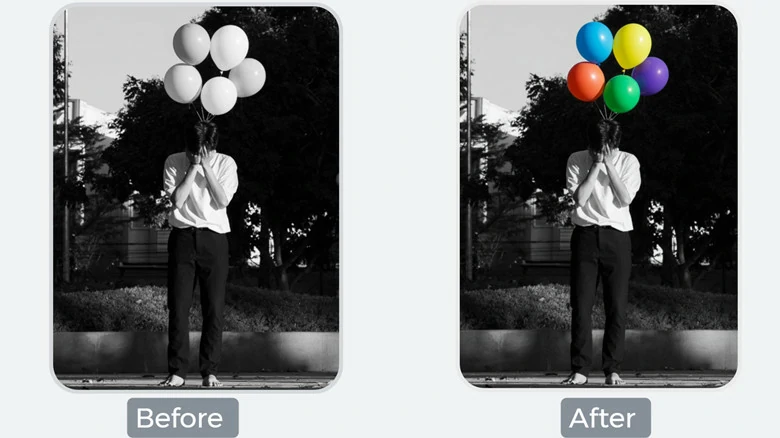
Change Color of an Object in Image Using FlexClip
2)Change Hair Color of an Image
Thinking about a new hair color? Virtually try on different shades to find the perfect one before heading to the salon. Just upload a photo and change hairstyle color with FlexClip right now!
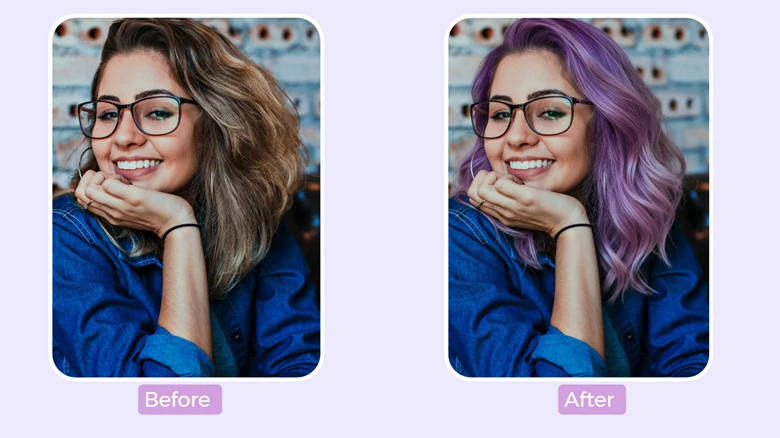
Change Hair Color of an Image Using FlexClip
3)Change Skin Color in Photo
Want to add tanning to your Bikini photo? Just use FlexClip's AI photo editor and change skin color in photo with text prompt.
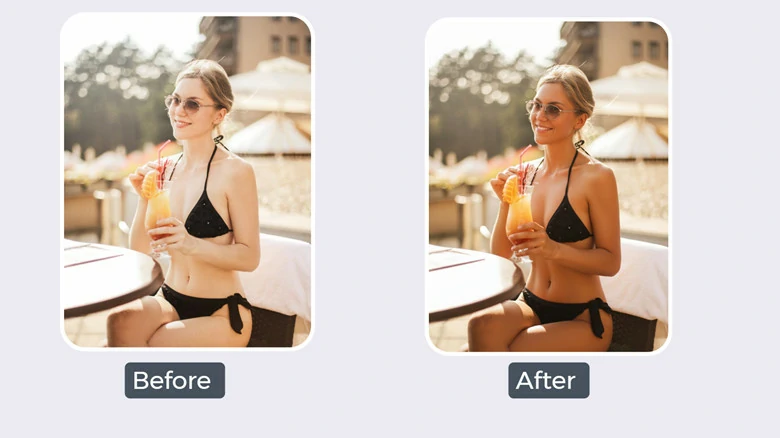
Change Skin Color in Photo Using FlexClip
4)Change Image Background Color
Feel the background too dull? Freely change image background to any color you want using FlexClip. You can change background hue or even completely swap the background for a new aesthetic.
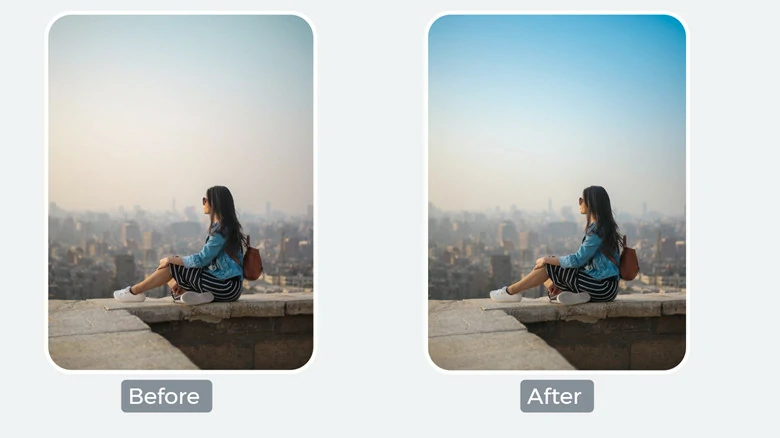
Change Image Background Color Using FlexClip
5)Change Image Color to a New Overlay
Want to change the whole hue of your image? You can do this with FlexClip by either adjusting colors, saturation, contrast, and lighting in your images or making edits with a textual prompt.
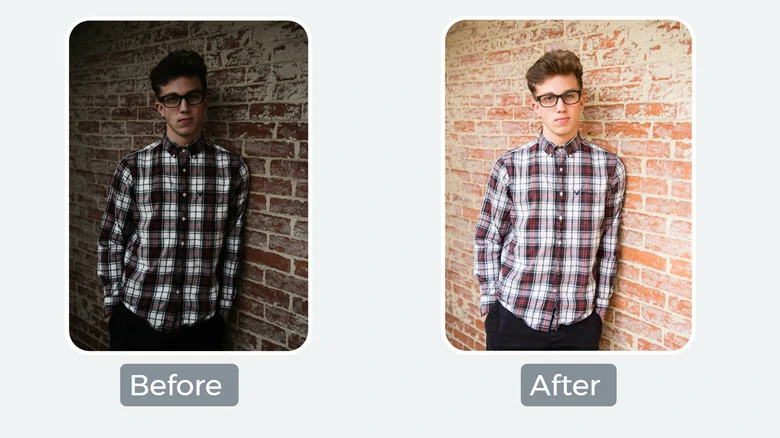
Change Image Color to a New Overlay Using FlexClip
What Makes FlexClip an Excellent Image Color Changer
Trained by millions of real pictures, FlexClip's AI photo editor can automatically detect and recolor objects, skin, clothes, hair, or backgrounds of pictures without the need for tedious manual editing. It also preserves image clarity and details—such as natural shadows, highlights, and textures—so the only thing that changes is the color.
FlexClip features a simple interface with one-click color replacement to speed up your workflow. It provides both basic tools (hue, saturation, brightness) and advanced AI-powered controls for maximum flexibility. Whether you want to adjust the overall hue of an image or precisely change the color of a specific object, FlexClip gives you a streamlined, hassle-free solution.
FlexClip is not just an image color changer. Instead, it's an all-in-one photo editor to retouch your resources. For example, it can help you change clothes, hairstyle, backgrounds, objects, facial expression, poses, etc. What's more, it integrates an AI tool to animate still images into dynamic videos. Just explore endless fun in FlexClip now!
Two More Photo Color Changers to Fit Your Specific Needs
In case you don't like the way to change image color with FlexClip, here we'll take you through another image color changers to recolor pictures online.
#1 Hair Color Changer from Fotor
Not sure the color you’re going to dye is right for you? Or want a visual makeover without wearing a wig? Try Fotor’s hair color changer to experiment with different colors in seconds. Using advanced AI technology, Fotor automatically detects your hair in any uploaded photo, allowing you to test a wide range of colors with ease. You can also adjust the intensity slider to fine-tune the depth of your chosen color and explore even more color options.
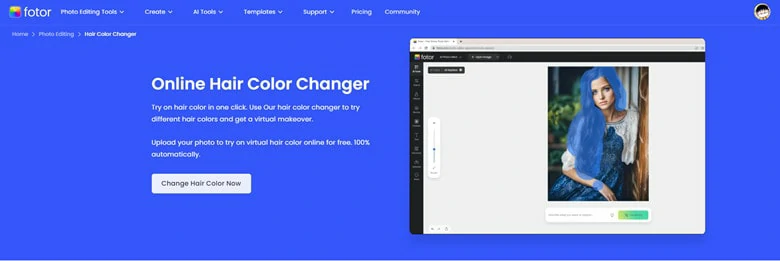
Hair Color Changer from Fotor
#2 Passport Background Color Changer from Cutout.Pro
Need to change the background color of your passport photos? Cutout.Pro is the ideal tool for editing passport photos online. Whether you need to resize a picture to the standard passport size, change the background to white, or adjust the outfit for a more professional look, Cutout.Pro has you covered. Along with a white background, you can choose from classic colors like red, blue, and gray, or explore stylish background options for a more creative touch.
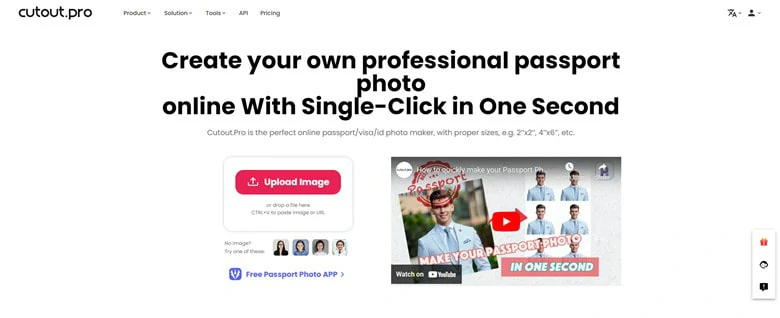
Passport Background Color Changer from Cutout.Pro
FAQs about Transforming Photo Color
1.Can I recolor specific objects in the image with a prompt?
With FlexClip AI photo editor, you can select a specific area and apply new colors to it. Just clearly describe it in your prompt and FlexClip's will accurately apply targeted colors to the specific section.
2.Can AI prompts handle multiple color changes at once?
Yes. You can request several changes in one prompt. For example, you can enter like make the dress yellow and the hair blond. However, if the picture design is a bit complicated, one prompt for one change is recommended for high-quality result.
3.Can I change anything of the image into a new color?
Yes. Using FlexClip's AI image color changer, you can transform anything of your image into a new color, including clothing, background, objects, etc.
4.Will AI distort my picture during recolored process?
It depends on the tools you use. As for FlexClip, it utilizes advanced AI model to precisely recolor the specific area while keeping the rest remained.
The Bottom Line
That's all for how to change color of image online with AI prompt. Using FlexClip, you can easily recolor any objects of your image with a simple prompt. Meanwhile, we also introduce another two image color changers to help you change hair color of your image or customize picture's background with ease. Which method you prefer most? Now it's your turn to have a try!




FlexClip AI Video Maker
Reach professional-quality videos faster with easy editing tools, templates, and smart AI.
Start Now for Free
Hot & Trending
-

Best Ways to Find Music in YouTube Videos
-

Instagram Story Video Quality Bad After Upload? Fix It!
-

How to Repost Video on TikTok & How to Remove TikTok Repost
-

Improve Video Quality Online: 3 AI Video Quality Enhancers You Can't Miss
-

4K Convert to HD 1080p without Watermark: Best 4k Video Converters
-

Best 8 Free Video Editors - No Download Required
-

Top 13 Birthday Video Makers with Music and Effects Free
-

How to Search Filters on TikTok & Use a Filter You See - TikTok Filter Guide




