


Yes, a simple iron should do the trick, but that ship has sailed. Time to get creative with editing instead! There are plenty of techniques to restore fabrics flawlessly while keeping other parts untouched, but which one to go?
In the following parts, we will be diving into the best way to remove wrinkles from clothes in photos. No professional-level editing skills, no downloading is needed. Let’s get started!

FlexClip Removes Clothes Wrinkles - Display Image
How to Remove Wrinkles from Clothes in a Photo Online
If you want to save hours of fiddling in complicated photo editing software, FlexClip’s Photo Editor is hand-down the top choice. Backed up with powerful AI, it can detect the wrinkle parts and fix them in one go, with just one prompt. Click the Remove Wrinkles from Clothes in Photo button, and explore the magic.

Step 1. Upload Your Image
You are now at FlexClip’s AI Photo Editor page. Drag and drop your image to the upload section. FlexClip’s AI Photo Editor is a renowned, 100% green tool. Always feel safe to use it.
This is the example image we will be using. You can see clearly that the dress is full of noticeable wrinkles.

FlexClip Removes Clothes Wrinkles - Display Image
Step 2. Remove Clothes Wrinkles
Enter a prompt describing how you want to edit the image. In this case, we should input: Remove all clothes wrinkles for a natural result, keep the cloth color and texture. Hit Generate.
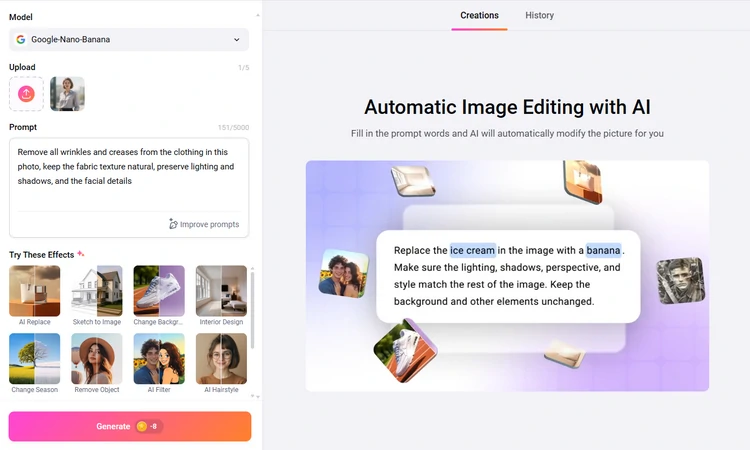
Remove Clothes Wrinkles in Photo Using FlexClip
Step 3. Export & Share
You are able to preview the wrinkle-free photo with several seconds. If you are satisfied with it, save it to a local folder or post to social media.
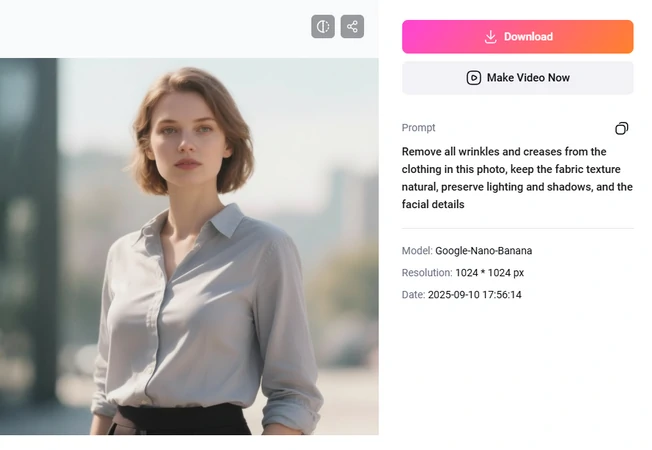
Remove Clothes Wrinkles in Photo Using FlexClip
What Makes FlexClip a Great Clothes Wrinkle Remover
Call us biased, because we are only recommending FlexClip. However, we are proud to say that FlexClip excels other clothes wrinkle removers. Here are some persuasive reasons.
While most clothes wrinkle removers are still asking you to do manual selection, as you have known, FlexClip adopts AI to automatically get the selection and removal tasks done. All you need to do is uploading the image, entering a prompt, and hitting the generation button. That significantly saves you much time and effort.
Even if you are using a professional photo editing tool like Adobe PhotoShop, it is a big challenge to preserve clothes texture and create natural lighting. That’s no longer the case if you are using FlexClip.
FlexClip’s AI is trained on real images. It understands what natural, wrinkle-free clothes should look like under different lighting conditions. You can always generate cool results.
FlexClip incorporates video editing tools so that you can create amazing videos from beautiful photos. Practical editing features like transition, cropping, masking, AI tools like AI auto cuts, AI voiceover, plus 7000+ templates are shaping your way of video creation.


More Ways to Get Creative with FlexClip
Edit Clothes Colors
Color regrets happen all the time. FlexClip’s AI changes your clothes color while preserving clothes’ style and texture in just one click. Again, this works on a prompt. You have to be specific on color codes, instead of offering a general color like pink, blue.

FlexClip Edit Clothes Colors
Try on New Clothes
If you are not satisfied with the clothes you are wearing in the photo, why not change to another one? FlexClip helps you virtually put on clothes like in the real world. It can detect your body shape, seamlessly put on the clothes photo to you body.
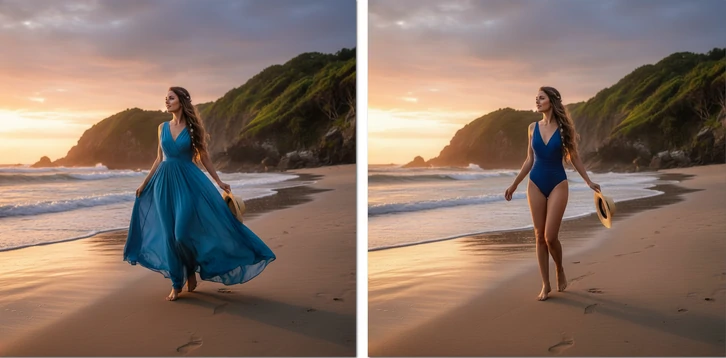
FlexClip Change Clothes
Animate Your New Photo
Why stick to a still image while you can radiate charm with a video? FlexClip’s image to video converts images to animated video instantly, using advanced models like Kling, Hailuo AI, Minimax, etc. Pick up one model you love and start generating.
FlexClip Converting Image to Video
FAQs About Removing Wrinkles from Clothes in Photo
1. Can I remove wrinkles from clothes in old photos?
Yes, FlexClip can successfully detect clothes wrinkles in old photos and remove them. To achieve a better result, it is suggested to restore the old photos first.
2. Do wrinkle-removing tools also work on backgrounds or just clothes?
FlexClip targets more than just clothing. You can use exactly the same techniques to clean up backgrounds and any other elements in the photo.
3. How much does it take to remove wrinkles from clothes in photo?
FlexClip adopts a credit-based pricing policy so that you don’t have to deal with a subscription. Each clothes wrinkle removal costs only 5 credits, which is about $0.13.




FlexClip AI Video Maker
Reach professional-quality videos faster with easy editing tools, templates, and smart AI.
Start Now for Free
Hot & Trending
-

Best Ways to Find Music in YouTube Videos
-

Instagram Story Video Quality Bad After Upload? Fix It!
-

How to Repost Video on TikTok & How to Remove TikTok Repost
-

Improve Video Quality Online: 3 AI Video Quality Enhancers You Can't Miss
-

4K Convert to HD 1080p without Watermark: Best 4k Video Converters
-

Best 8 Free Video Editors - No Download Required
-

Top 13 Birthday Video Makers with Music and Effects Free
-

How to Search Filters on TikTok & Use a Filter You See - TikTok Filter Guide


