Ever wondered how to blur any moving objects in a video? Instead of just covering or blurring any static elements, there are many cases that you want to blur a moving object in a video, such as blurring license plates on moving vehicles to prevent the identification of people or locations or hide any moving faces of individuals who want to protect their privacy while participating in a video. Well, you’ve come to the right place!
In this post, we’ll introduce different tools for this purpose and explain how to blur moving objects in a video on different devices.
Contents:
Bonus: Free Customizable Video Templates You Might Love



Create Video Faster with FlexClip’s Pre-Made Templates →
Start from Scratch Easily with FlexClip's Online Video Maker →
Also Read: How to Stick Text on Moving Objects: Make Text Follow an Object >
Part 1 How to Blur out Any Moving Objects in Video Online
FlexClip can always be your go-to tool for easy and effective video editing. With various blurring effects, FlexClip helps you effortlessly blur any objects in your videos. What’s more, its powerful motion tracking feature allows you to quickly and easily make the blur effect track any moving objects so they will stay blurry regardless of how much they move in the video.
Let's check the steps below and learn how to blur moving objects in a video online with FlexClip.


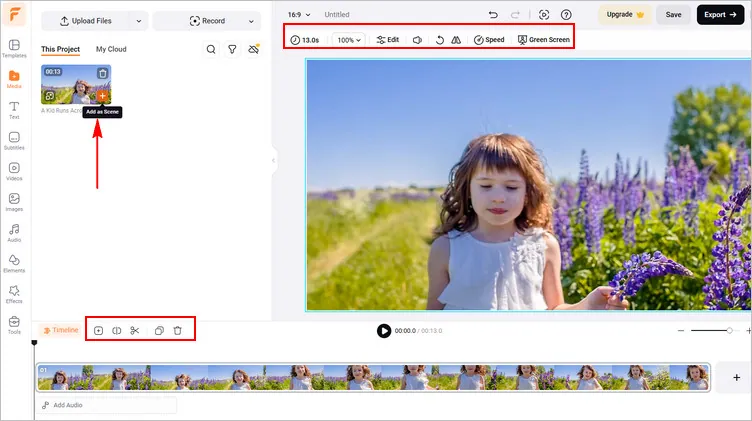
Blur out Any Moving Objects in Video Online with FlexClip - Upload Video
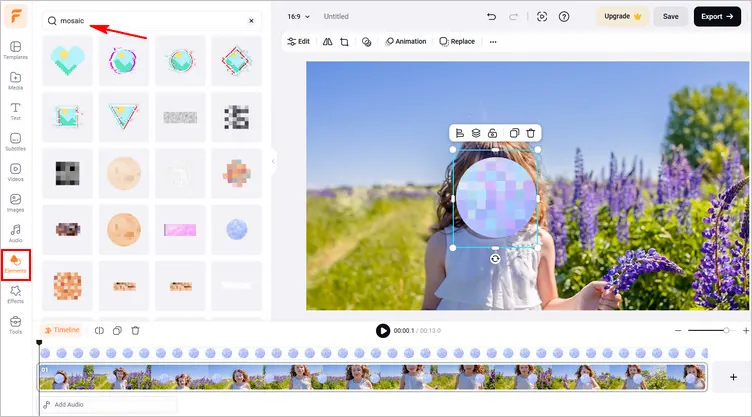
Blur out Any Moving Objects in Video Online with FlexClip - Blur Elements
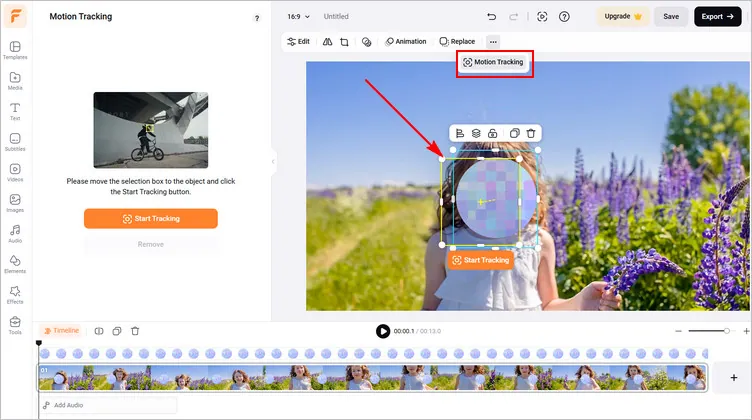
Blur out Any Moving Objects in Video Online with FlexClip - Motion Track
Part 2 How to Blur Moving Objects in Video Using Software on Desktop
Adobe Premiere Pro's versatility and robust features make it a go-to choice for professional video edits. When it comes to blurring video in Adobe Premiere Pro, whether it's blurring faces, license plates, or other specific objects, there are various methods available. In addition, its motion track feature is great for adding blur effects to a moving object in a video.
Blur Moving Objects in Video Using Premiere Pro
Part 3 How to Blur Moving Objects in Video on iPhone and Android
CyberLink’s PowerDirector is an excellent choice for iOS and Android user who is seeking a blur video app to blur moving object s in a video. With its advanced AI-based auto mosaic technology, PowerDirector offers an auto blur mode that effortlessly blur faces or bodies in your video in videos .
Follow these easy steps to blur moving faces/objects in a video with PowerDirector App on your iPhone or Android device:
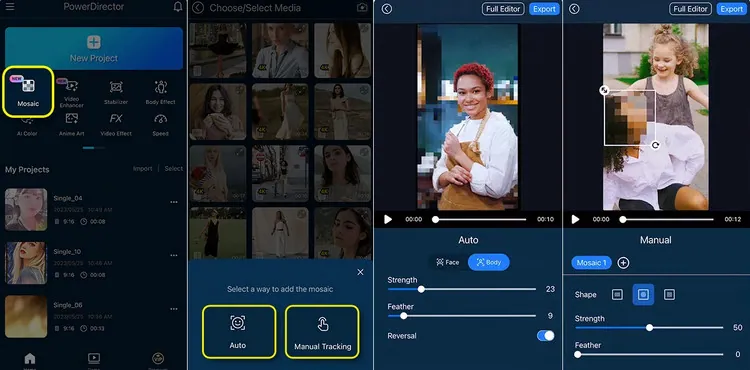
Blur out Any Moving Objects in Video Using PowerDirector App
Final Words
Well, that’ll all for our tutorial on how to blur moving objects in a video on different devices. Hopefully, these tips were useful and will help you take your video editing skills to the next level.




FlexClip AI Video Maker
Reach professional-quality videos faster with easy editing tools, templates, and smart AI.
Start Now for Free
Hot & Trending
-

Best Ways to Find Music in YouTube Videos
-

Instagram Story Video Quality Bad After Upload? Fix It!
-

How to Repost Video on TikTok & How to Remove TikTok Repost
-

Improve Video Quality Online: 3 AI Video Quality Enhancers You Can't Miss
-

4K Convert to HD 1080p without Watermark: Best 4k Video Converters
-

Best 8 Free Video Editors - No Download Required
-

Top 13 Birthday Video Makers with Music and Effects Free
-

How to Search Filters on TikTok & Use a Filter You See - TikTok Filter Guide