


TikTok has always been the birthplace of viral AI video trends. Recently, the AI Toy Touch filter has taken the platform by storm, allowing users to turn their photos into stunning AI-generated videos that feature natural interactions with adorable, doll-like versions of themselves.
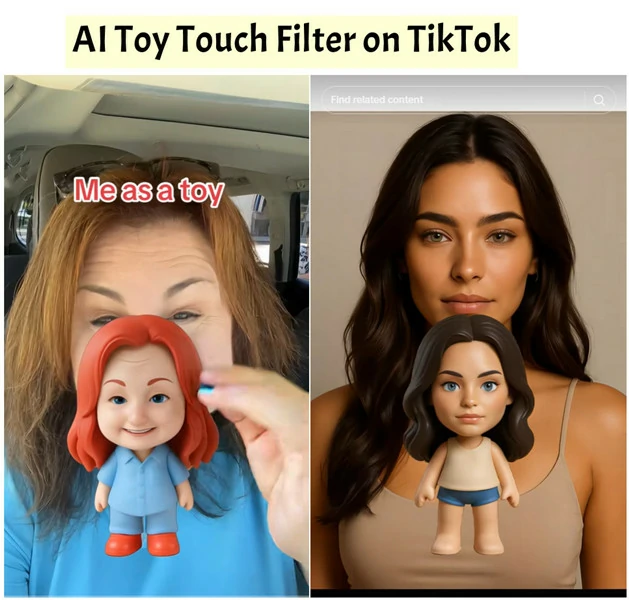
AI Toy Touch Filter Trend on TikTok
Want to join the viral trend? In this blog, we’ll show you exactly how to get the AI Toy Touch effect on TikTok and introduce a dedicated tool that lets you create your own doll version with even more flexibility.
How to Get AI Toy Touch Filter on TikTok
Excited to try this trending toy touch effect on TikTok? Follow this straightforward step-by-step guide to turn yourself into a cute doll.
Step 1: Find AI Toy Touch Filter on TikTok
Let’s begin by finding TikTok AI toy touch filter. The easiest way to get this effect is searching it directly.
Step 2: Apply the Toy Touch Filter
You’ll now be taken to a new interface with a red “Use Template in CapCut” button. Tap it, and you’ll be able to apply this adorable effect right away.

Tap Use Template in CapCut for Applying AI Toy Touch Filter
Step 3: Make Your AI Toy Touch Video
Now you’re all set! Choose a photo from your album, tap Next, and let the AI do the magic — it will automatically analyze your image and transform it into a smooth AI Toy Touch video, complete with natural, lifelike interactions between you and your doll version.
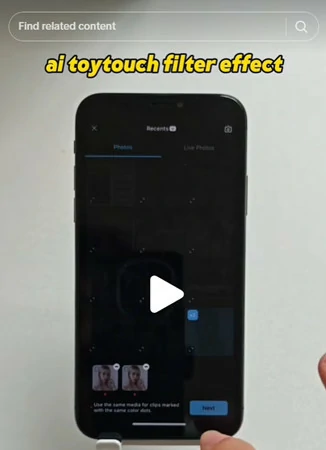
Make Your AI Toy Touch Filter Video on TikTok
AI Toy Touch Filter Outside TikTok: See Your Doll-like Version with More Controls
Applying the AI Toy Touch effect on TikTok is fun, but it does come with limitations. For instance, the toy version and interaction movements are generated randomly. If you want more control or wish to create the effect outside TikTok, try an alternative tool like FlexClip. It offers greater customization, flexibility, and creative fun.

Here is how to make it.
Step 1: Access FlexClip and Turn Your Photo into Doll Version
Go to FlexClip’s AI Photo Editor and upload the photo you want to turn into a miniature figure. Then, add a simple AI prompt to guide the transformation.
Prompt used in this picture:a 3D toy figurine version of a person, cute chibi style, big head small body, smooth plastic texture, bright soft lighting, Pixar-style character design, detailed face similar to the real person, realistic shadow and reflection, professional product photo.
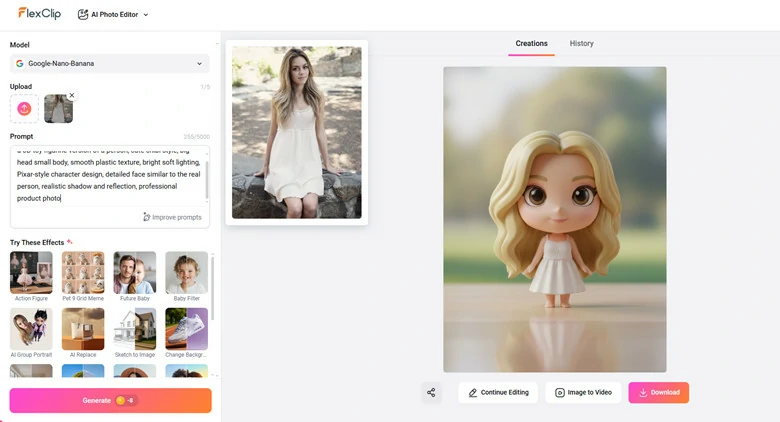
Turn Your Photo into Toy-like Version with FlexClip
Pro Tip: For the best results, remove any unwanted objects and keep the background simple so the focus stays on your toy doll.
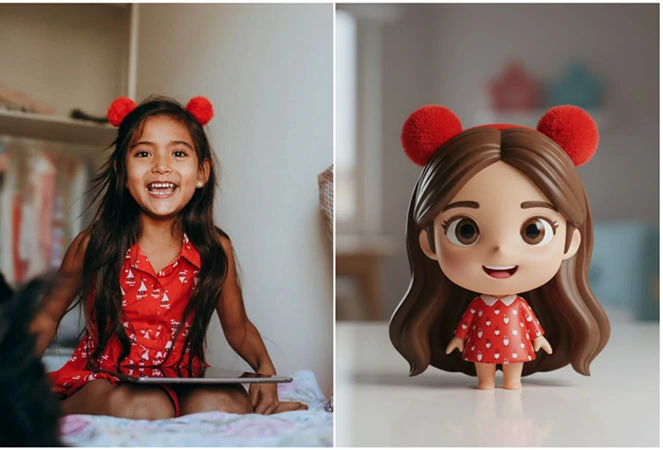
Remove Unnecessary Objects and Make Background Simple for Better Toy Touch Effect
Step 2: Blend the Doll Version and Original Photo Together
Once you get the doll-like picture, let’s combine it with the original photo to form a single frame. Simply upload two photos to FlexClip’s AI Photo Editor again and let AI place the toy-like figure to the original picture.
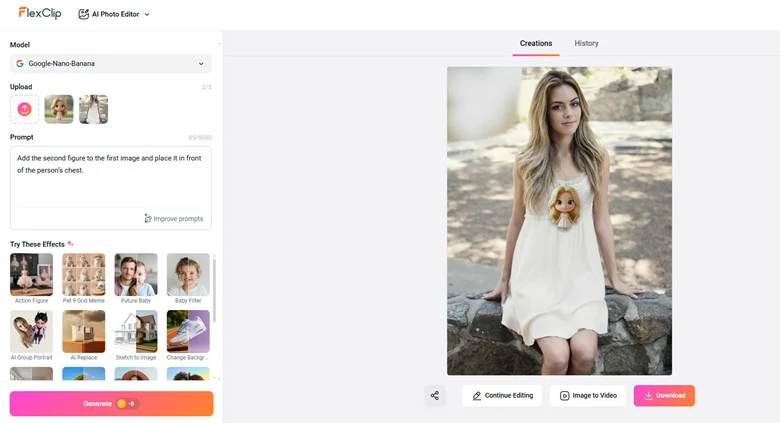
Combine the Doll Version and Original Photo Together
Step 3: Animate Toy Picture for Fun
Now you’ve got your toy image! While the static picture looks great, turning it into a short video will make it even more engaging. Open FlexClip’s Image-to-Video tool, upload your picture, and enter a prompt describing the scene you want — for example, a girl gently patting the toy.
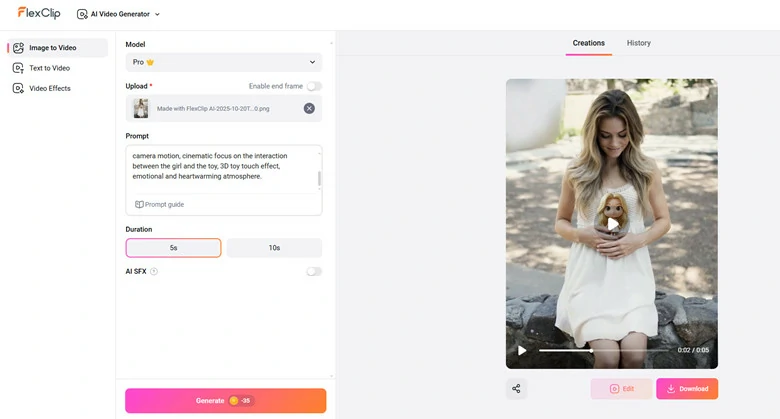
Animate the Toy Picture for Fun
Step 4: Download or Keep Edits
You’ll get your video in just minutes, complete with smooth, natural interactions with your adorable toy. It’s ready to share or download right away! If you’d like to customize it further, FlexClip’s built-in editor lets you easily add background music, trending social media stickers, or other creative touches to make your content truly shine.

Customize and Download Your AI Toy Touch Video Created by FlexClip
Besides the trending Toy Touch filter, FlexClip can also turn your selfie into various fun styles — like an action figure, 3D emoji, Barbie box, muppet, crochet doll, and more. Simply head to FlexClip and transform yourself into a whole new world of creativity.
Turn Selfie into Various Fun Styles in FlexClip
FAQs About AI Toy Touch Filter
1.What is AI toy touch filter?
It’s a viral AI effect on TikTok that transform your photo into a cute, doll-like version, often with touch interactions like patting, holding the toy to make it look like natural miniature figure.
2.Can I use the AI Toy Touch effect outside TikTok?
Yes. Platforms like FlexClip, Media.io, and CapCut offer similar AI Toy Touch generators, allowing you to upload a clear photo and create the same cute, doll-style interactive videos without TikTok needed.
3.How to turn my photo into AI-generated action figure?
Absolutely! With FlexClip’s AI action figure generator, you can transform any photo into a Barbie box, baby figure, or other trending action figure styles. Simply upload your photo, choose your favorite figure type, and click Generate to create your personalized action figure.
4.Can I customize the doll’s look or outfit?
It’s not directly supported on TikTok yet. However, third-party platforms like FlexClip let you customize styles, outfits, and backgrounds for more personalized results.




FlexClip AI Video Maker
Reach professional-quality videos faster with easy editing tools, templates, and smart AI.
Start Now for Free
Hot & Trending
-

Best Ways to Find Music in YouTube Videos
-

Instagram Story Video Quality Bad After Upload? Fix It!
-

How to Repost Video on TikTok & How to Remove TikTok Repost
-

Improve Video Quality Online: 3 AI Video Quality Enhancers You Can't Miss
-

4K Convert to HD 1080p without Watermark: Best 4k Video Converters
-

Best 8 Free Video Editors - No Download Required
-

Top 13 Birthday Video Makers with Music and Effects Free
-

How to Search Filters on TikTok & Use a Filter You See - TikTok Filter Guide




