


The AI Hollywood selfie video trend is taking over social media. It features a series of selfies with classic Hollywood movie stars, set against authentic behind-the-scenes backdrops and seamlessly stitched together with smooth transitions, making the footage look like it was captured on the spot.
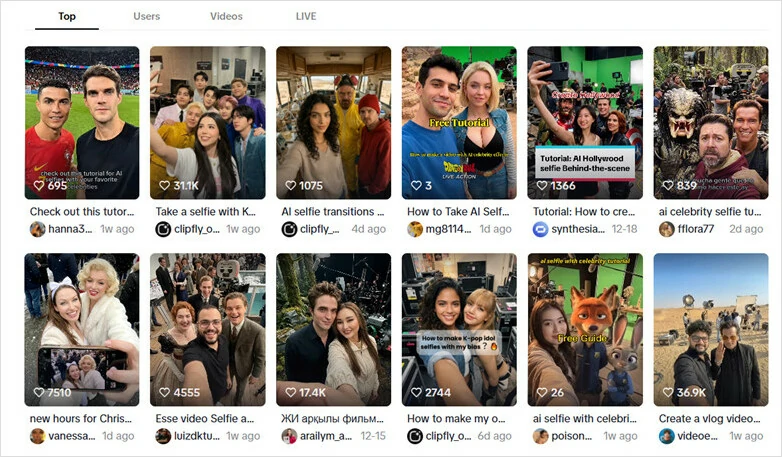
The Viral AI Hollywood Selfie Video Trend on TikTok
Want to jump on this viral AI selfie video trend? They’re much easier than you think to make. In a matter of three steps, you’re ready to showcase unique selfies with movie scenes. Let’s explore how to experiment on generating and creating AI behind-the -scenes effect video!
Also interested: 5 AI Tools to Swap Your Face with Any Celebrity>>
Step 1: Generate Selfies with Movie Star
To create an Al selfie video, you’ll need to prepare selfies with celebrities, image-to-video tool to animate them and a simple video editor to finetune. Now no more platform switching! Just try FlexClip, an all-in-one AI-powered video&image editor, and go on your creation journey!

Firstly, open FlexClip’s AI Photo Editor and upload an image of yourself to create stunning selfies with celebrities. For the best and most natural results, use a well-lit, clear image.
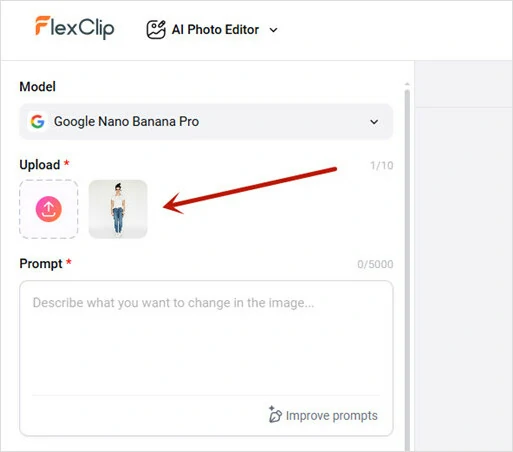
Upload Your Image to FlexClip's AI Photo Editor
Pro Tips: If you don't have a ready-to-use one, generate a daily capture and ask FlexClip's AI to enhance it or directly upload a reference image and let FlexClip recreate it into a perfect new one.

Extensive AI Generation Models Available in FlexClip
FlexClip lets you experiment image creation with different top-notch generation models, including Nano Banana, Seedream, Qwen, ChatGPT, Flux and more. Here we keep the default option, Google Nano Banana Pro, which is known for strong character consistency and advanced reasoning.

Enhance or Recreate Your Portrait with FlexClip's AI
Next, enter a prompt describing your favorite movie star and what you want the selfie to look like. You can follow the provided prompt template or customize your own.
Wide-angle selfie of the person holding a phone, capturing the official [movie name] cast in the background standing by my side, mid-shoot on a professional film set. Visible cinema camera on rig, boom microphone overhead, light stands and cables around, candid behind-the-scenes atmosphere, natural motion blur, shallow depth of field, realistic skin texture, cinematic lighting, ultra-photorealistic, high detail, raw on-set vibe, no text, no logos.
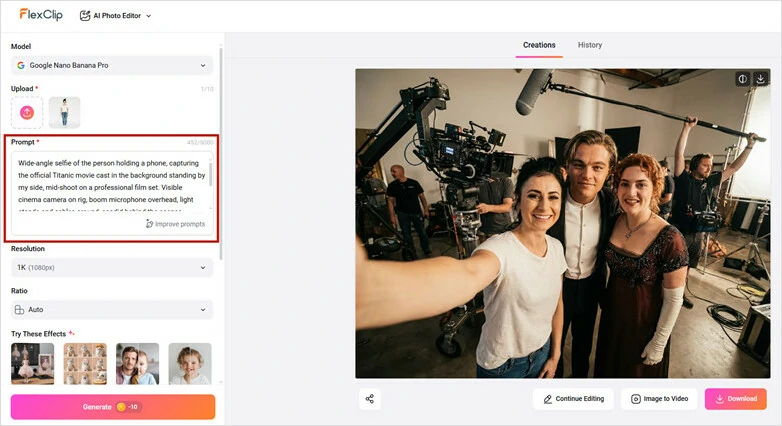
Describe the Hollywood Star You Want to Take a Selfie with Prompt
Repeat the process to generate many selfies with movie stars because you need multiple frames to make the video longer. After that, download all generated selfies to local folder.
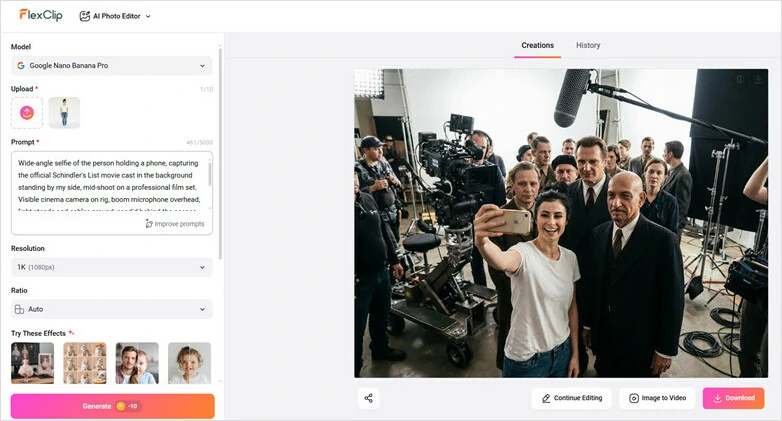
Repeat the Process to Generate Selfies with Celebrity as Many as You Want
Step 2: Animate Selfies into Dynamic Video
Now it’s time to bring your still selfies to life. Go to FlexClip’s Image-to-Video tool and enable End Frame to animate your Hollywood selfies. This feature supports multiple AI models to generate, including FlexClip Pro, Google Veo 3.1, Kling O1, King 1.6 Pro, and MiniMax Hailuo 02. Here we set Kling O1 as an example.
Upload any selfie as the starting frame and choose another snapshot as the ending frame. Then enter a selfie video prompt to guide the AI on camera movements and create a smooth, natural-looking selfie video. Simply copy and paste the prompt below to make the magic happen:
A person holding a phone runs toward the next set while the camera follows closely from behind, dynamic handheld movement, slight motion blur, energetic behind-the-scenes feel, continuous shot, natural lighting, ultra-photorealistic, no text.
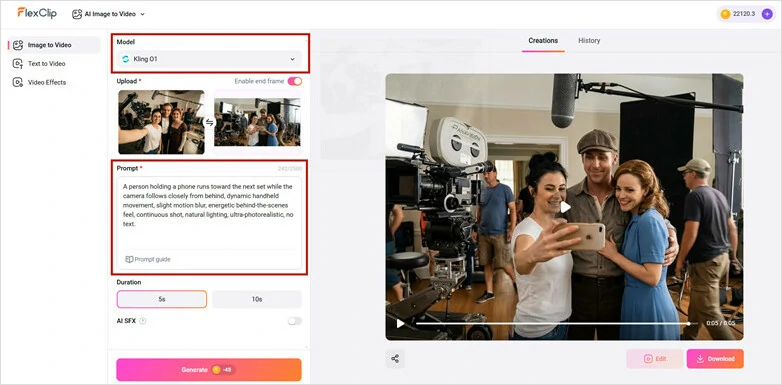
Upload Your Start and End Frame Photos and Enter Prompt
For each repeat, use the previous end frame as the new starting frame, then upload another image as the next end frame to ensure smooth transitions. Repeat this process until you’ve created all the AI selfie clips.
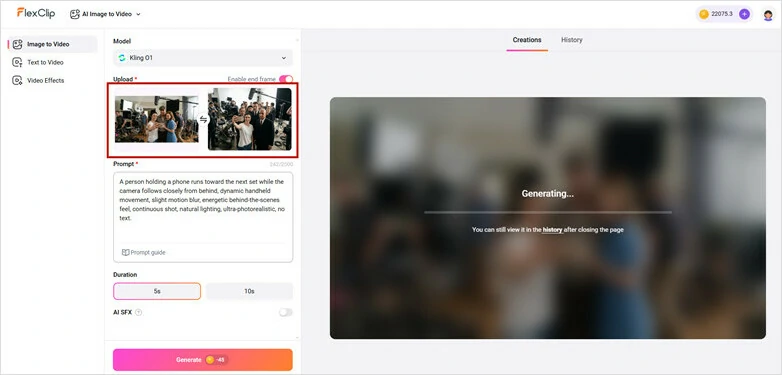
Repeat the Process to Generate All the Selfie with Celebrity Videos
Step 3: Combine AI Selfie Clips into a Whole Video
Let’s combine your selfie clips into a whole video using FlexClip’s built-in video editor! Simply upload all your movie scene clips and drag and drop them to the timeline as the generation sequence.
To make the video more captivating, add iconic lines using the character’s voice. You can upload an existing voiceover or use FlexClip’s AI voice cloning feature to create one yourself. It’s easy to use and lets you finish all the narration in just minutes.

Recreate Character's Voice with FlexClip's AI Voice Cloning
Perfect the AI selfie video with soothing background music. You can directly find a royalty-free one from FlexClip’s music stock or use its AI music generator to craft an innovative melody for your own.
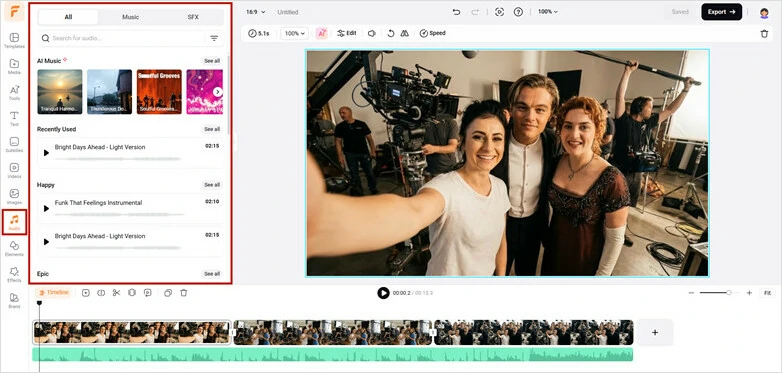
Perfect the Video with Soothing Background Music
Preview and watch the AI-generated Hollywood selfie video. Once satisfied, click on Export button to download and share with your friends!
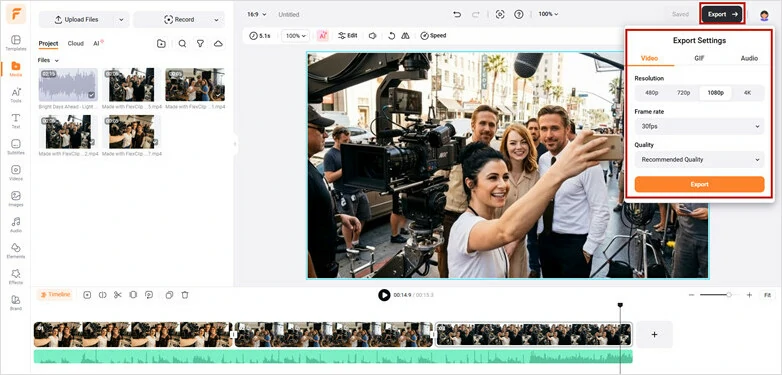
Preview and Download Your AI Selfie with Celebrity Video
More Creative Ideas for You to Explore Using FlexClip
You can take it further with AI selfie videos using the same generation process. Here are some ideas from FlexClip to inspire you:
# 1 AI Age Progression Video
Wonder how you would look like when you were older or younger? Use FlexClip’s AI photo editor as a time machine to visualize your look and then animate still pictures into a video to show smooth age transformation.
AI Age Progression Video
#2 AI Dress Change Video
Create appealing dress-change video to impress your audience right now! Just use FlexClip’s AI photo editor as your digital wardrobe and generate your outfit transition video with two photos.
AI Dress Change Video
#3 Charming AI Transition Video
Whether you want to showcase a day-to-night transition or a captivating season change frame by frame, FlexClip makes it easy. With FlexClip’s AI Photo Editor, you can generate scenes from different times or seasons using a single image, then animate them into a smooth, seamless video.
Charming AI Transition Video
A Further Look of the Best AI Selfie Video Maker
AI-powered image and video generation is no longer new, but not all AI selfie video generators offer access to as wide a range of models as FlexClip does. With FlexClip, top-tier options like Sora AI, Nano Banana Pro, Veo 3, and more are just a click away.
FlexClip offers an AI voice cloning feature with full control, allowing you to recreate iconic lines using authentic character voices, making AI selfie videos more immersive and engaging.
Creating an AI selfie video is just the beginning of your creative journey with FlexClip. It also offers a complete suite of video editing tools, so whether you’re a seasoned creator or a beginner, you can easily craft stunning AI selfie videos with celebrities and add your own personal touches.
Frequently Asked Questions
1.What is an AI selfie video?
It’s an AI-driven trend that features visuals of taking selfies with popular Hollywood movie stars against behind-the-scenes settings. Highly interactive and mesmerizing, it has gone viral on TikTok, Instagram, and other social media platforms.
2.Are AI-generated AI selfie with celebrity videos high quality?
Yes. FlexClip delivers high-quality AI selfie videos with strong character consistency, powered by advanced AI models. The results are realistic, featuring smooth motion and crystal-clear visuals.
3.Do I need editing skills to create an AI selfie video?
No. Our AI selfie with celebrity video generator is designed for beginners. You just need to upload a selfie, input prompt to generate selfie with celebrity and animate these pictures, AI will automatically handle all the rest.




FlexClip AI Video Maker
Reach professional-quality videos faster with easy editing tools, templates, and smart AI.
Start Now for Free
Hot & Trending
-

Best Ways to Find Music in YouTube Videos
-

Instagram Story Video Quality Bad After Upload? Fix It!
-

How to Repost Video on TikTok & How to Remove TikTok Repost
-

Improve Video Quality Online: 3 AI Video Quality Enhancers You Can't Miss
-

4K Convert to HD 1080p without Watermark: Best 4k Video Converters
-

Best 8 Free Video Editors - No Download Required
-

Top 13 Birthday Video Makers with Music and Effects Free
-

How to Search Filters on TikTok & Use a Filter You See - TikTok Filter Guide




