Make, Edit & Enhance Videos Using Gemini AI Video Maker
Use FlexClip's online Gemini AI video generator to easily turn images or prompt texts to videos, animations, cartoons or artistic pictures with remarkable quality and creativity. Generate all kinds of visual scenes, plots, animations, voiceovers, sound designs and music using Gemini AI toolkit with just one tap, instantly bringing dreamlike vision and soundscape to life. Effortlessly edit, polish or convert an image with textual commands, no need of any video or image editing experience. Plus, you'll discover a wealth of free video templates, stock footage & images, effects, overlays, transitions, countdowns and music to make your Gemini AI generated video appealing and impressive. Try it for free now!
Make Videos with Gemini AI Handy video editor
 Rich video templates
 Extensive media library
 Dynamic text animations
- Trusted by:






Advanced Gemini AI Video Templates for Free
 CustomizeAI Recreate
Artificial Intelligence Brand
 CustomizeAI Recreate
Technology Innovative Corporation Ai Business Introduction
 CustomizeAI Recreate
Artificial Intelligence Presentation
 CustomizeAI Recreate
Technology Sizzle Reel
 Customize
3d Logo Reveal
 CustomizeAI Recreate
Modern Minimalist Ai Technology Business Company Animation Slideshow
 Customize
Technology Data Hacker Intro
 CustomizeAI Recreate
Technology Company Show Business Ai Introduce
 Customize
Ai Digital Tech Logo Reveal
 CustomizeAI Recreate
Ai Tech Agency
 CustomizeAI Recreate
Technology Business Company Slideshow Innovate Ai Spaceflight
 CustomizeAI Recreate
New Technology Explainer
Seamlessly Integrate Google Assets and Google AI Visual Models into Your Workflow
FlexClip now brings Google's ecosystem and advanced Google Veo & Nano Banana models together in one streamlined AI creation experience. From importing photo & footage assets directly from Google Drive to generating stunning videos Using Google Veo's image-to-video and text-to-video features, everything works seamlessly in one place — faster, smarter and more intuitive than ever.
Import Photos & Videos Directly from Google Drive
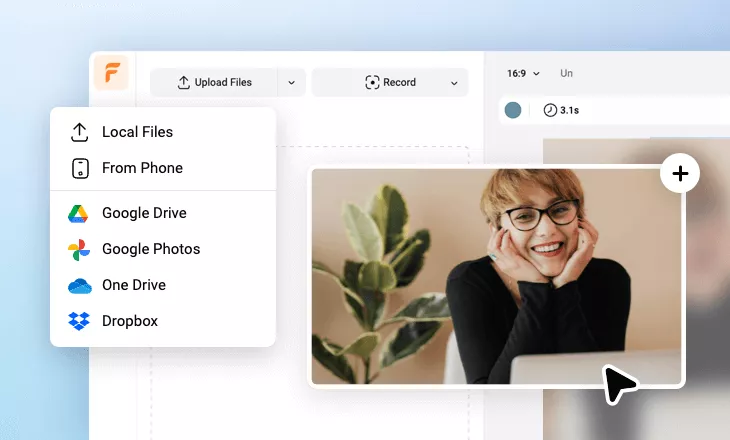
Skip tedious downloading and uploading hassle. Instantly access and import your Google Drive's photos and videos into FlexClip workplace. Whether you're working with team-shared Google Drive folders or personal drive storage, you can quickly drag, drop and edit video and images. Besides Google Drive, FlexClip's has its own cloud for storing, re-editing and sharing with your teammates.
Google Veo Image to Video – Turn Still Images into Cinematic Video
Bring your images to life with Google Veo's image-to-video feature. Simply upload a photo and let AI intelligently transform it into dynamic, high-quality video with realistic animation, motion, depth and smooth transitions. Perfect for product showcases, social contents, marketing and storytelling — just upload an image, enter prompts, optionally set start-frame & end-frame photos, choose video ratio of 16:9 and 9:16, select generated video length of 4s, 6s or 8s, then watch your video come alive.
Google Veo Text to Video – Generate Stunning Videos Using Gemini Prompts
Transform your video creation ideas into professional-grade videos with only a few text prompts. Powered by Google Veo's powerful text-to-video model, FlexClip can create engaging, visually rich scenes & plots based on your textual description. From promotional videos to concept storytelling, just describe video contents with prompts, choose video length in 4s, 6s or 8s, pick video ratio between 16:9 and 9:16, then hit [Generate] to watch Google Veo to bring it to life immediately.
Google Nano Banana Pro Photo Editor
Edit, enhance and polish a photo effortlessly with built-in Google Nano Banana Pro model inside FlexClip. Simply upload your image or load it from Google Drive, choose from a variety of AI image effects to transform its style, object, lighting, texture and overall mood in seconds. From cinematic tones to professional retouching and stylized transformations - including background chagne, action figure, hair changing and text editing & designing, Google Nano Banana Pro helps you achieve master image editing results with prompts. Just upload, select an effect and let Nano Banana Pro handle the rest.
Google Nano Banana Text-to-Image Generator
Generate any stunning AI image using Google Nano Banana Pro. FlexClip's AI text-to-image components support multiple Nano Banana editions including Google Banana 2, Google Nano Banana Pro, Google Nano Banana, Google Imagen 4 Ultra, Google Imagen 4, and Google Imagen 4 Fast — giving you full control over image creativity, quality and style.
Simply enter a detailed prompt, choose your preferred artistic style, upload a reference image if needed, and customize resolution settings from 1K, 2K to 4K. With flexible aspect ratios ranging from 1:1 to ultra-wide 21:9, you can create images perfectly optimized for social media, banners, wallpaper and more.
Why You Need to Make a Gemini AI Video

Boost Sales
A compelling video can absolutely influence buying behavior, leading directly to sales.

Increase Traffic
Nothing can compare to the power of video content when it comes to driving traffic to your site.

Encourage Social Shares
Videos on social media platforms generate more likes and shares than images and text combined.
How to Make a Gemini AI Video in 3 Steps
- 1
Add Media
Add videos or photos from computer or stock libraries to the scene.
- 2
Customize
Add text, music, and voiceover to customize your Gemini AI video.
- 3
Export
Download your Gemini AI video in various ratios and definitions or share it online with the world.